
Learn what the blue tick means, how to turn it off, and how to read WhatsApp messages without blue tick — including a smarter solution for businesses.
What Is the WhatsApp Blue Tick Meaning?
Before we learn how to remove the blue tick from WhatsApp, you need to understand what the blue tick represents.
One grey tick → Message sent
Two grey ticks → Message delivered
Two blue ticks → Message read
For many users — especially business owners — blue ticks create unnecessary pressure:
Customers expect instant replies, and businesses worry about looking “unresponsive.”
So knowing how to read WhatsApp messages without blue tick becomes essential.
How to Remove Blue Tick from WhatsApp (Official Method)
WhatsApp allows you to disable read receipts inside the app settings.
Step-by-step:
Open WhatsApp

Tap the three dots (top right).

Select Settings
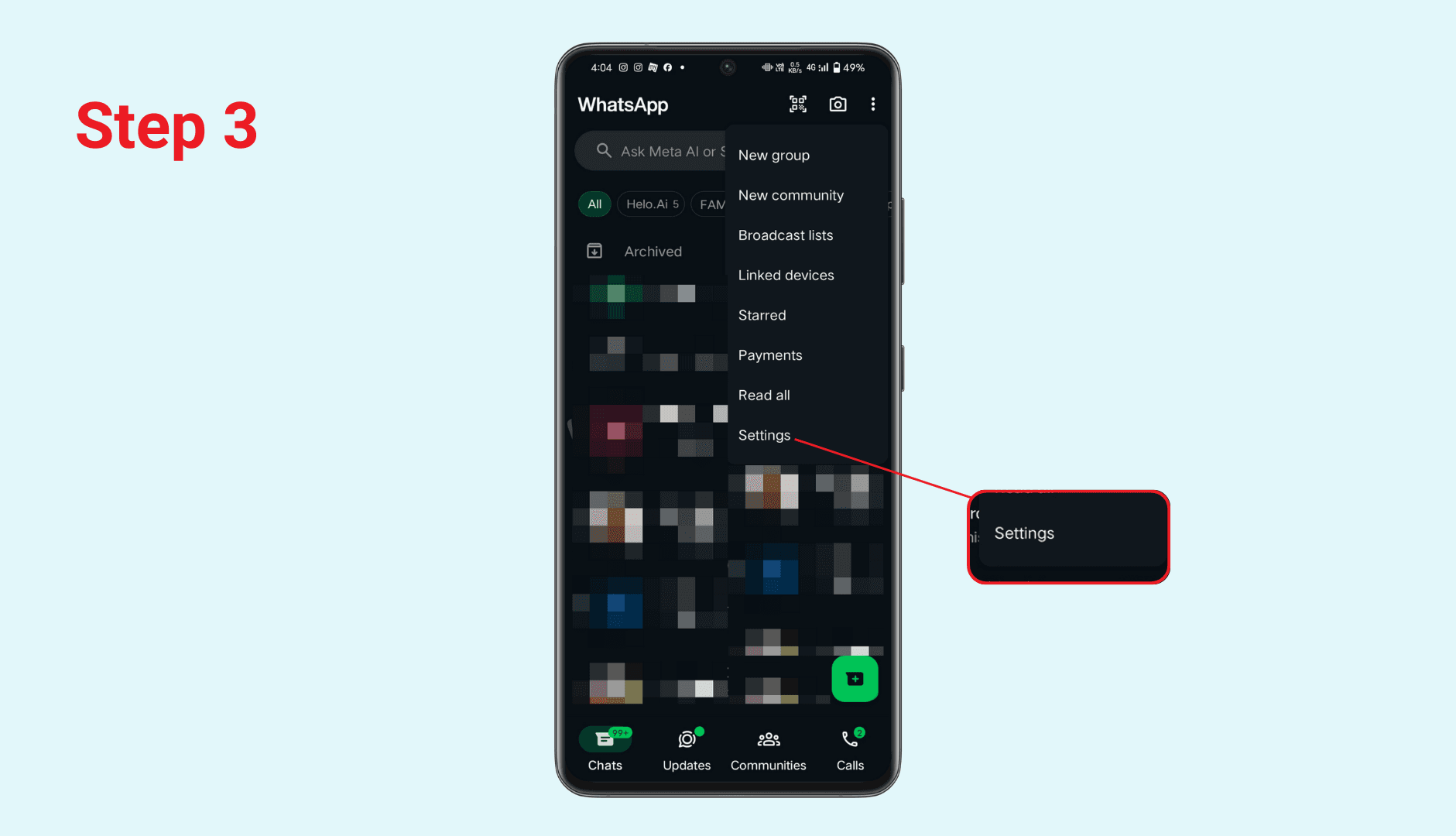
Go to Privacy
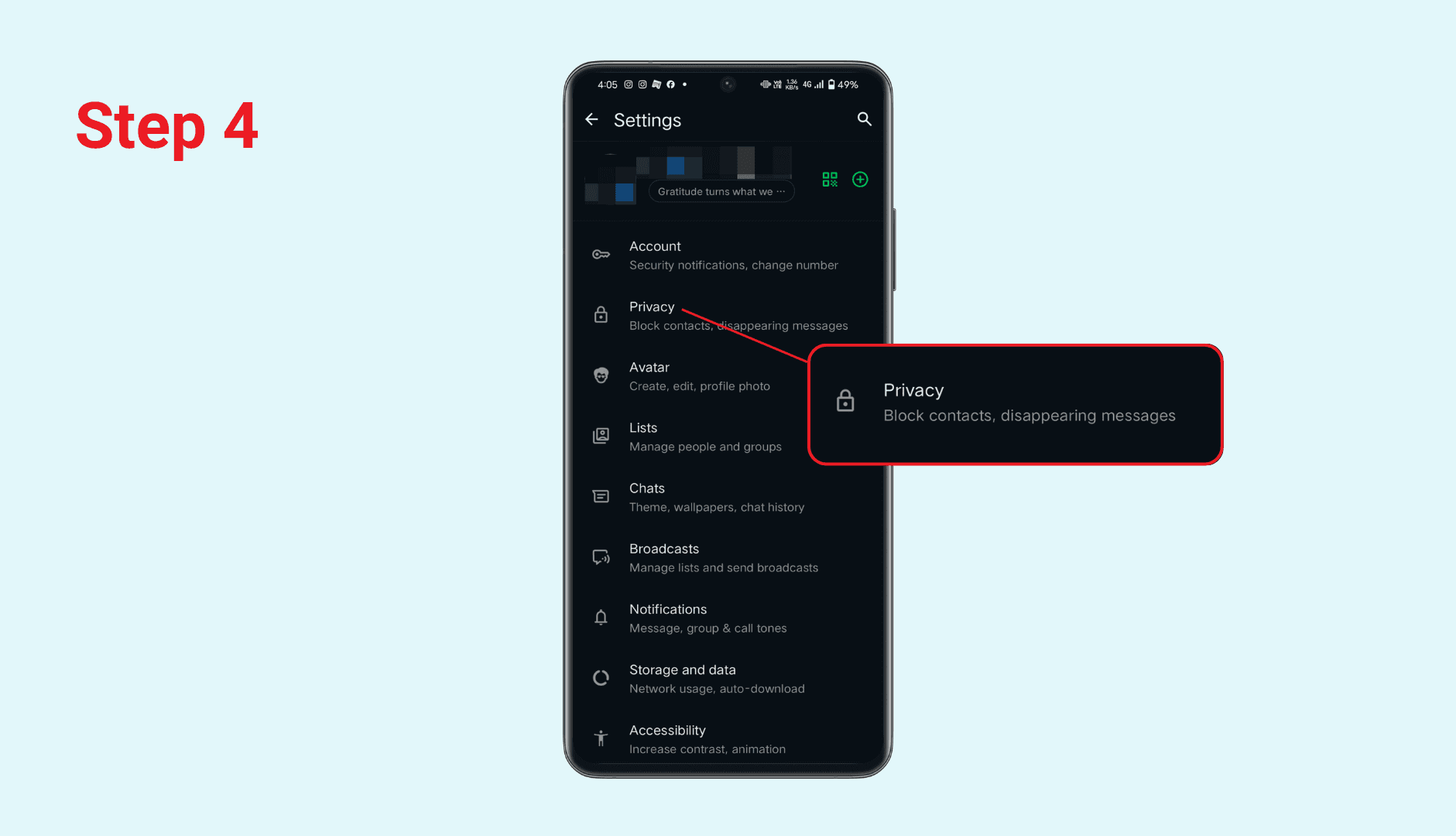
Find the option Read Receipts and turn it OFF.

This will successfully remove the blue tick from WhatsApp for:
Chats with individuals
Many message types
IMPORTANT: This setting does not affect group chats — blue ticks still appear when you read group messages.
How to Read WhatsApp Messages Without Blue Tick (Other Methods)
Even if you keep read receipts ON, there are still ways to preview messages without triggering a blue tick.
Read from Notification Preview
iOS and Android both allow you to expand notifications to read most of the message without opening the app.
Turn on Airplane Mode
Open WhatsApp
Read messages while offline
Close WhatsApp
Turn Airplane Mode off
(If you forget to close WhatsApp before going back online, the blue tick will appear.)
Use WhatsApp Widgets (Android)
Android widgets allow quick preview without marking the chat as read.
🌟 Business Use Case: Remove Blue Tick Stress With Dealism (No Read Receipts Triggered)
If you're a business owner, creator, or small shop seller, disabling blue ticks manually is not enough.
You still face three real problems:
Too many messages arriving at the same time
Stress from unread or late-replied WhatsApp inquiries
Fear that customers will think you’re ignoring them if reply is slow
This is where Dealism comes in.
Dealism — The World’s First Vibe-Selling AI Sales Agent
Dealism is not just an auto-reply bot. It is an AI Sales Agent that learns your sales logic, brand tone, and real chat history to help you close deals across WhatsApp and Instagram.
✨ Key Features
Read & Reply to WhatsApp Messages — Without Showing Blue Tick
Dealism’s internal message viewer lets you check customer messages without triggering any read receipts. Your customers only see a reply when you are ready — not when you open the chat.
This solves:
No pressure to reply instantly
No awkwardness when you need time to check product details
No “they opened my message but didn’t reply” tension
This function directly helps anyone searching for: ✔ How to read WhatsApp messages without a blue tick ✔ remove blue tick from WhatsApp for business use
Vibe-Selling Agent
Unlike ManyChat or Wati — which focus on scripted flows — Dealism understands messages emotionally and strategically.
It pushes conversations forward with:
Human-like tone
Goal-driven sales prompts
Adaptive product explanations
Follow-up sequences that feel natural, not robotic
Why Dealism Helps You Avoid the Blue Tick Problem Entirely
If you’re using WhatsApp for business, the biggest challenge isn’t the blue tick — It's the expectation behind the blue tick.
Customers think:
“You read my message, why no reply?”
Dealism solves this by:
Allowing you to preview messages without triggering the blue tick
Auto-replying when appropriate
Handling first-touch inquiries
Filtering buyers from non-buyers
Moving customers toward checkout even when you are offline
Essentially, you gain:
✔ Zero pressure
✔ Zero unread-backlog anxiety
✔ Zero fear of missing leads
Conclusion
Learning how to remove blue tick from WhatsApp is useful for privacy, mental health, and business communication. You can disable read receipts manually or use temporary tricks like airplane mode.
But if you are running a business, the real solution is smarter:
👉 Use Dealism to read WhatsApp messages without blue tick, reply intelligently, and close sales with AI.
Dealism is the next evolution of WhatsApp sales — not just automation, but true vibe-driven selling.


