
WhatsApp Business Web lets you manage WhatsApp Business conversations from a computer, making it easier to type replies, share files, organize chats, and serve customers without constantly switching to a phone. It works especially well for solo operators and small teams that still handle most conversations manually. As message volume grows, however, businesses may need an additional automation layer for instant answers, lead qualification, and follow-up.
What is WhatsApp Business Web?
WhatsApp Business Web is essentially the desktop version of the WhatsApp Business app. It allows you to send and receive messages, manage contacts, and utilize various business features directly from your computer's web browser or through the dedicated WhatsApp Desktop application. This eliminates the need to constantly switch between your phone and computer, saving valuable time and improving efficiency.
Key Features and Benefits of Using WhatsApp Business Web
WhatsApp Business Web offers a suite of features designed to help businesses operate more smoothly and effectively:
1. Enhanced Efficiency and Productivity
Typing on a keyboard is significantly faster than typing on a phone. WhatsApp Business Web allows your team to respond to customer inquiries more quickly, leading to improved customer satisfaction. You can also easily switch between different conversations, attach files like product catalogs or invoices, and manage multiple chats simultaneously without the hassle of juggling your mobile device.
2. Professional Communication Tools
The WhatsApp Business app, and by extension its web interface, provides tools to professionalize your customer interactions. These include:
Business Profile: Create a dedicated profile with your business name, address, category, description, and contact information. This builds credibility and makes it easy for customers to find essential details.
Automated Messages: Set up greeting messages to welcome new customers and away messages to inform them when you're unavailable. This ensures no customer query goes unanswered, even outside business hours. You can also explore advanced automation with tools like WhatsApp auto-reply features to handle common questions instantly.
Quick Replies: Save frequently used responses to common questions as quick replies. This allows you to send pre-written messages with a simple shortcut, saving time and ensuring consistent communication.
Labels: Organize your chats by assigning labels to customers based on their status (e.g., 'New Customer,' 'Pending Payment,' 'Order Complete'). This helps in managing your customer base and follow-ups more effectively.
These built-in tools make manual communication faster, but they still rely on someone reading the message, choosing the right response, and remembering the next step. If customers regularly ask about prices, availability, bookings, or product fit, Dealism can help answer using approved business information, clarify what the customer needs, recommend the appropriate next step, and involve a human when judgment is required.
3. Seamless Integration and Accessibility
WhatsApp Business Web is incredibly easy to set up. You simply need to link your WhatsApp Business account from your phone to the web interface. It works across major web browsers like Chrome, Firefox, and Safari, and is also available as a downloadable desktop application for Windows and macOS. This ensures you can access your business communications from virtually anywhere with an internet connection.
4. Improved Customer Service
By providing a convenient and responsive communication channel, WhatsApp Business Web significantly enhances customer service. Customers appreciate the ability to connect with businesses on a platform they already use daily. Fast, personalized responses can lead to increased loyalty and positive word-of-mouth.
How to Set Up and Use WhatsApp Business Web
Setting up WhatsApp Business Web is straightforward:
Download the WhatsApp Business App: If you haven't already, download the free WhatsApp Business app from your smartphone's app store.
Create Your Business Profile: Fill in your business details in the app's settings.
Open WhatsApp Business Web: Go to
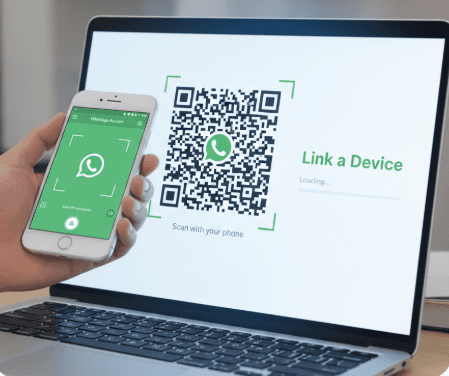
web.whatsapp.comon your computer's browser or open the WhatsApp Desktop application.Link Your Account: Open WhatsApp Business on your phone, go to Settings > Linked Devices, and tap 'Link a Device.' Scan the QR code displayed on your computer screen with your phone.
Once linked, your chats will sync, and you can start messaging from your desktop.
Where WhatsApp Business Web Stops — and AI Automation Begins
WhatsApp Business Web is a convenient workspace for human messaging; it is not a complete sales automation system. Dealism is not a browser extension that changes WhatsApp Web. It uses supported WhatsApp connection options to handle conversation tasks that would otherwise depend on a team member being online.
Task | WhatsApp Business Web | Dealism |
|---|---|---|
Type and manage chats from a computer | Yes | Conversation dashboard available |
Use saved quick replies and labels | Yes | Uses business knowledge and conversation context |
Answer routine questions automatically | Limited to greeting and away messages | Can handle approved product and service questions |
Qualify a lead through natural conversation | Manual | Can ask about needs, timing, location, or budget |
Recommend a booking, checkout, or next step | Manual | Can guide the customer to an appropriate action |
Continue contextual follow-up | Manual | Can help keep promising conversations moving |
Escalate a complex conversation | A team member monitors the inbox | Can involve a human when judgment is needed |
For a broader look at greetings, qualification, reminders, and follow-up, see this practical guide to WhatsApp automation.
Spending too much time answering the same WhatsApp questions? Build and test your Dealism AI sales agent →
Is WhatsApp Business Web Right for Your Business?
If your business interacts with customers regularly, especially through messaging, then WhatsApp Business Web is likely an invaluable asset. It's particularly beneficial for:
Small and Medium-Sized Businesses (SMBs): Offering a low-cost, high-impact way to engage with customers.
E-commerce Businesses: For order updates, customer support, and product inquiries.
Service-Based Businesses: For appointment confirmations, service reminders, and client communication.
According to a report by Statista, the number of WhatsApp Business users is projected to grow significantly, indicating its increasing importance in the business landscape.
Stay with WhatsApp Business Web when one person can comfortably manage the inbox and most conversations need a personal, manual response. Consider Dealism when inquiries arrive outside business hours, repetitive questions consume the team's time, leads need qualification before handoff, or follow-ups are being missed. You can connect through one of Dealism's currently supported WhatsApp options without treating Dealism as a WhatsApp Web add-on. If you are comparing the next step for your team, review these WhatsApp marketing tools for small businesses.
Conclusion
WhatsApp Business Web is an effective free starting point for businesses that want to manage customer conversations from a desktop. It makes manual replies, file sharing, quick replies, and chat organization easier. The limitation appears when the inbox grows faster than the team can respond.
Dealism can help small businesses continue from that point by answering routine questions with approved business information, qualifying customer needs, recommending the next action, supporting contextual follow-up, and handing complex conversations to a person.
Create your free Dealism account and test an AI sales agent on WhatsApp →
Frequently Asked Questions (FAQs)
Q1: Is WhatsApp Business Web free to use?
A1: Yes, the WhatsApp Business app and WhatsApp Business Web are free to download and use. There are no subscription fees associated with their basic functionality.
Q2: Can I use WhatsApp Business Web without my phone being connected?
A2: Once your WhatsApp Business account is linked to the web or desktop app, you can use it independently for a period. However, for optimal performance and to ensure continuity, it's best to keep your phone connected to the internet periodically.
Q3: Can I manage multiple WhatsApp Business accounts on one computer?
A3: You can use multiple WhatsApp Business Web sessions on a single computer, but each session must be linked to a different phone number and WhatsApp Business account. The desktop application typically supports one account at a time per instance.
Q4: How secure is WhatsApp Business Web?
A4: WhatsApp Business Web uses the same end-to-end encryption as the mobile app, ensuring that your conversations are secure and private. Your messages are encrypted from your device to the recipient's device.
Q5: Can I send media files and documents through WhatsApp Business Web?
A5: Absolutely. You can send photos, videos, documents, voice messages, and even your location through WhatsApp Business Web, just as you would on your mobile phone.
Q6: What's the difference between WhatsApp Business app and WhatsApp Business Web?
A6: The WhatsApp Business app is the core application installed on your smartphone, offering all features. WhatsApp Business Web is an extension of this app, allowing you to access its functionalities from your computer's browser or a desktop application for convenience.
Q7: Can WhatsApp Business Web qualify leads automatically?
A7: Not by itself. WhatsApp Business Web provides tools such as quick replies, greeting messages, away messages, and labels, but a person still manages the conversation. With a supported WhatsApp connection, Dealism can help ask qualification questions, understand the customer's needs, and guide the conversation toward a booking, checkout, or human salesperson.
Q8: Is Dealism a WhatsApp Business Web extension?
A8: No. Dealism does not modify the WhatsApp Web browser interface. It is an AI conversation platform that works through supported WhatsApp connection options to automate replies, qualification, follow-up, and handoff when a business needs more than manual desktop messaging.