If you’re just “replying to messages,” you’re wasting traffic. On Instagram, DMs aren't just a chat window—they are your automated sales engine.
For many small and medium-sized service businesses (SMBs)—from clinics and beauty studios to coaches and local e-commerce shops—Instagram DMs are the closest point to a sale. Yet most businesses treat DMs as a to-do list: answering questions, sending information, and hoping something sticks. The result? Missed opportunities, frustrated customers, and wasted time.
Dealism flips this script. Instead of passive replies, it turns messy chats into real business actions automatically.
What Is an Instagram DM?
A DM (Direct Message) is Instagram’s private chat feature. You can send text, photos, videos, links, and product information.
For SMBs, DMs are not just a messaging tool—they are your first business touchpoint. Most businesses use them reactively. Dealism uses DMs proactively: to qualify clients, clarify needs, and push actions forward. It ensures that every DM becomes a step toward an actual result, not just a conversation.
Why Most SMBs Fail With Instagram DMs
High volume, low judgment
Small clinics, beauty studios, and coaches receive dozens of DMs daily. Staff may simply relay messages, but rarely make decisions. Valuable leads fall through the cracks.Unclear customer needs
Clients often ask vague questions: “Are you available?” or “How much does it cost?” Without immediate clarification, appointments can be mismatched, or conversations stall completely.Automation tools are too limited
Simple bots only respond with templates, and CRMs are often heavy and cumbersome. The problem isn’t replying—it’s judging and driving the next step automatically. This is why many traditional automation tools fail to deliver real business growth for SMBs.
What Is Vibe Selling?
Vibe Selling is Dealism’s core method. It’s not a rigid script or pushy sales tactic. Instead, it’s a three-step approach that lets conversations naturally progress to action:
Understand emotion – read the client’s mood and intent
Clarify needs – qualify the client’s requirements clearly
Naturally drive action – guide the conversation toward bookings or sales without being pushy
Vibe Selling ensures that every DM becomes a judgment-driven sales interaction, automatically triaging and acting on opportunities while maintaining a human touch.
How to DM Effectively: Clarify, Qualify, Execute
1️⃣ Clarify Needs
Dealism doesn’t just “reply” to messages. It qualifies clients like a senior front desk:
“Before pushing an appointment, the AI checks symptoms, budget, and preferred timing. Only when the request matches your services does it move forward.”
The Agent performs preliminary triage, ensuring only qualified inquiries advance:
Who is the client?
What exactly do they want?
Are they a good fit for your business?
Example: A massage studio receives: “I want a session next week.” Dealism asks for the type of massage, preferred time, and staff availability, then recommends the perfect slot. No wasted back-and-forth, no lost lead.
2️⃣ Match & Naturally Push Forward
Once needs are clarified, the Agent matches resources:
Suitable service or product
Available staff or instructor
Next actionable step for the client
All done without sounding robotic. This is Vibe Selling in action: understanding, qualifying, and guiding, all in one seamless conversation.
Scenario: An online course provider receives multiple DMs asking about modules and pricing. The Agent automatically shares relevant PDFs, answers common questions, and sends a direct booking link. Hours of manual work are eliminated, and potential customers move forward effortlessly.
3️⃣ Execute Actions Automatically
The true power of DM is not typing messages—it’s getting things done:
Send photos, product info, or documents (how to DM a photo on Instagram)
Follow up or recall clients automatically
Understand multiple languages for international clients
Push bookings, payments, or next steps at the right moment
Dealism Agents also connect multiple channels: Instagram DM, WhatsApp, and internal messaging systems. Every conversation is tracked and acted upon without manual intervention, creating a truly omnichannel sales experience. Business owners no longer need to monitor every message. DM becomes a self-running revenue engine.
SMBs Don’t Need a Complex CRM
Many SMBs believe a CRM is essential. Dealism takes a different approach:
“Instead of buying a complex CRM that nobody fills, hire an AI Agent that actually gets work done. Dealism solves Action, not Record.”
It’s the difference between logging activity and turning conversations into real revenue. For SMBs, this means: every DM is a step toward results, not just a line in a database.
Common DM Challenges (FAQ)
Q: Why can’t I DM certain people?
Beyond privacy settings, the real challenge is: can you capture intent in the first moment? Dealism ensures every compliant DM enters the “automation-for-action” track, so no potential lead is lost.
Q: How do I send pictures or files via DM?
Instagram supports sending images, videos, and files. For SMBs, visuals often drive decisions—before-and-after photos, product samples, course material. Dealism automatically sends the correct content based on client needs, aligned with the conversation.
Q: How do I handle high DM volume efficiently?
Manual typing is inefficient. Dealism Agents qualify, clarify, and push actions, turning dozens of DMs into actual appointments and sales. Every conversation is meaningful and actionable.
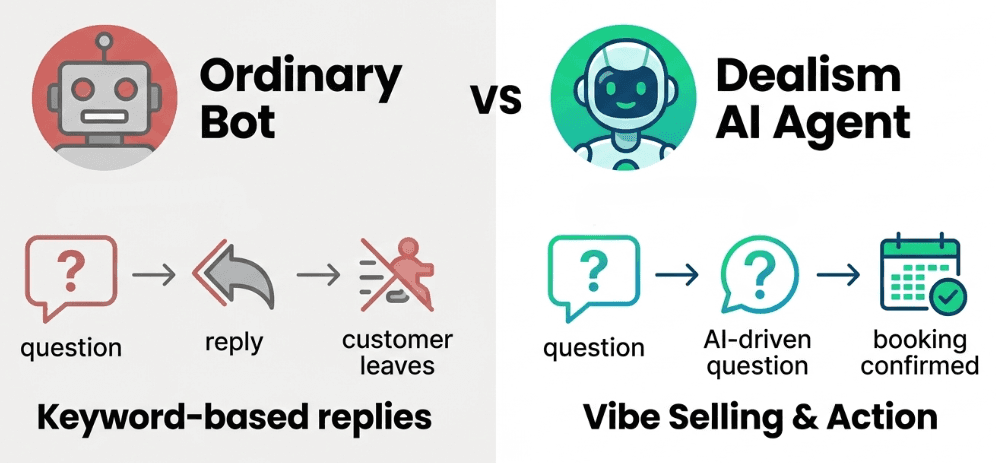
Before & After: Ordinary Bots vs. Dealism AI Agent
Dimension | Ordinary Auto-reply / Bot | Dealism AI Agent |
Understanding | Keyword-based | Context & intent-based |
Goal | Give an answer | Drive action (bookings, sales) |
Experience | Mechanical, cold | Human-like Vibe Selling |
Value | Saves typing time | Runs business processes, generates real revenue |
Summary: Stop Replying, Start Executing
Instagram DMs are more than chat—they are your automated sales engine. Most SMBs fail because they reply without judgment. Dealism transforms every conversation into clarified, qualified, and action-driven interactions.
In one sentence:
Dealism turns messy chats into real actions. Not bots. Not CRM. Just AI agents that understand, decide, and move the deal forward.
For SMBs:
No complex sales training needed
No endless monitoring of Instagram
No writing SOPs
DMs run automatically, and business moves forward
Dealism even coordinates across multiple messaging channels, ensuring Instagram, WhatsApp, and other platforms all work together. Your sales process becomes truly omnichannel, with every conversation moving toward action. Every lead is qualified, clarified, and pushed to the next step automatically.
Stop letting Instagram DMs become a chaotic to-do list. Let conversations run your business—you only watch the results. Stop replying, start executing with Dealism.