UNIFIED INBOX FOR AI + HUMAN CONVERSATIONS

One inbox.
Every message has a next move.

Bring customer conversations into one place. Let your AI Customer Agent reply automatically, prepare a response for approval, or hand the conversation to a person—without losing context.

One working queue Three response modes CRM context included
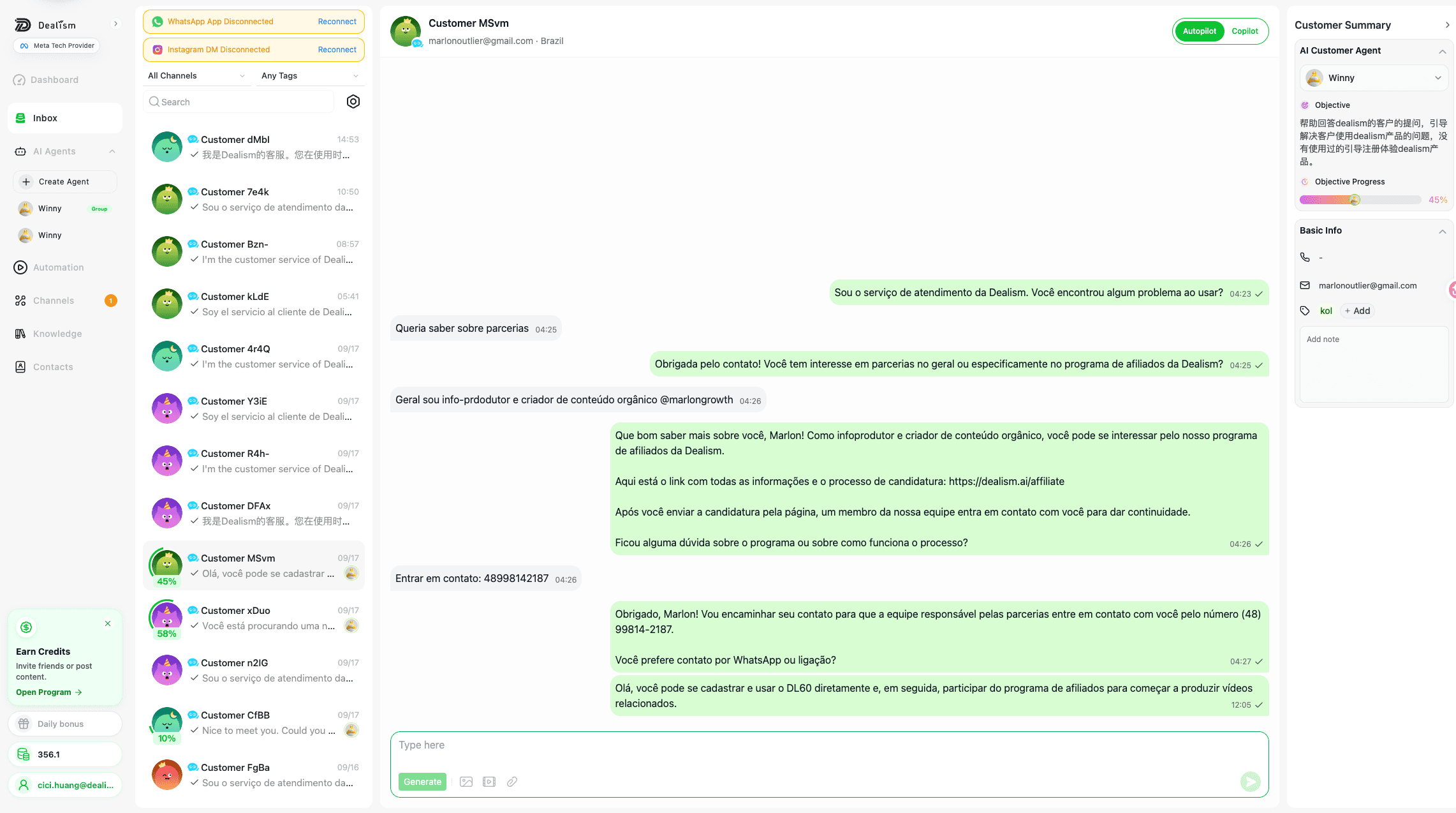
Unified Inbox · current product UIREAL PRODUCT
Current Dealism Unified Inbox interface
REAL INBOX CONTROLAutopilot or Copilot per contact
Current Dealism product UI. Customer-identifying details and message content are replaced with fictional samples.

FOUR SUPPORTED CHANNELS

Meet customers where they already message.

WhatsApp AppPersonal conversations
WABABusiness messaging
InstagramDMs and Story replies
Live ChatWebsite conversations

Connection requirements differ by channel. The Inbox keeps the source of every conversation visible.

ONE INBOX · THREE WAYS TO WORK

Automation when it’s clear.
Human judgment when it matters.

Choose how the AI Customer Agent participates. The working mode stays visible at the conversation level.

01

AUTOPILOT

Let the Agent reply automatically.

Turn on automatic replies for all new messages, or change one contact to Autopilot when that conversation is ready.

  • Available globally for incoming messages
  • Visible at the individual conversation level
  • A person can pause the Agent when needed
Current Dealism Inbox zoomed into one active contact AUTOPILOT · REAL INBOX UI
02

COPILOT

Get a reply ready for review.

AI generates a recommended response inside the real message composer. A person reviews it, edits if needed, and decides when to send.

  • Generate from the active conversation
  • Edit before anything is sent
  • Keep final approval with a person
Current Dealism Inbox zoomed into one active contact COPILOT · REAL INBOX UI
03

HUMAN HANDOFF

Bring in a person at the right moment.

Define handoff conditions in the Playbook. The conversation is surfaced for attention, the Agent pauses, and the user receives an email notification.

  • Support-needed state stays visible in the Inbox
  • The active conversation keeps its existing context
  • A manual WhatsApp App reply also pauses the Agent
Current Dealism Inbox zoomed into one active contact HUMAN HANDOFF · REAL INBOX UI

WhatsApp safety signal: when a person replies manually in the connected WhatsApp App, the Agent pauses for that conversation.

CONTEXT INSIDE THE CONVERSATION

Know who you’re talking to without leaving the thread.

Customer details stay beside the active conversation, so the next reply can reflect what your team already knows.

  • 01
    Basic informationSee the contact details that have been collected.
  • 02
    Custom tagsAdd labels that make the queue easier to filter and act on.
  • 03
    Notes in contextKeep useful human context close to the conversation.
Unified Inbox · current customer context panel
Current Dealism Unified Inbox showing the customer profile panel beside a conversation
REAL PRODUCT PANELBasic info + tags + notes
Current Dealism product UI. Identifying details are masked with fictional sample information.

CONTACTS · BUILT-IN CRM

Turn conversations into customer context.

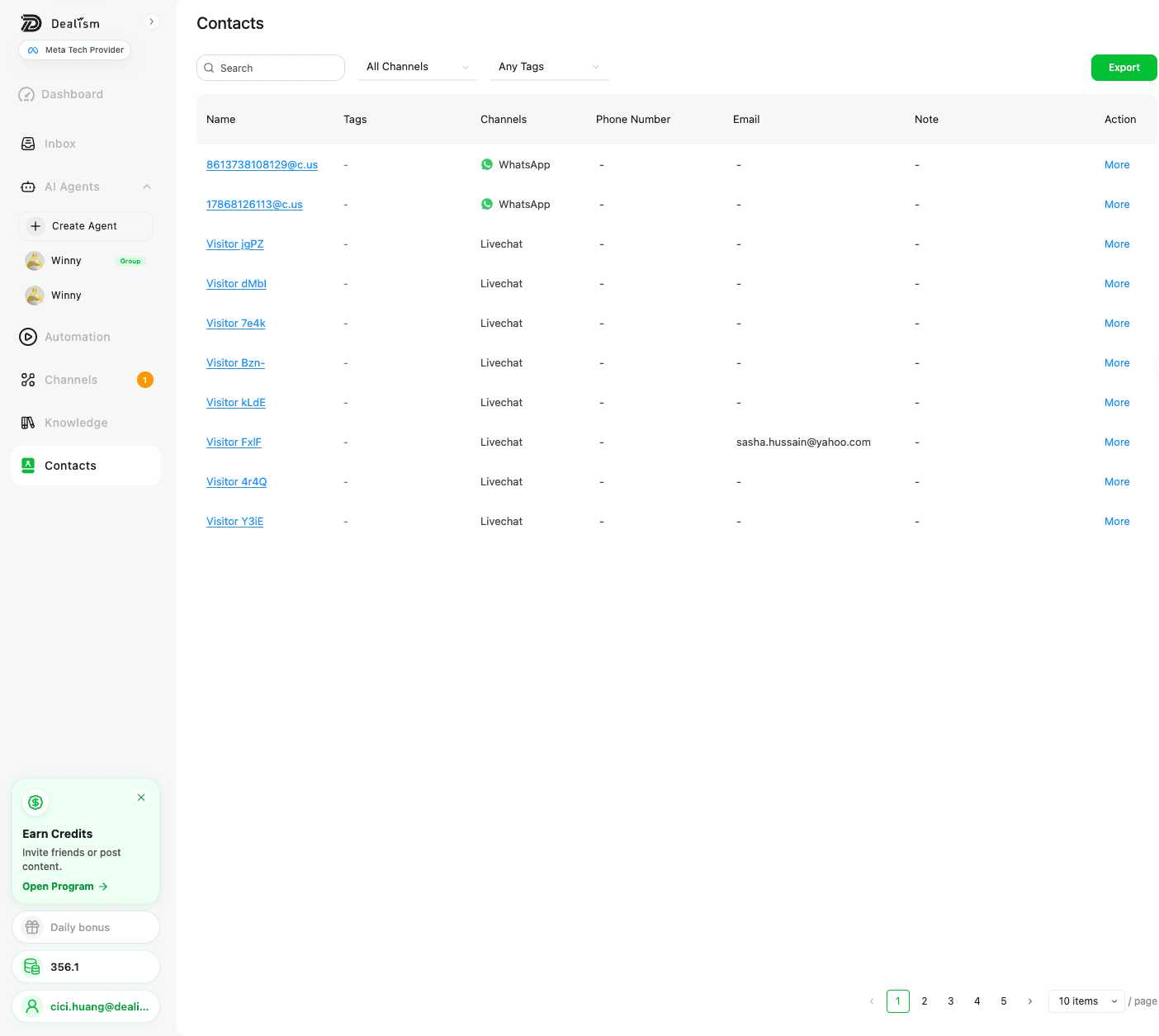
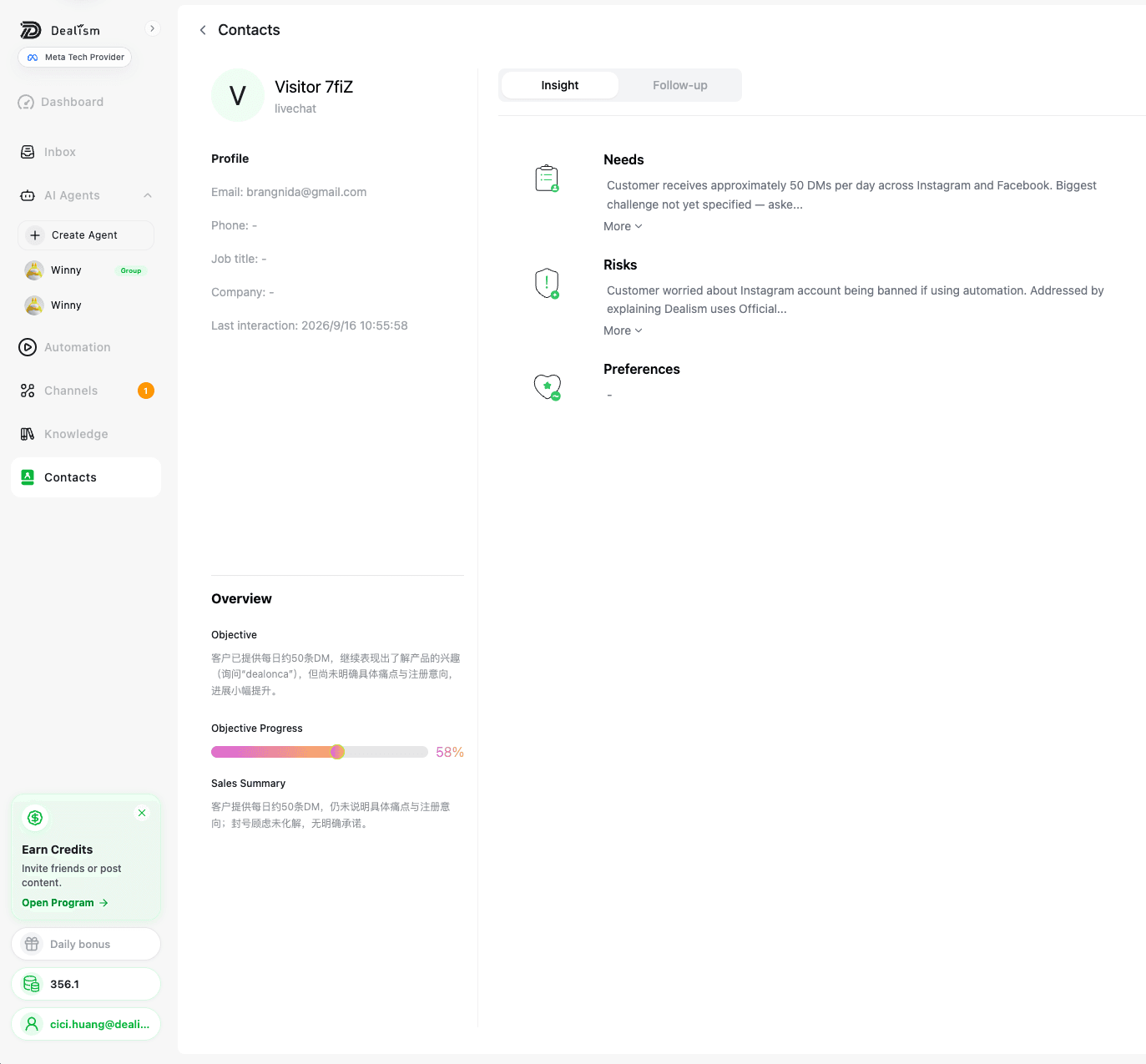
Search, filter, and understand each contact from one place. Keep the basics, the channel history, and a concise conversation summary ready for the next follow-up.

Contacts list · current product UI
Current Dealism Contacts list with channel and tag filters
FILTER AND SEARCHChannels + tags
Current Contacts UI. Identifying fields are masked.
Contact details · current product UI
Current Dealism contact profile with conversation insights
CONVERSATION INTELLIGENCENeeds + risks + preferences
Current contact details and Insights UI. Identifying fields are masked.

CRM Export, conversation summaries, and Insights are available on Starter and Pro plans. Fields shown depend on the information collected.

ANOTHER INSTAGRAM ENTRY POINT

Want a private DM to begin after a Post or Reel comment?

That is a separate workflow built for eligible public comments.

Explore Comment-to-DM →

BUILT FOR CONTROL

Keep Approved Knowledge and
Human Judgment in the Loop

01

Business-controlled guidance

The selected Agent works from the knowledge, objective, tone, and boundaries your business provides.

02

Visible AI mode

Choose Autopilot or Copilot instead of treating every interaction as fully automatic.

03

Supported Meta connections

Dealism is a Meta Business Partner and uses supported connection paths for eligible Meta channels.

Meta Business Partners

QUESTIONS BEFORE YOU CONNECT

Frequently Asked Questions

01What is a unified inbox for customer conversations?+

A unified inbox brings conversations from multiple customer messaging channels into one working interface. Instead of opening each channel separately, a team can view and continue supported conversations from a shared environment.

02Which channels can I connect to the Dealism Inbox?+

The current Dealism Inbox supports WhatsApp App, WhatsApp Business Platform (WABA), Instagram DM, and Live Chat connections. Eligibility and setup requirements differ by channel.

03Can my team reply to WhatsApp and Instagram from one workspace?+

Yes. After connecting eligible channels, supported WhatsApp and Instagram conversations can be viewed and managed from the Dealism Inbox. Each conversation retains its visible channel source.

04What is the difference between Autopilot and Copilot?+

Autopilot lets the selected AI Customer Agent continue supported conversations automatically within the guidance you provide. Copilot helps a person prepare a response while the person reviews, edits, and sends it.

05Can a person take over an AI conversation?+

Yes. When judgment, approval, negotiation, or personal attention is needed, a person can open the active conversation and continue with the earlier exchange visible.

06Does Dealism automatically merge the same customer across channels?+

Dealism brings supported channel conversations into one working environment and shows the source of each conversation. Separate identities from different channels should not be assumed to merge automatically unless the relevant connections and customer data explicitly support that relationship.

07Can I see which conversations need attention?+

The Inbox includes visible signals such as unread activity and a human-intervention state. These help the team identify conversations that may require review without opening every thread first.

08Can I use more than one AI Customer Agent?+

Dealism supports selecting an available Agent for a customer conversation. Each Agent can be configured with its own role, approved knowledge, objective, tone, and boundaries.

09Is Dealism a ticketing system or a customer conversation inbox?+

Dealism is positioned around ongoing customer conversations, AI assistance, and human handoff across supported messaging channels. It is not positioned as a replacement for every specialized help-desk, SLA, or ticket-management workflow.

10Is Dealism a Meta Business Partner?+

Yes. Dealism is a Meta Business Partner, and Dealism PTE. LTD. has completed Meta Access Verification. Businesses must still follow the current rules, permissions, consent requirements, and messaging windows that apply to each Meta channel.
ONE INBOX · THE RIGHT NEXT MOVE

Let AI handle the repeatable.
Keep people ready for the important.

Bring supported conversations, customer context, and human control into one Dealism workspace.

Start free with Dealism →

Customer conversations, one working view.

© 2026 DEALISM PTE. LTD.