
Support teams today are under pressure from every side. Customers expect faster replies, businesses want better efficiency, and small teams are often trying to do more without hiring more people. That is why more companies are looking at automating customer service, including AI support, as a practical way to reduce repetitive work and improve response quality without losing control of the customer experience.
For modern SMBs, the question is no longer whether automation matters. The real question is how to automate customer support in a way that is useful, scalable, and still feels clear and human. Done well, an automation message does not replace support teams. It helps them focus on the work that actually needs judgment, empathy, and problem-solving.
What Is Automated Customer Service?
Automated customer service uses AI, workflows, knowledge bases, routing systems, and self-service tools to handle support tasks more efficiently. Instead of relying on staff to answer every message manually, it can respond to common questions, route requests, suggest help content, send updates, and collect feedback.
Good automation is not only about speed. It helps teams manage higher message volume, reduce repetitive replies, and keep service quality more consistent across channels.
Why Businesses Are Automating Customer Service
Businesses are automating customer service because manual support does not scale well. As message volume grows, delays increase, teams get overloaded, and customers expect faster, more consistent replies.
Faster and More Reliable Response
Customers want quick answers, even if the full issue is not solved right away. Automation helps businesses send instant replies, basic answers, and acknowledgments without adding more staff.
Better Coverage with Less Repetition
Support requests come in at night, on weekends, and during busy periods, while many of them are the same questions repeated again and again. Automation helps cover these gaps, reduce repetitive work, and free human teams to focus on more complex cases.
More Consistent Service at Scale
As support volume increases, consistency becomes harder to maintain across staff members and channels. Automation helps standardize routine communication, making the customer experience more stable and reliable.
What Customer Service Tasks Should You Automate First, and What Should Wait?
The best way to start is small. Focus first on high-volume, low-complexity tasks that are easy to standardize and low risk to automate, then leave more sensitive or judgment-based cases for human support.
Good first candidates include:
FAQs and repetitive support questions, such as business hours, pricing basics, location, appointment rules, delivery windows, and standard policies
order updates, booking requests, and basic status checks, like confirming an appointment, checking shipping progress, or handling simple reschedule requests
ticket triage and internal routing, where the system sorts requests by type, urgency, or next team instead of answering everything directly
follow-up messages and simple reminders, such as missing documents, abandoned bookings, upcoming appointments, or incomplete support steps
feedback requests and post-interaction surveys, which help teams collect satisfaction data without adding manual work
These tasks work especially well for SMBs such as clinics, beauty and wellness businesses, tutoring services, agencies, and other service providers that receive many repetitive but predictable questions. In chat-heavy environments, tools like Dealism can also help classify and route conversations from WhatsApp, Instagram, or web chat before a human takes over.
At the same time, not every task should be automated too early. Strong support automation should also know when to stop and hand the conversation to a person. Cases that are better left to human support include:
emotionally sensitive complaints, where customers need empathy and careful handling
complex troubleshooting cases, which often require back-and-forth clarification and technical judgment
requests that require policy judgment, such as refund exceptions, unusual approvals, or special cases not covered by a clear rule
high-risk or privacy-sensitive conversations, especially those involving personal data, payment details, or health-related information
A good automation strategy is not about automating everything. It is about automating the right things first, while protecting the moments that still need human judgment, and using tools like Dealism where conversational context and human handoff matter most.
The Main Types of Customer Service Automation
There is no single tool that defines automated support. Most businesses use a mix of systems depending on their channel, team size, and workflow.
AI Chatbots and AI Support Agents
AI chatbots and support agents handle common questions, suggest next steps, and guide customers through basic flows. Simple bots work best for fixed replies. More advanced tools are better at understanding intent, asking follow-up questions, and handling less predictable conversations.
For businesses that need more than FAQ handling, Dealism can be positioned as a more advanced option. Instead of only answering routine questions, it can help interpret the conversation, clarify the request, and guide the customer toward booking, qualification, or support resolution.
Automated Ticket Routing and Prioritization
Not every inquiry should go to the same person. Routing systems can sort requests by urgency, type, or department and send them to the right queue. This saves time and reduces confusion.
For example, a local education center may want admissions questions to go to one team and technical access problems to another. A clinic may separate appointment changes from medical preparation questions.
Self-Service Knowledge Bases
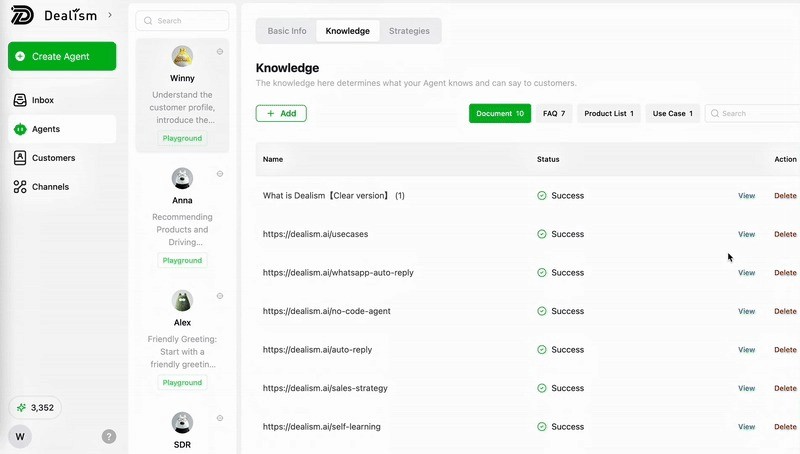
A knowledge base lets customers solve simple problems on their own. It may include FAQs, process explanations, pricing rules, service details, return policies, and troubleshooting steps.
This works well for SMBs that receive the same questions over and over. A salon can publish cancellation rules. A tutoring company can explain lesson packages. An agency can answer onboarding questions before the first meeting.
Email, Messaging, and Social Response Automation
Automation is not only for website chat. It can also work across email, WhatsApp, Instagram, Messenger, and other support channels. This is useful for businesses whose support conversations start in one place but continue elsewhere.
Notifications, Follow-Ups, and Feedback Collection
Automation can send reminders, request reviews, confirm appointments, follow up on open cases, or collect satisfaction feedback after an issue is resolved. These tasks are repetitive but important, making them ideal candidates for automation.
Dealism for Conversational Customer Service Automation
Many customer service automation systems work best when the question is simple and predictable. But real support conversations are often less structured, especially in chat-first channels where customers may ask about pricing, availability, support details, and next steps all at once.
That is where Dealism fits more naturally. Rather than treating support as a chain of isolated FAQ replies, it helps businesses handle conversations across WhatsApp, Instagram, and web chat with more context, clearer intent recognition, and smoother movement toward resolution, booking, qualification, or follow-up.
Why It Works Better in Chat-First Support
Traditional support automation performs best when the workflow is linear and the answer is already mapped to a fixed trigger. That model often breaks in service businesses, where customers ask loosely, switch topics, or combine support and purchase intent in the same conversation.
Dealism is better suited to these environments because it can help businesses:
identify the real intent behind the message
clarify vague requests
maintain conversational context
route inquiries into the right workflow
support both service handling and next-step action
This makes it especially useful when support does not stop at “question answered,” but often continues into consultation, booking, intake, or sales follow-up.
How Dealism Live Chat Adds More Value Than a Standard Website Widget
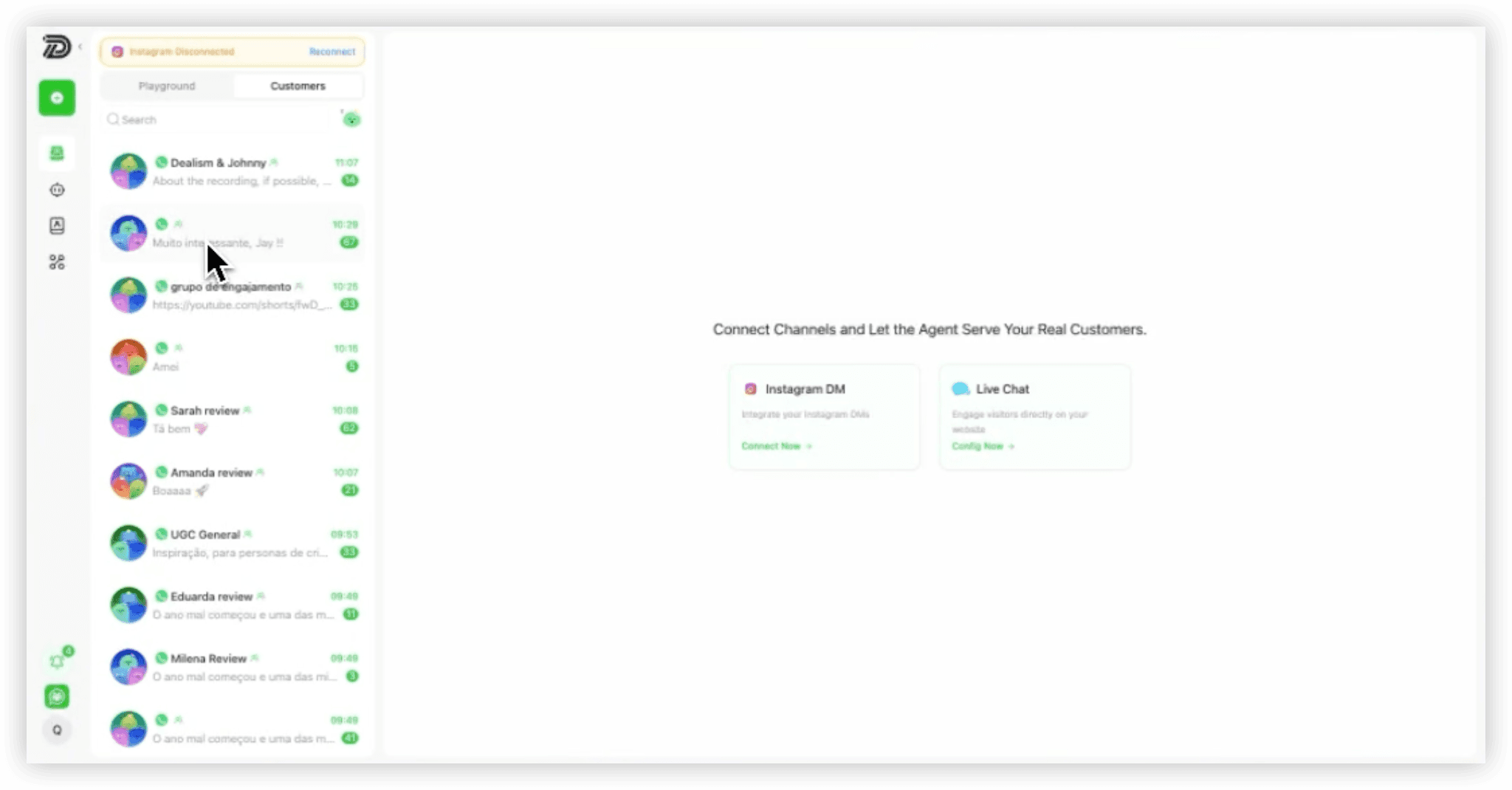
One of the strongest parts of Dealism in customer service automation is Live Chat. It should not be framed as a traditional on-site support box. Its role is closer to a website-to-conversation entry point.
Instead of trapping the interaction inside a disconnected website widget, Dealism Live Chat helps move visitors into a connected WhatsApp or Instagram conversation, where the exchange can continue more naturally. This matters because many support conversations do not end during one website session. Customers leave, come back later, ask follow-up questions, or need more explanation before taking action.
That creates several practical advantages:
the conversation continues in a channel customers already use
support does not end when the visitor leaves the site
follow-up can happen in the same thread
support, qualification, and booking can stay connected
the overall experience feels more direct and human
For service businesses, this is often far more useful than a standard live chat widget that only captures a short, isolated interaction.
Where Dealism Fits Best and Why It Stands Out
Dealism fits best in businesses where support is high-frequency, conversational, and action-oriented, especially when the main channels are WhatsApp, Instagram, or website chat.
It is particularly suitable for:
small and mid-sized service businesses handling repetitive but slightly nuanced questions
teams that want automation without building a heavy CRM-first workflow
businesses where support often overlaps with consultation, qualification, booking, or follow-up
operators managing many inquiries with limited support manpower
teams looking for a more adaptive system with self-learning capabilities that can improve support quality over time
What makes Dealism stand out is that it goes beyond basic support bots. Its key advantages include:
strong chat-first channel fit across WhatsApp, Instagram, and web chat
more natural handling of layered or unclear customer inquiries
better context continuity between support and follow-up
intent-based routing based on customer need and likely next action, not just keywords
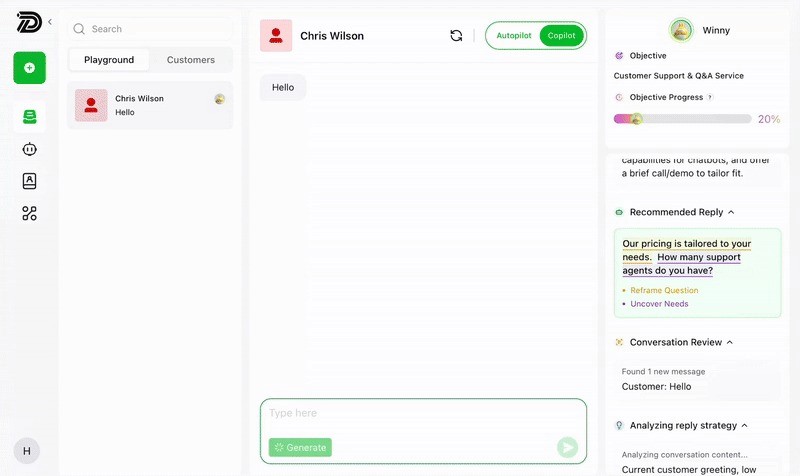
flexible control through Copilot and Autopilot style workflows
more action-oriented outcomes, helping move conversations toward booking, escalation, consultation, or resolution
For businesses that rely on conversational channels, Dealism helps reduce repetitive manual replies while keeping the customer experience more natural and structured. What makes Dealism stand out is that it goes beyond a basic AI Chatbot. It works more like an AI sales agent for conversational workflows, helping businesses handle support in a way that is more structured, context-aware, and action-oriented.
How to Implement Customer Service Automation in 5 Steps
The best answer to how to automate customer support is not “buy a tool and turn it on.” Strong implementation starts with workflow design.
Step 1. Audit Your Current Support Workflow
Map where requests come in, which questions repeat most, and where delays happen. Look at email, chat, social DMs, phone, and website forms. Identify which parts of support are repetitive and which parts need human judgment.
Step 2. Identify High-Volume, Low-Complexity Tasks
Start with tasks that are repetitive, clear, and easy to standardize. FAQs, booking checks, policy questions, and status updates usually come first. Avoid automating emotionally sensitive or complex cases too early.
Step 3. Build a Reliable Knowledge Base
Automation depends on accurate source material. Keep FAQs, process explanations, service details, and policies organized in one place. If the source information is incomplete or outdated, the automation layer will also be weak.
Step 4. Choose a Platform That Matches Your Channels
Do not pick a tool based only on features. Choose one based on where your customers actually talk to you. Businesses with chat-first support should prioritize platforms built for those environments.
If most customer conversations happen in WhatsApp, Instagram, or website chat, the platform needs to support those channels well. This is why channel fit is a major part of good customer service and support automation.
Step 5. Launch, Measure, and Improve
Start with one workflow, monitor performance, and refine based on real conversations. It is better to automate one support path well than try to automate everything at once and create a poor customer experience.
Best Practices for a Strong Automated Support System
Keep Humans in the Loop
Automation should support people, not trap customers. There should always be a clear path to a human when the issue is complex, emotional, or sensitive.
Write Clear Escalation Rules
The system needs to know when to stop automating. Define what should be escalated, who should receive it, and how fast the handoff should happen.
Keep Your Knowledge Base Updated
Policies change. Service details change. Prices change. An outdated knowledge base creates outdated support.
Unify Context Across Channels
Customers may move from a website to WhatsApp, from Instagram to email, or from support to booking. Strong automation for customer service should keep the context connected instead of treating each message like a brand-new case.
Optimize for Clarity, Not Just Speed
Fast replies matter, but clear replies matter more. A quick but confusing answer still creates support work later.
How to Measure the Success of Customer Service Automation
First Response Time
Measure how quickly customers receive the first reply. Faster first response usually improves customer confidence.
Resolution Rate
Track how many issues are fully solved, not just acknowledged.
Customer Satisfaction
Use surveys or feedback forms to learn whether customers feel the support was actually helpful.
Deflection Rate
See how many simple issues are handled without needing human intervention. This helps show whether your self-service and automated workflows are working.
Team Efficiency and Workload Reduction
One of the clearest outcomes of automating customer service is lower manual workload. Track how much time your team saves and whether they can focus more on high-value issues.
Conclusion
The goal of support automation is not to replace people with cold systems. It is to build a workflow that is faster, more scalable, and easier for both customers and teams to navigate. That is the real value behind ways to automate customer service that work in practice.
For modern businesses, especially SMBs, the smartest path is to start simple, focus on repetitive tasks, and improve from there. And for businesses that rely on conversational channels like WhatsApp, Instagram, and web chat, platforms like Dealism can help make automation feel more natural, connected, and action-oriented. Ready to make your support workflow easier to manage and more effective in real conversations? Explore Dealism and see how conversational customer service automation can turn more inquiries into clear next steps.