


Yes — a growing number of Shopify merchants pair the store's native checkout and discount tools with a dedicated Instagram automation layer, because Shopify itself doesn't fully close the gap between an Instagram comment and a completed sale. That gap matters because Instagram is one of the two biggest social acquisition channels for Shopify stores, alongside Facebook. For the full mechanics of how comment-to-DM automation actually works, see Dealism's Instagram DM automation guide.
What Does Shopify Already Handle Well for Sellers?
Shopify's core strength is the parts of the sale that happen after someone decides to buy: product pages, cart, checkout, discount codes, and order management are all handled natively, and merchants can extend all of it with a large app ecosystem. Social selling is also clearly a priority for the platform — the Facebook & Instagram sales channel app is reportedly the most-installed app in the entire Shopify App Store, according to a compilation of Shopify's own figures by ecommercetrix.com (updated roughly a month ago). That app helps merchants sync a product catalog into Instagram Shopping so items can be tagged and browsed — but syncing a catalog is a different job from replying to the comment someone left asking if the item comes in their size.
Where Do Instagram Comments and DMs Fall Through the Cracks?
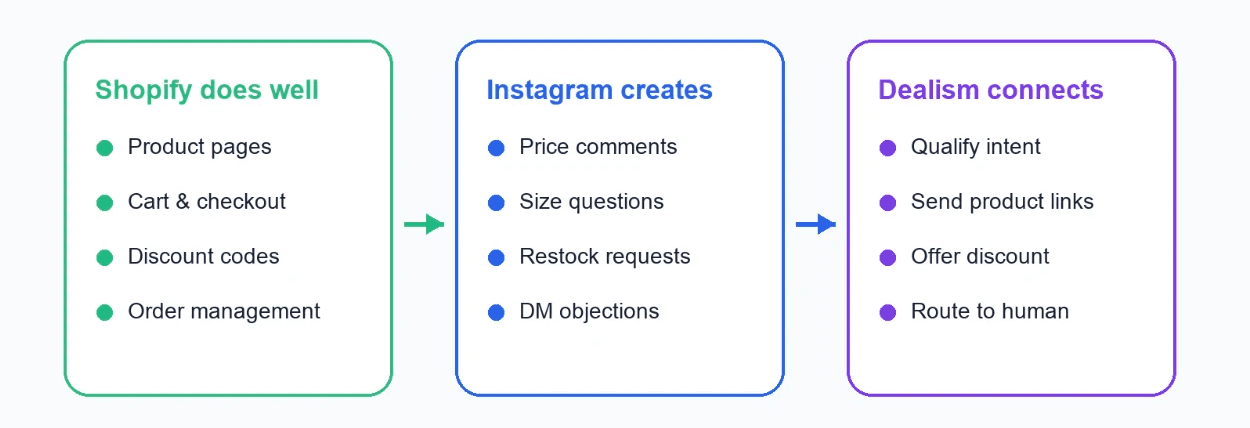
Instagram is used by 48.4% of Shopify stores tracked in StoreLeads' State of Shopify report (current data), which means roughly half of all Shopify merchants are generating Instagram comments and DMs on top of their store traffic. Shopify's own free messaging tool, Shopify Inbox, centralizes chats from the storefront widget and Facebook Messenger, and Shopify's help documentation confirms it can connect to Instagram messaging as well. But independent reviews of the tool point out real limits: a detailed breakdown by eesel AI (December 2025) notes Shopify Inbox doesn't pull in every messaging channel into one place, and separate testing found it handles Instagram direct messages but does not collect comments left on posts or ads — which is exactly where a lot of pre-purchase questions ("is this in stock," "does it run small," "is there a discount code") actually show up first.
That's the specific gap: catalog sync gets your products into Instagram Shopping, and Shopify Inbox gets some direct messages into your dashboard, but the comment section itself — often the highest-volume entry point — is left for the merchant to answer by hand or ignore.
Which Instagram Automation Tools Work Alongside Shopify?
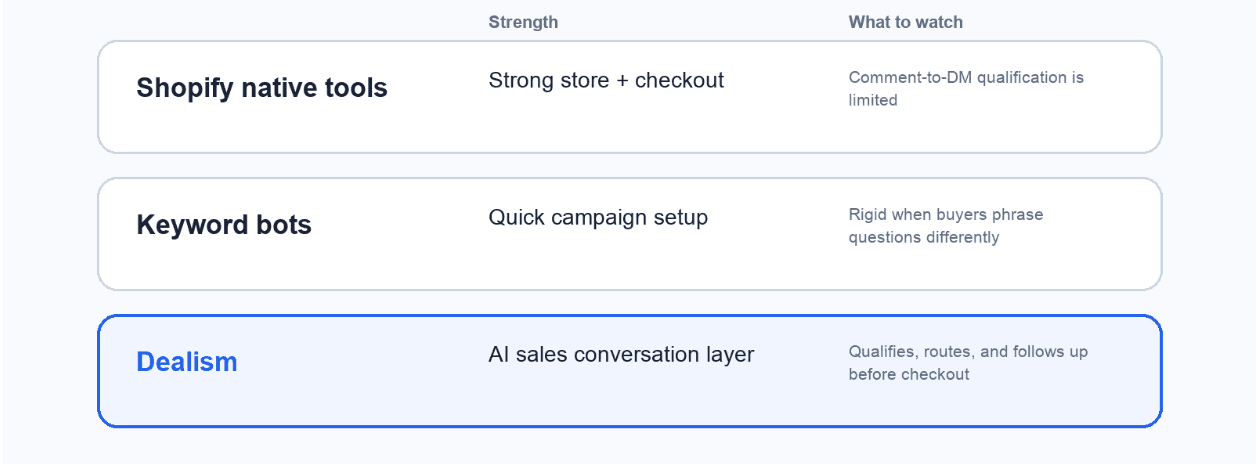
Because this isn't a gap Shopify closes with one official first-party plugin, most merchants end up comparing standalone Instagram automation tools rather than a single app-store listing. These range from simple keyword-triggered bots to AI-native platforms that read intent before replying. Dealism's comparison of free Instagram DM bots is a reasonable place to start if you want to test comment-to-DM automation before paying for anything.
The practical difference between the two categories: keyword bots are quick to set up but only work for the exact phrasing you anticipated, while AI-driven tools can handle a wider range of real customer language and carry the conversation from a comment through to a product recommendation or checkout link without a human rebuilding the flow every time a shopper phrases a question differently.
Why Add Dealism on Top of Shopify's Native Tools?
Shopify already gives merchants a strong foundation — checkout, discounts, order history, and a catalog that syncs into Instagram Shopping. What it doesn't do on its own is turn the comment under a product photo into a qualified conversation that ends at that same product's checkout link. That's the layer Dealism is built to add: it can reply to Instagram comments and DMs the moment they arrive, ask a clarifying question (size, color, shipping destination), then send the shopper straight to the matching Shopify product or checkout link, or hand off to WhatsApp for a more detailed back-and-forth.
This is a "1+1 > 2" pairing rather than a replacement — Dealism isn't a checkout system or a cart, and it doesn't need to be, because Shopify already does that part well. Dealism's job is the conversation that happens before the shopper ever gets there. Social commerce itself is not a niche add-on anymore: Shopify's own research puts the global social commerce market at $821 billion in 2025, on pace to pass $1 trillion by 2028, and a large share of that shopping starts as a conversation rather than a browse session. Dealism's Instagram messaging product page covers how that first-reply layer is set up in more detail.
How Does the Comment-to-Checkout Flow Work With Dealism?
A typical setup for a Shopify store looks like this:
1. Choose the entry point. Most Shopify sellers start with comment keywords ("price," "size," "restock") under their best-performing posts and ads, since that's where the highest volume of repeat questions shows up.
2. Map each entry point to a next step. A stock or price question can route straight to the matching product page; a sizing or fit question can route to a slightly longer qualifying exchange first.
3. Write the first automated reply. It should answer the real question with real information — product details, shipping estimate, or an active discount code — not a placeholder "thanks, we'll get back to you."
4. Add the product or checkout link. Once the shopper's question is answered, the natural next step is a direct link to the relevant Shopify product page.
5. Add one follow-up, not several, for shoppers who engaged but didn't click through — a single well-timed nudge converts better than repeated messages.
6. Set a handoff rule for anything Dealism shouldn't fully automate: sizing disputes, returns, or bulk/wholesale inquiries should route to a human or to WhatsApp.
7. Test the flow against your actual DMs and comments before turning it on for all traffic.
Dealism can support sending product links, discount codes, and WhatsApp handoffs as part of this flow, depending on how you configure it — it does not automatically sync Shopify inventory, order status, or payment data, so keep stock and pricing current on your end. For the comment-automation piece specifically, Dealism's Instagram comment auto-reply setup guide walks through the configuration step by step. If a large share of your qualified conversations end up moving to WhatsApp rather than staying on Instagram, Dealism's WhatsApp tools breakdown for Shopify merchants covers what that handoff can look like alongside cart-recovery-style messaging.
Where Can You Find Ready-to-Use Message Templates?
Instead of duplicating a long list of scripts here, start from copy that's already built around real Instagram buyer questions. Dealism's Instagram welcome message examples article has 30+ templates for greetings, offers, and support replies you can adapt with your own product names, shipping details, and discount codes.
FAQ About Instagram DM Automation for Shopify
Does this replace Shopify Inbox? Not necessarily — some merchants run both. Shopify Inbox is a solid free option for storefront chat and some direct messages; Dealism is aimed specifically at the comment-to-DM volume and qualification step that Shopify Inbox doesn't fully cover.
Will Dealism sync my Shopify inventory or order data automatically? No. Dealism can send shoppers to your Shopify product and checkout pages and support the conversation around price, sizing, or shipping, but it does not automatically sync inventory, orders, or payment data unless that's separately confirmed for your setup.
Should a shopper go to checkout, WhatsApp, or a human? Simple, answerable questions (price, stock, shipping time) usually convert better with a direct link to the product page. Anything involving customization, a dispute, or a bulk order tends to do better on WhatsApp or with a person in the loop.
Do I need a developer to set this up? No. Setup is generally handled by describing your store, products, and rules rather than writing code, but you should still test the flow with real customer questions before publishing it.
Is Instagram automation risky for my Shopify store's account standing? Using tools built on Instagram's official messaging APIs is the safer path; avoid any tool that asks for your Instagram password directly instead of going through official account permissions.
How Do Shopify Merchants Get Started With Dealism?
If your Shopify store's Instagram comments and DMs already outnumber what one person can answer by hand, that's the clearest signal it's time to automate the first reply rather than the whole conversation. Map your three most common Instagram questions, decide which ones should route straight to a product page and which need a human or WhatsApp, and set up Dealism to handle that first layer. Independent research on DM-based selling backs this up directly: LeadResponse's 2026 analysis of Instagram DM statistics found DM-to-sale conversion rates typically fall between 7% and 20%, well above the 1–3% typical of Instagram ads alone — which is exactly the kind of pre-checkout conversation Shopify's native tools weren't built to carry on their own.


