

You have probably seen the setup: comment “GUIDE” on a Reel and a link appears in your DMs a few seconds later.
It is convenient. It also raises an obvious question: is ManyChat safe for Instagram?
The short answer is generally, yes. ManyChat is a legitimate automation platform that connects through Meta’s official infrastructure. Simply connecting it should not get an Instagram account banned.
But “official” does not mean “restriction-proof.” You still decide who receives a message, how often it is sent, and whether it feels helpful or like spam.
Is ManyChat safe? The quick verdict
Safety question | Short answer | What it means for you |
Is ManyChat a legitimate platform? | Yes | ManyChat says it is a Meta Business Partner and uses Meta’s official APIs. |
Does connecting it guarantee no restrictions? | No | Meta still controls its rules, detection systems, and enforcement. |
Does ManyChat need account and message data? | Yes | It needs permissions and processes conversation data to run automations. |
Can a well-configured flow still feel spammy? | Yes | An official connection cannot rescue a repetitive or unwanted customer experience. |
So the useful verdict is not “safe” or “unsafe.” It is this:
ManyChat is generally safe to connect. Whether the automation remains safe depends on what you ask it to do.
Why ManyChat is generally safe to connect
ManyChat says it is an official Meta Business Partner and works through Meta’s APIs. That separates it from unofficial tools that ask for your Instagram password, scrape the platform, or imitate clicks in a browser.
A normal connection should send you to a Meta or Instagram authorization screen. You sign in with Meta, review the requested permissions, and approve access. ManyChat does not need you to type your Instagram password into a random form inside its product.
ManyChat’s current setup requires an Instagram professional account—Business or Creator. Personal accounts are not supported through the same path.
This lowers credential risk, but Meta still decides what is allowed. ManyChat cannot simply overturn a restriction.
That is what “Meta-approved” should mean here: the platform uses a supported door. It is not a VIP pass around the rules.
Dealism uses the same supported connection path. It is a Meta Business Partner, and Dealism PTE. LTD. has completed Meta Access Verification as a verified Tech Provider. Meta’s authorization flow lets you review permissions and choose the business assets to connect. Dealism does not need your Instagram password. You can review the verification details and data practices on the Dealism security page.
Can ManyChat get your Instagram account restricted?
Connecting ManyChat is not normally the problem. The behavior created by a flow can be.
Imagine a Reel suddenly takes off. Five hundred people comment within an hour. Your automation replies “Sent! Check your DMs” under every comment, then sends every person the same promotional link.
The flow worked as designed. It also produced a burst of repeated comments and near-identical DMs that customers may never have clearly requested.
ManyChat’s own guidance says Meta may flag rapid automated messages, aggressive public comment automation, or overlapping account behavior. It cannot override Meta’s detection systems.
Common risk patterns include:
messaging people who did not clearly ask to hear from you;
posting the same public reply hundreds of times;
sending identical promotions immediately after vague comments;
allowing two connected tools to answer the same event;
continuing automated follow-up outside the applicable messaging window;
using automation for prohibited offers or misleading engagement tactics.
If Instagram has already shown “We’ve detected automated behavior,” stop diagnosing the vendor and start reviewing the account. Our guide to the Instagram automated behavior warning.
What data and permissions does ManyChat access?
Account safety is only one half of the question. The other half is data.
To run triggers and send messages, a platform needs relevant account and conversation information, including details customers submit through a flow.
ManyChat lists ISO/IEC 27001 and SOC 2 Type II on its privacy and security page. Those are useful vendor-review signals, not a reason to stop asking questions.
Before connecting any messaging platform, check:
Which account and business assets are you authorizing?
Which team members can see conversations and flows?
Are you collecting information you do not need?
How long will you keep it?
Can you remove access cleanly?
Are sensitive details entering the automation?
Think of permissions like keys to a shop. A trustworthy key-management company matters. You still should not issue every employee every key forever.
Apply the same permission checklist whichever provider you choose.
A safer way to set up ManyChat
You do not need secret action limits or random delays that make a bot “look human.” You need a flow that respects why the person interacted.
1. Connect through the official authorization screen
Do not hand your Instagram password to an automation provider. Avoid browser extensions or tools promising to bypass Meta’s limits.
2. Start with clear user intent
“Comment GUIDE and I’ll send the checklist” creates a clear exchange. Triggering a sales DM from every “nice post” or emoji comment does not.
3. Make the first DM useful
If someone requested a guide, send the guide. Do not make them click through six conversational steps before delivering what you promised.
The ManyChat messaging-window guide explains that difference in practical terms.
4. Prepare for the viral version
Ask what the flow will do with 1,000 comments, not ten. Vary useful replies, prevent duplicate triggers, watch errors, and pause if comments become a wall of identical text.
5. Check conversation routing
If several apps are connected, decide which handles each entry point. Otherwise, multiple tools may reply to the same person.
6. Keep logs and a human exit
Logs should show whether a trigger arrived, a message was suppressed, Meta returned an error, or the DM was sent. Offer human help for sensitive, unusual, or sales-ready conversations.
For a broader implementation checklist, see this guide to Instagram DM automation.
What tasteful automation looks like
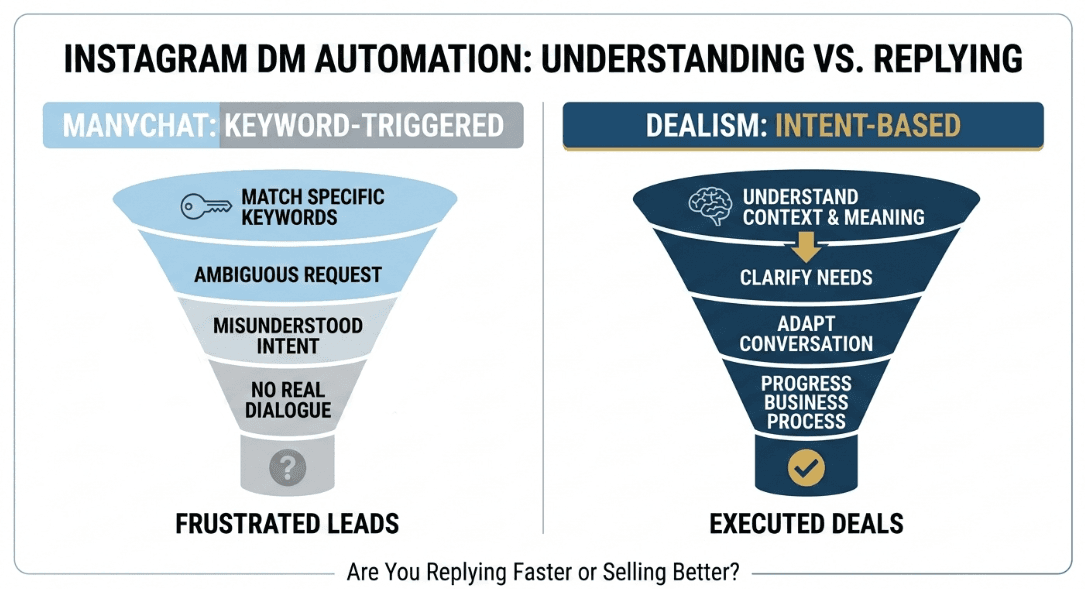
Here is the difference.
Weak flow
Any comment → “Sent!” → identical sales link → repeated follow-ups
The user’s intention is unclear, replies are repetitive, and the promised value is buried.
Thoughtful flow
“Comment GUIDE” → requested guide → one relevant question → human takeover when needed
The user knows what will happen. Automation keeps the promise, then makes room for judgment.
A focused Comment-to-DM workflow is often enough when your only goal is to deliver a requested link, checklist, booking page, or product detail.
When ManyChat is—and is not—the right fit
ManyChat fits creators and marketers who want visual control over triggers, conditions, tags, and structured sequences.
It may feel less natural when customers ask unpredictable questions or need help choosing a next step. A rigid sequence can become a maze of branches.
Dealism approaches that part as a conversation. Its Instagram automation platform can use business information to answer questions, clarify needs, recommend a next step, and keep human review available.
That does not make Dealism automatically “safer.” Every tool must respect permissions, user intent, platform rules, and sensible pacing. The difference is what happens after someone shows interest.
If you are comparing options, this guide to free Instagram DM bots explains the trade-offs without treating every automation tool as the same product.
Frequently asked questions
Is ManyChat approved by Instagram or Meta?
ManyChat says it is an official Meta Business Partner and uses Meta’s official APIs. That makes it a legitimate platform connection, but Meta still controls Instagram’s messaging rules and account enforcement.
Can ManyChat get my Instagram account banned?
Simply connecting ManyChat should not cause a ban. Spam-like, excessive, misleading, or policy-breaking activity can still lead to warnings or restrictions, even when it runs through an official platform.
Does ManyChat need my Instagram password?
A supported connection should use Meta or Instagram’s authorization screen. Do not give an automation tool your password directly.
Can ManyChat message anyone on Instagram?
No. Available triggers and follow-up messages remain subject to user interactions, permissions, messaging windows, product limitations, and Meta’s rules. ManyChat is not a tool for unsolicited bulk DMs.
Is customer data safe in ManyChat?
ManyChat publishes security certifications and information about its controls. Each business must still review permissions, staff access, retention, consent, and sensitive data.
Can I disconnect ManyChat later?
Yes. Review active automations, contacts, exports, and retention needs before removing it.
Final answer: the connection is legitimate; the experience is yours
So, is ManyChat safe? Generally, yes. It uses a supported Meta connection and is a legitimate option for Instagram automation.
The honest caveat is that no provider can make an unwanted message welcome or make repetitive behavior invisible to Instagram. Connect through the official authorization flow, ask only for the permissions you need, start with clear user intent, and watch what happens when volume rises.
The safest-looking automation is not the one with the cleverest delay. It is the one where the customer understands why the message arrived—and finds it useful when it does.


