
A WhatsApp blast is one of the fastest ways to reach a large audience on the channel they actually check. With WhatsApp messages landing in the same thread people use to talk to friends and family, blast campaigns routinely see open rates far above email — which is exactly why so many businesses now use them to promote offers, send updates, and re-engage customers.
But sending bulk messages on WhatsApp is not as simple as copy-pasting a contact list. WhatsApp enforces strict anti-spam rules, and the wrong approach can get your number restricted or banned. This guide explains what a WhatsApp blast is, how to blast messages on WhatsApp step by step, which WhatsApp blast software to use, and how to do it all without putting your account at risk.
What Is WhatsApp Blast?
A WhatsApp blast is a single message sent to many recipients at once, where each person receives it as an individual, private 1:1 message — not in a shared group.
That distinction matters. Because the message arrives in a personal chat thread rather than a noisy group, it feels direct and personal, which is a big part of why blast campaigns convert better than most other channels.
Businesses typically use WhatsApp blast messages for:
Promotions, discounts, and flash sales
Product launches and back-in-stock alerts
Event and webinar invitations or reminders
Order, shipping, and appointment notifications
Re-engagement and win-back campaigns
Because WhatsApp messages appear in personal chat threads, they typically achieve much higher open rates than email marketing campaigns.
WhatsApp Blast vs WhatsApp Broadcast
People often use "blast" and "broadcast" interchangeably, but they're not the same thing — and the difference decides which method you should use.
Feature | WhatsApp Broadcast | WhatsApp Blast (API tools) |
Contact limit | 256 contacts | Thousands of recipients |
Requires saved contact | Yes | Not always |
Automation | Limited | Advanced automation |
Analytics | None | Message tracking |
Best for | Small outreach | Large marketing campaigns |
In short: a broadcast is the built-in feature inside the WhatsApp Business app, capped at 256 saved contacts. A blast at real scale runs on the WhatsApp Business API, which removes the contact cap and adds automation, analytics, and compliance controls. For anything beyond a few hundred contacts, the API is the only sustainable route.
How to Blast Messages on WhatsApp (Step by Step)
There are two legitimate ways to blast messages on WhatsApp. Start with the app if your list is tiny; move to the API the moment you're sending at scale.
Method 1 — WhatsApp Broadcast List
Open the WhatsApp Business app and tap the three-dot menu (Android) or Broadcast Lists (iPhone).
Tap New broadcast / New list.
Select up to 256 contacts — note that only people who have saved your number will actually receive the message.
Compose your message and send. Each recipient gets it as a private chat, and any reply opens a normal 1:1 conversation.
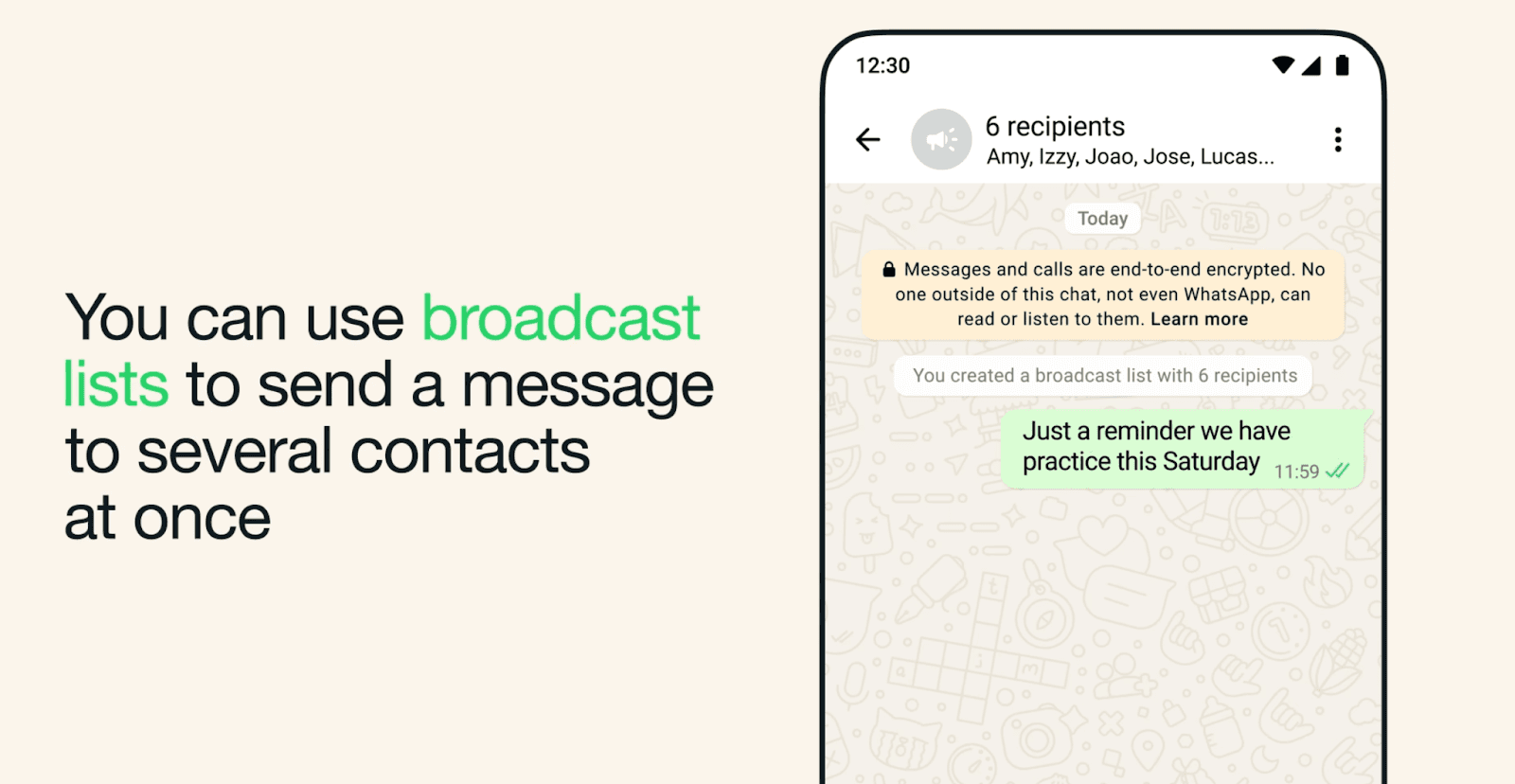
However, it has limitations:
Maximum 256 contacts per broadcast
Contacts must save your phone number
No automation or analytics
For growing businesses, these restrictions quickly become limiting.
Method 2 — WhatsApp Business API (scale)
Set up access to the WhatsApp Business Platform through Meta or a compatible provider, and verify your business. If your goal is to automate the replies generated by the campaign, connect a supported WhatsApp setup to Dealism after the sending foundation is in place.
Build a clean, opt-in contact list — only message people who agreed to hear from you.
Create a message template and submit it for approval. Marketing templates must be approved by Meta before they can be sent.
Segment your audience and schedule the send so the right message reaches the right group.
Send, then track delivery, reads, and replies — and route incoming replies to your team or an AI agent so no lead is left hanging.
The API is what makes high-volume blasting reliable and policy-compliant. It also unlocks the part most businesses underestimate: handling the flood of replies a good blast generates.
Already have campaign delivery covered? Use Dealism to answer, qualify, and follow up with the people who reply →
WhatsApp Blast Software: What to Look For
Because raw API access is technical, most businesses send blasts through WhatsApp blast software — a platform that sits on top of the official API and makes campaigns manageable. When comparing tools, the features that actually matter are:
Official API / verified BSP status — avoid anything that promises blasting from a personal account (more on why below).
Template management — easy creation and approval tracking for marketing templates.
Opt-in & contact management — capture consent and keep lists clean.
Segmentation & scheduling — target by behavior, not one giant list.
Analytics — delivery, read, and reply rates per campaign.
Two-way automation / AI replies — the difference between a tool that sends and one that responds.
Transparent pricing — WhatsApp's own per-message fees are billed by Meta on top of any software cost.
A quick warning on the tools marketed as "WhatsApp blasters" that send from a regular personal number: many are unofficial and violate WhatsApp's terms. Using them risks account bans, failed delivery, and data-security problems. For any long-term business use, stick to official, API-based software.
If you're weighing specific platforms, see our breakdown of the best WhatsApp marketing software in 2026, and our WhatsApp AI assistant if you want sending and replies handled in one place.
WhatsApp Blast Compliance: Rules Businesses Must Follow
This is where most campaigns go wrong. WhatsApp's systems are designed to catch spam-like behavior, and a single careless blast can get your number flagged. Follow these rules to stay safe.
1. Always collect explicit opt-in.
Only message people who actively agreed — via website forms, click-to-WhatsApp ads, checkout subscription boxes, or support conversations. Messaging people who never opted in is the fastest way to trigger spam reports.
2. Control frequency and monitor quality.
Avoid overwhelming recipients with repetitive promotions. WhatsApp recommends sending messages when they are expected, timely, and relevant. Monitor read rates, opt-outs, blocks, and quality signals, then reduce frequency for contacts who stop engaging.
3. Use approved templates through the official API.
Don't route mass sends through unofficial tools or personal accounts.
4. Personalize every message.
Use the recipient's name, reference past purchases, or send location-specific offers. Personalized messages get fewer complaints and better responses.
5. Make it a conversation, not a megaphone.
WhatsApp is built for two-way messaging. Inviting replies — and actually answering them — improves your quality signals and protects your number.
6. Honor opt-outs immediately.
Always give an easy way to stop, and respect it. Ignoring opt-outs is both a compliance risk and a reputation risk.
WhatsApp Blast Message Examples & Templates
Use these as starting points — swap in your brand voice and personalize with [Name] and [Brand].
Flash sale
🎉 [Name], our weekend sale is live! Get 20% off everything today only. Tap to shop → [link]
Back in stock
Good news, [Name] — the item you wanted is back in stock. Want us to reserve one for you?
Event reminder
Reminder: your webinar starts in 30 minutes. Join here → [link]
Order & shipping update
Your order #48392 has shipped 🚚 Track it here → [link]
Abandoned cart
Still thinking it over, [Name]? Your cart is saved. Complete checkout in the next 24h and get free shipping → [link]
Appointment reminder
Hi [Name], this is a reminder of your appointment with [Brand] tomorrow at 3 PM. Reply YES to confirm or RESCHEDULE to change it.
Win-back
We miss you, [Name]! Here's 15% off your next order to welcome you back → [link]
The Limits of Traditional Blasting
A blast is great at one thing: getting a message in front of a lot of people fast. What it doesn't do is handle what happens next.
The moment a campaign goes out, replies start coming in — and most blasting setups have no plan for them. Teams end up:
Drowning in replies they can't answer quickly enough
Struggling to tell genuine buyers apart from casual questions
Letting hot leads go cold because no one followed up in time
A blast that generates 500 replies but converts a handful of them isn't a marketing win — it's a missed-opportunity machine.
From WhatsApp Blast to WhatsApp Marketing Automation
The businesses winning on WhatsApp in 2026 have shifted from one-way blasting to conversation-driven automation — systems that manage the entire lifecycle after the send, not just the send itself. (See our guide to WhatsApp marketing automation.)
These systems can:
Automatically respond to customer inquiries
Qualify leads through conversation
Route high-intent prospects to sales teams
Trigger follow-up workflows
Using AI to Turn WhatsApp Conversations into Sales Workflows
Sending a WhatsApp blast can help businesses reach many customers quickly, but the real challenge begins once people start replying. Teams often struggle to keep track of conversations, understand customer intent, and decide what the next step should be.
Dealism is designed for the reply stage—not as a replacement for a compliant bulk-sending platform. Once a recipient responds, Dealism can use your business knowledge and the conversation context to answer questions, identify what the customer needs, and guide the chat toward the appropriate next step.
A practical post-blast workflow looks like this:
A customer replies to the promotion, reminder, or product update.
Dealism answers using approved business information instead of a generic canned response.
The AI agent qualifies the request by clarifying the customer's goal, timing, product interest, or other relevant needs.
The conversation moves to an action, such as a recommendation, booking page, checkout, follow-up, or human handoff.
This is where WhatsApp automation becomes more valuable than simple message delivery: the campaign can keep moving after the first reply without forcing every customer through the same rigid flow.
Turn your WhatsApp blast replies into qualified sales conversations with Dealism →
Frequently Asked Questions(FAQ)
Is WhatsApp blast legal?
Yes — sending bulk messages is allowed when you use the official WhatsApp Business API, get recipient opt-in, and follow WhatsApp's messaging policies. Unsolicited messages or unofficial "blaster" tools can get your account banned.
How many messages can you blast at once?
The WhatsApp Business app caps broadcast lists at 256 saved contacts. The WhatsApp Business API removes that limit and lets you send to thousands, with your daily volume tied to your account's messaging tier.
Is a WhatsApp blast free?
The Business app broadcast feature is free but limited. API-based blasting carries WhatsApp's per-message fees (billed by Meta) plus any software subscription, so confirm current rates with Meta and your provider before scaling.
Can you get banned for blasting on WhatsApp?
Yes. Messaging people without consent, overwhelming recipients, or using unofficial tools can trigger restrictions. Clear opt-in, approved templates, relevant content, frequency control, and prompt opt-out handling reduce that risk.
What is the best WhatsApp blast software?
The best tools are official, API-based, and handle not just sending but the replies — opt-in management, segmentation, analytics, and AI-powered responses. Compare options in our best WhatsApp marketing tools guide.
Conclusion
A WhatsApp blast can help you reach customers quickly—but in 2026, sending is only half the job. Strong campaigns pair compliant delivery, clear consent, approved templates, relevant timing, and genuine two-way conversation with a plan for every reply.
Get the foundations right, choose official sending software, and don't let your campaign end at “message delivered.” Use Dealism when you need to answer questions, qualify interest, continue follow-ups, and bring in a human at the right moment.
Create your free Dealism account and start converting WhatsApp replies →


