Conocimiento
Actualizado
Lectura de 5 min
Su Agente solo puede utilizar la información que tiene a su disposición
Contar con información clara, actualizada y coherente permite que su agente responda siempre de manera consistente. Revise los datos clave sobre precios, políticas y productos cada vez que su negocio experimente cambios.
¿Qué hace la base de conocimientos?
La base de conocimientos es la información de negocio que su AI Agent utiliza para responder a los clientes. Dealism puede generar conocimientos a partir de las conversaciones, y usted puede agregar información adicional mediante archivos o enlaces. Las entradas se muestran categorizadas en áreas como faq, policy, pricing, product_info, strategy y usecase.
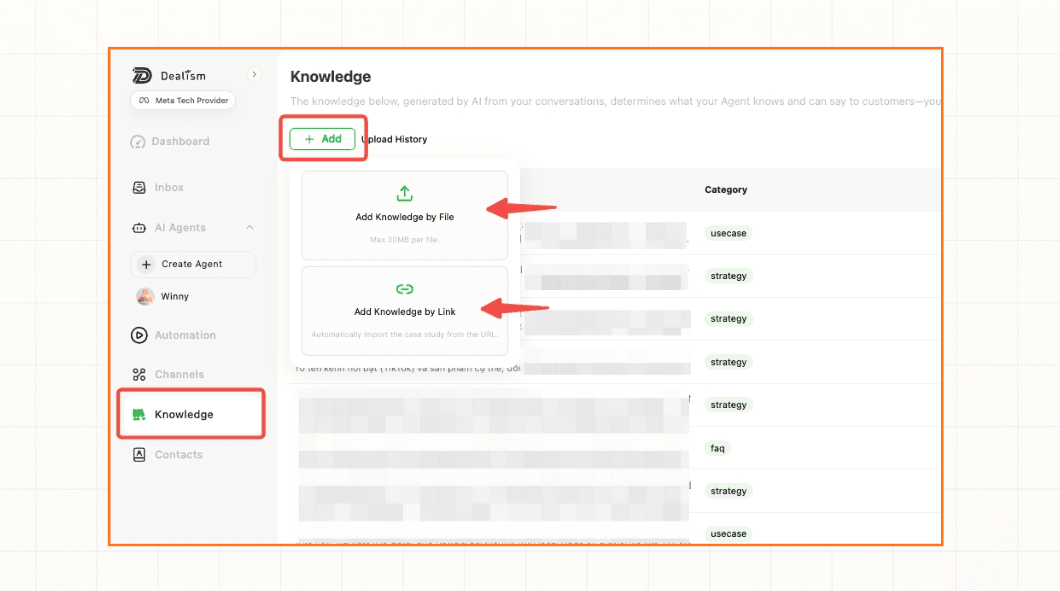
Cómo influyen los conocimientos en las respuestas
La base de conocimientos determina lo que su Agent sabe y qué puede comunicar a los clientes. Una entrada específica y actualizada proporciona al Agent un dato confiable para sus respuestas. Por el contrario, una entrada vaga, obsoleta o contradictoria puede dar lugar a respuestas incompletas o inconsistentes.
Los conocimientos deben reflejar las reglas reales de su negocio. Evite incluir instrucciones que inciten al Agent a especular sobre precios, disponibilidad, políticas o datos de los clientes que no estén registrados.
Mejores prácticas para la base de conocimientos
Utilice una única fuente de verdad: evite mantener dos entradas que muestren precios o políticas contradictorias.
Redacte pensando en preguntas reales de los clientes: use un lenguaje claro, directo y sitúe la respuesta principal al inicio.
Estructure los datos por separado: mantenga los productos, políticas, preguntas frecuentes y casos de uso en entradas independientes y enfocadas, en lugar de agruparlos en un único documento extenso.
Defina condiciones claras: especifique el país, la moneda, el tipo de cliente, el plan, las fechas o las excepciones cuando una regla no sea universal.
Proteja la información confidencial: no suba contraseñas, datos personales de clientes, detalles de tarjetas de pago ni información reservada.
Realice auditorías periódicas: mantenga la información al día cada vez que cambien sus precios, disponibilidad, servicios o políticas.

Pruebe y mantenga actualizados sus conocimientos
Formule al Agent varias preguntas reales de clientes, incluyendo casos excepcionales o consultas de seguimiento.
Verifique que los nombres, precios, enlaces, políticas y siguientes pasos coincidan exactamente con la fuente.
Corrija las entradas confusas y elimine la información obsoleta o contradictoria.
Vuelva a realizar pruebas después de cada actualización relevante.
Si el Agent no aplica una entrada nueva o actualizada, consulte El Agent no utiliza los nuevos conocimientos.