

An Instagram Collab lets two accounts publish one shared Post or Reel. Create the content, open Tag people, choose Invite collaborators, select the account, and publish. The invited account then needs to accept.
That can reach both audiences, but the post still needs a reason to respond—and someone to continue the conversation.
This guide covers both parts: how to collab on Instagram and how to turn the shared attention into useful inquiries.
What is an Instagram Collab post?
An Instagram Collab post is a Feed Post, Carousel, or Reel shared by an original author and one or more invited collaborators.
After acceptance:
both usernames appear as authors;
the content can appear on each collaborator’s profile;
engagement stays attached to one shared post;
both audiences can see and respond to it.
Unlike a tag, a Collab invite makes the other account a coauthor and can distribute the post through its profile.
Current 2026 guidance from Shopify reports support for up to five collaborators. Sprout Social's overview explains how the post pools engagement. Rollouts vary, so your app is the final authority.
How to collab on Instagram: step by step
Labels can vary by app version, but the normal flow is:
Open Instagram and tap + to create content.
Choose a photo, Carousel, or Reel.
Finish your edits, audio, and caption.
On the final publishing screen, tap Tag people.
Select Invite collaborators.
Search for the account and select the correct profile.
Tap Done, then publish the post.
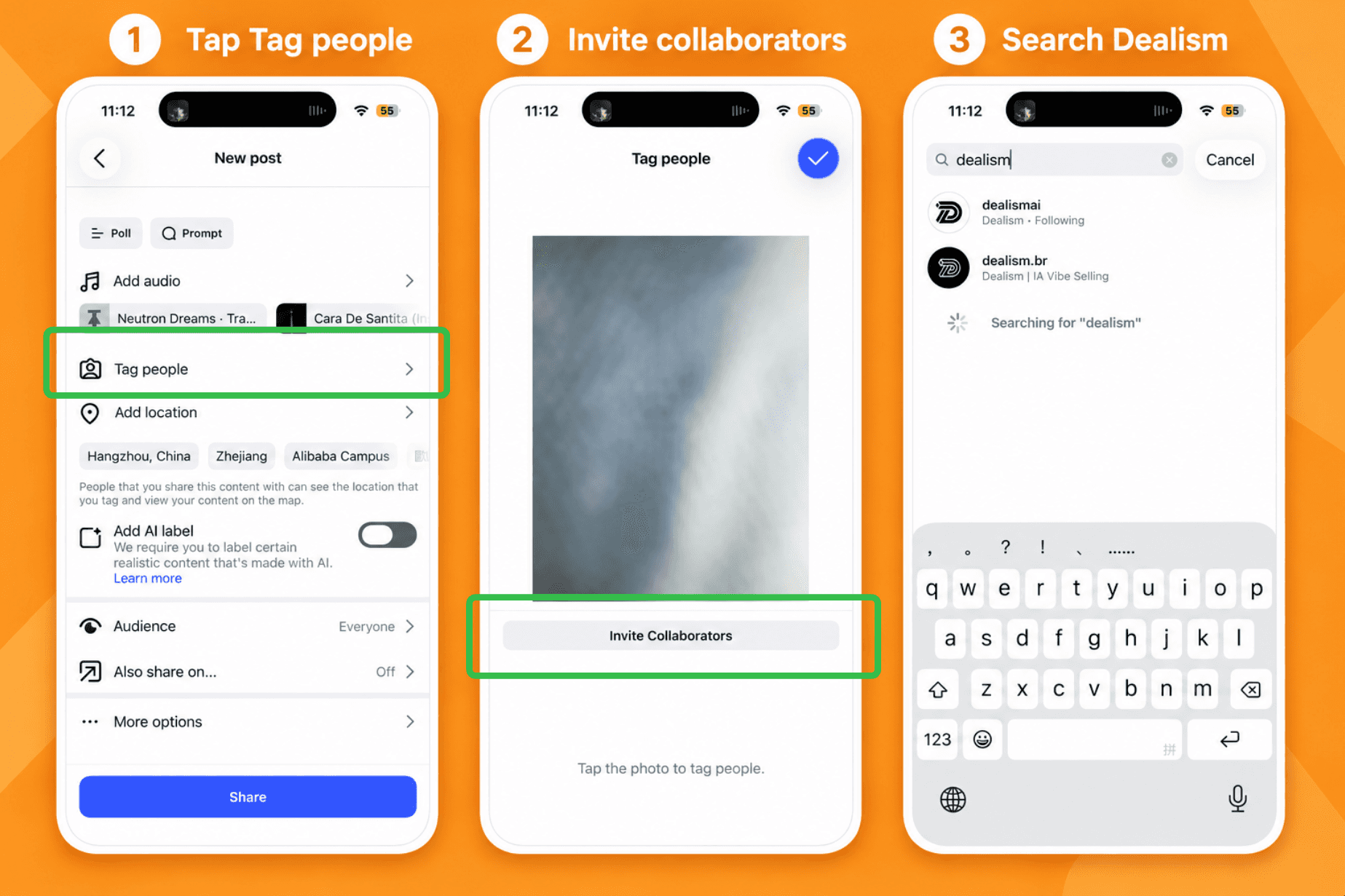
The post appears on the original account first and becomes shared only after the collaborator accepts.
Before publishing, agree on the creative, caption, CTA, timing, and who will answer comments. A surprise invite is easy to miss.
How to accept a collaboration on Instagram
If someone invited you to a Collab post:
Open the notification or DM containing the invitation.
Open the post preview.
Tap Review or View request.
Choose Accept.
Check that the post now appears on your profile with both accounts listed.
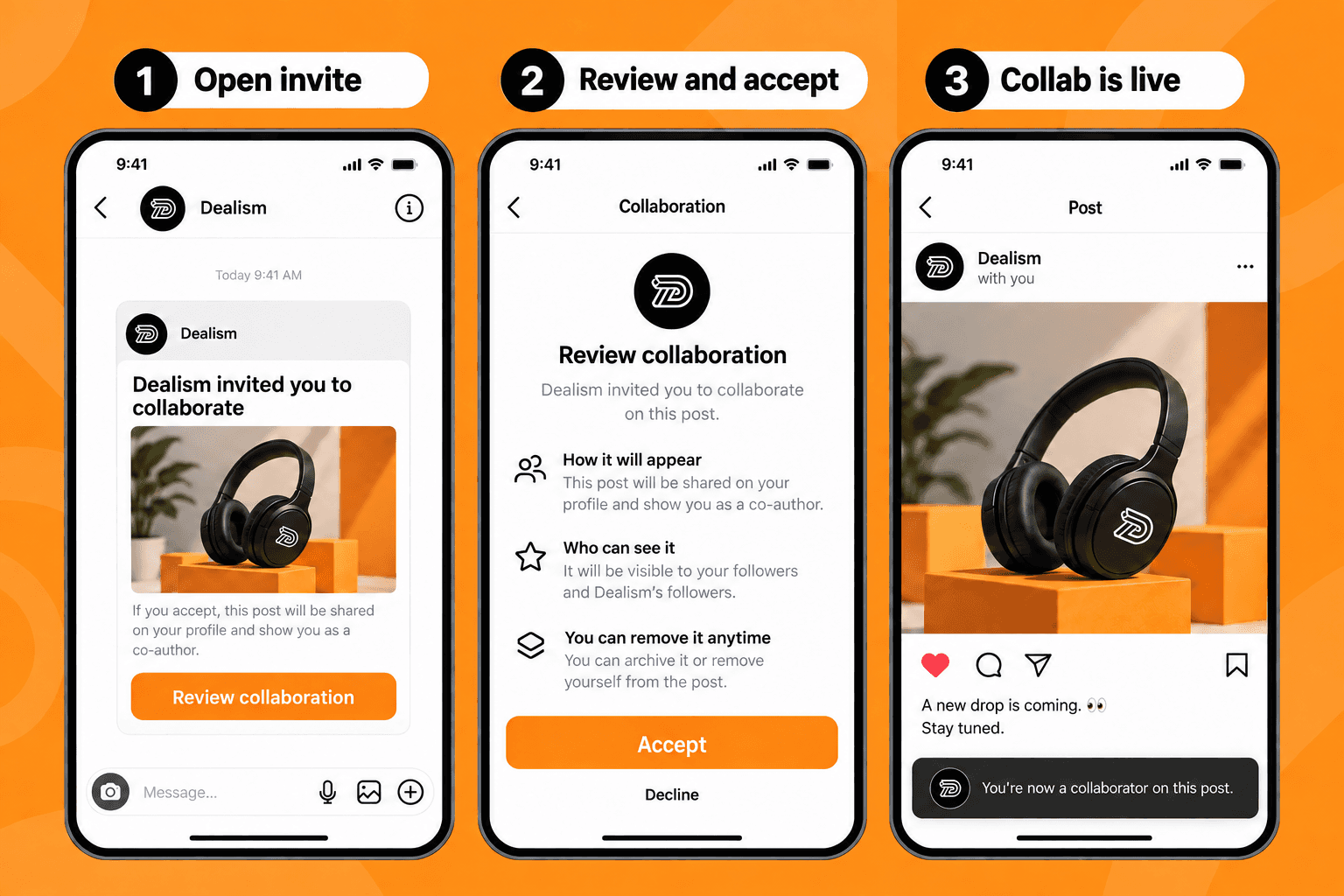
Review the content first. As a coauthor, it becomes part of your public presence—not merely a tag.
If the invitation is missing, check Message Requests and notifications, then confirm the author selected the right username.
Can you add a collaborator after posting?
Sometimes. Instagram now shows a post-publication collaborator option for some accounts and content types, but availability is not perfectly consistent.
Where the option exists:
Open the published Post or Reel.
Tap the three-dot menu.
Choose Edit.
Open Tag people or Add collaborators.
Select the account and save your changes.
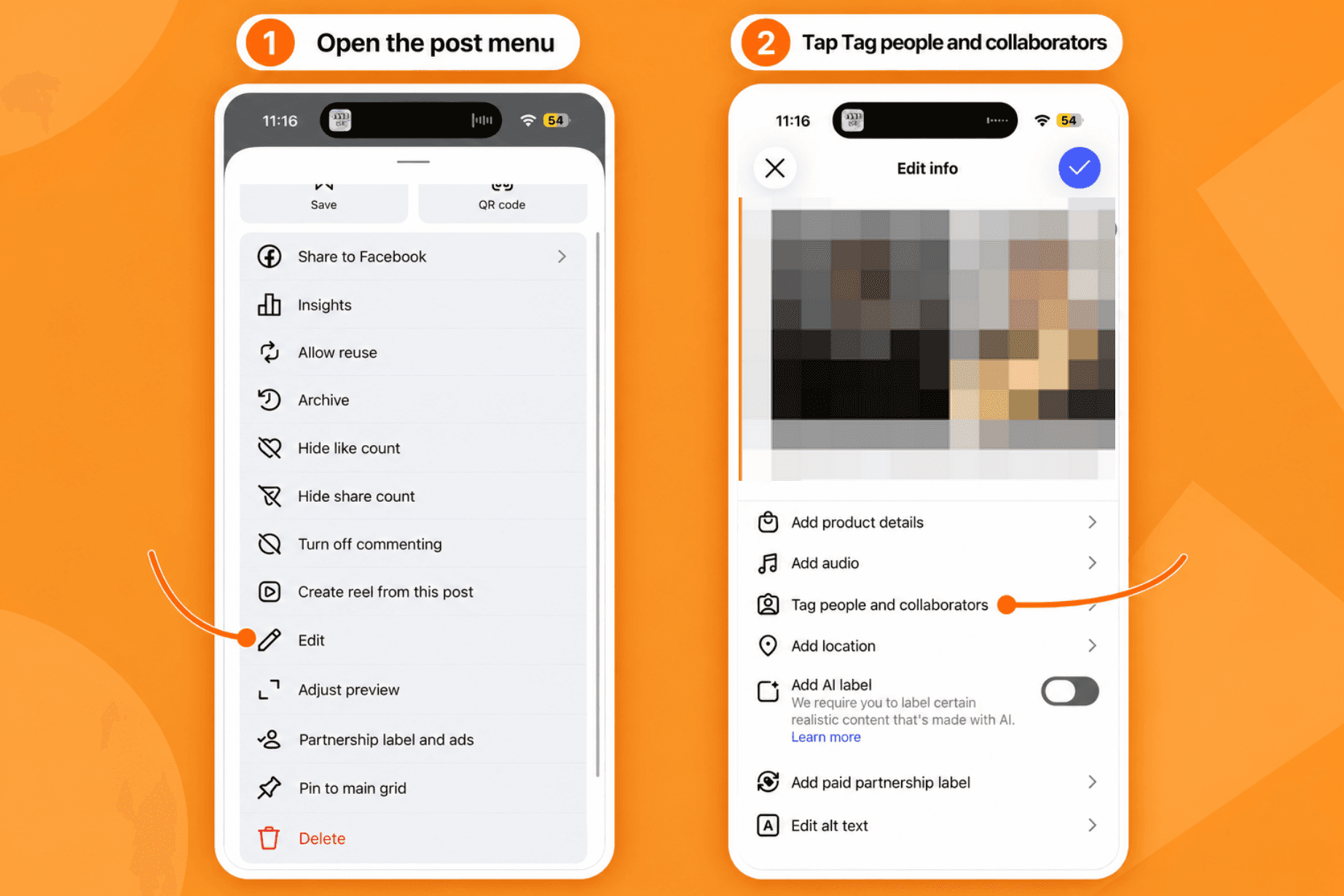
If Instagram only adds a tag, update the app and try the web version. Do not delete a post with useful engagement just to test this feature.
Why use Instagram Collab posts?
A Collab works best when the audiences overlap enough to care but differ enough to create discovery.
Think fitness coach plus nutritionist, creator plus software brand, or venue plus event organizer: each partner brings relevant context and a distinct audience.
The benefit is not simply “twice the reach.” Distribution still depends on timing, content quality, and relevance. The real advantage is shared trust and one comment thread.
That shared thread is where lead generation can begin.
How to use a Collab post to generate leads
Decide what viewers should do next. “Follow us for more” may grow the audience, but it does not identify people who want the offer. This Instagram DM automation guide covers the wider reply and handoff setup.
A lead-focused CTA is more specific:
“Comment MENU and we’ll send the event packages.”
That creates a simple journey:
Shared Collab post → keyword comment → requested DM → useful question → booking or human handoff
Agree on one offer and one CTA
Both collaborators should promote the same next step. A bio-link CTA on one account and a DM CTA on the other splits the response.
Choose one resource—perhaps a price list, checklist, or booking page—and one memorable keyword.
Make the first DM keep the promise
If someone comments MENU, send the menu. Do not begin with five questions or hide the link behind a long sales sequence.
Dealism’s free Instagram Comment-to-DM workflow can deliver the requested resource. Meta’s official Instagram API documentation documents a private reply within seven days of an eligible comment. Further conversation depends on the customer replying and the applicable messaging window.

Ask one question that helps
After delivering the resource, ask something relevant to the decision:
“Which date are you considering?”
“Are you looking for the beginner or advanced option?”
“How many people will attend?”
The answer reveals intent and gives a person or AI agent enough context to recommend a next step. If the CTA sends a URL, understand how Instagram comment links work.
Decide who owns the conversation
A shared post should not create a confused inbox. Agree on:
which account sends the reply;
who handles public questions and qualified leads;
when a person takes over;
how both partners measure results.
Dealism’s Instagram automation platform can handle the first step, continue with real business information, and keep human takeover available. For simpler trigger tools, compare these free Instagram DM bots. The goal is to respond well when somebody asks—not message every commenter.
Three Instagram Collab lead examples
1. Fitness coach × nutritionist
Post: A seven-day starter routine. CTA: “Comment START for the workout and meal checklist.” First DM: “Here’s the checklist: [link]. Which part is harder—training or meal planning?”
2. Creator × digital-product brand
Post: The creator demonstrates one result using the product. CTA: “Comment TEMPLATE and we’ll send the sample.” First DM: “Here’s the sample: [link]. What are you trying to create with it?”
3. Venue × event organizer
Post: A Reel showing the venue, format, and date. CTA: “Comment TICKETS for availability and group options.” First DM: “Here are the ticket options: [link]. Are you booking for yourself or a group?”
What if Instagram Collab is not working?
“Invite collaborators” is missing
Update Instagram, confirm you are creating a supported Post or Reel, and try again in the mobile app. Features may not appear identically on every account.
The other account did not receive the invite
Check the username, Message Requests, notifications, and tag and mention permissions.
The post appears on only one profile
The collaborator may not have accepted yet. A normal tag also does not turn the post into a Collab.
Adding a collaborator after posting only creates a tag
Post-publication support can vary. If it does not work, use a regular tag or create a future Collab instead of deleting valuable content.
Missing features do not automatically mean a shadowban. If Instagram shows an enforcement message, identify whether it is a warning, action block, suspension, or disabled account. An automated-behavior warning is different from a missing Collab button.
Frequently asked questions
How many collaborators can you add on Instagram?
Current 2026 guides report up to five collaborators. Check the limit shown in your app.
Can you make a Collab Instagram Story?
The coauthor feature is for Feed Posts, Carousels, and Reels—not standard Stories. Partners can still reshare the Collab to Stories.
Who owns an Instagram Collab post?
The original author controls the post. A collaborator can leave or remove it from their profile, but cannot take ownership.
Can Comment-to-DM work with a Collab post?
Eligible triggers depend on the account, connection, permissions, and supported API behavior. Test from the account that owns the post before promoting the keyword. Review Instagram DM limits and avoid sending unrelated promotions to every commenter.
A Collab creates shared attention—your follow-up creates the lead
Learning how to collab on Instagram takes a few taps. Building a useful collaboration takes more thought.
Choose a relevant partner, one offer, and one CTA. Deliver what commenters requested, then ask one useful question.
That is the difference between a Collab post that collects views and one that starts conversations your business can actually continue.


