

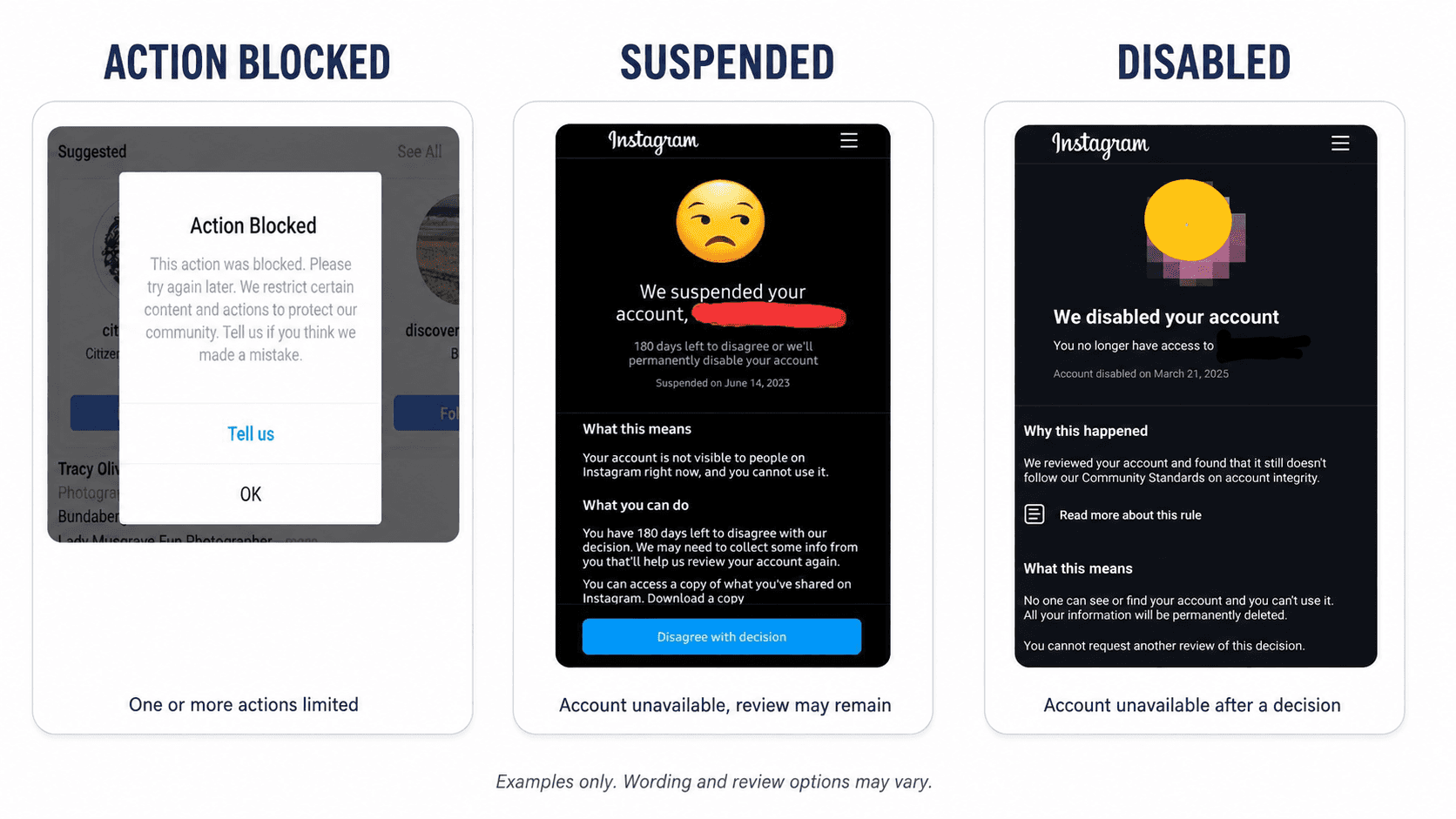
An Instagram warning, action block, suspension, and disabled account are not the same thing. A warning tells you Instagram has noticed a possible issue. An action block stops a specific activity, such as commenting or following. A suspension affects access to the account while a decision or review may still be pending. A disabled account is inaccessible because Instagram has taken account-level action.
The wording shown in the app can vary by account, region, and enforcement stage. Diagnose the problem from the exact notice and what you can still do—not from the word “ban” alone.
Instagram account statuses compared
Status | Can you log in? | What is affected? | First step |
Warning | Usually | Instagram warns about behavior or content, but features may still work | Save the notice and stop the activity that triggered it |
Action blocked | Yes | One or more actions, such as following, commenting, liking, or messaging | Stop retrying the blocked action and read the full notice |
Suspended | Often no | The account may be hidden and unavailable while a decision can still be disputed | Follow the review or verification instructions on screen |
Disabled | Usually no | The whole account is unavailable | Check whether Instagram offers an in-app review |
These labels should not be treated as a guaranteed progression. A warning does not automatically become an action block, and an action block does not necessarily lead to suspension.
What is an Instagram warning?
A warning is a notice, not proof that your account has already been suspended. Instagram may show one when an action, piece of content, login, or usage pattern needs attention. Depending on the notice, you may still be able to post, comment, and use your account normally.
Read the exact message and record what happened immediately before it appeared. If the message mentions automated activity, follow the steps in our Instagram automated behavior warning guide.
Instagram does not publish one universal activity limit that guarantees safety. Its Community Guidelines do, however, tell users not to post repetitive comments or repeatedly contact people for commercial purposes without consent.
What does “Action Blocked” mean on Instagram?
An action block normally prevents a particular activity while leaving the rest of the account accessible. For example, Instagram may stop you from following accounts, posting comments, liking posts, or sending messages. You may see “Action Blocked” or “Try Again Later” when you attempt the affected action.
Do not keep testing the action every few minutes. Save a screenshot, note which feature is unavailable, and use any “Tell us” or review option shown in your version of the app. Avoid assuming that an action block will end after a fixed number of hours; Instagram does not publish a universal duration.
What does an Instagram suspension mean?
A suspension is broader than an action block. The account may be unavailable and hidden from other people, but Instagram may still offer a way to disagree with the decision, verify your identity, or wait for a review.
If Instagram presents a deadline or asks for information, follow the instructions attached to your own account. Do not copy another user’s timeline: appeal windows and verification steps can differ.
What does a disabled Instagram account mean?
A disabled account cannot normally be used or found by other people. Instagram’s official disabled-account guidance says that a disabled message appears when you try to log in. If you believe the decision was a mistake and a review remains available, Instagram directs you to enter your credentials in the app and follow the on-screen instructions.
“Disabled” should not automatically be read as “permanently deleted.” Look at the notice. Some accounts may still be offered a review, while other screens may state that another review is unavailable. If no disabled message appears, you may instead be dealing with a login or security problem.
How to check your Instagram Account Status
If the option is available, open the Instagram mobile app and go to:
Profile → Menu → Settings and activity → More info and support → Account Status
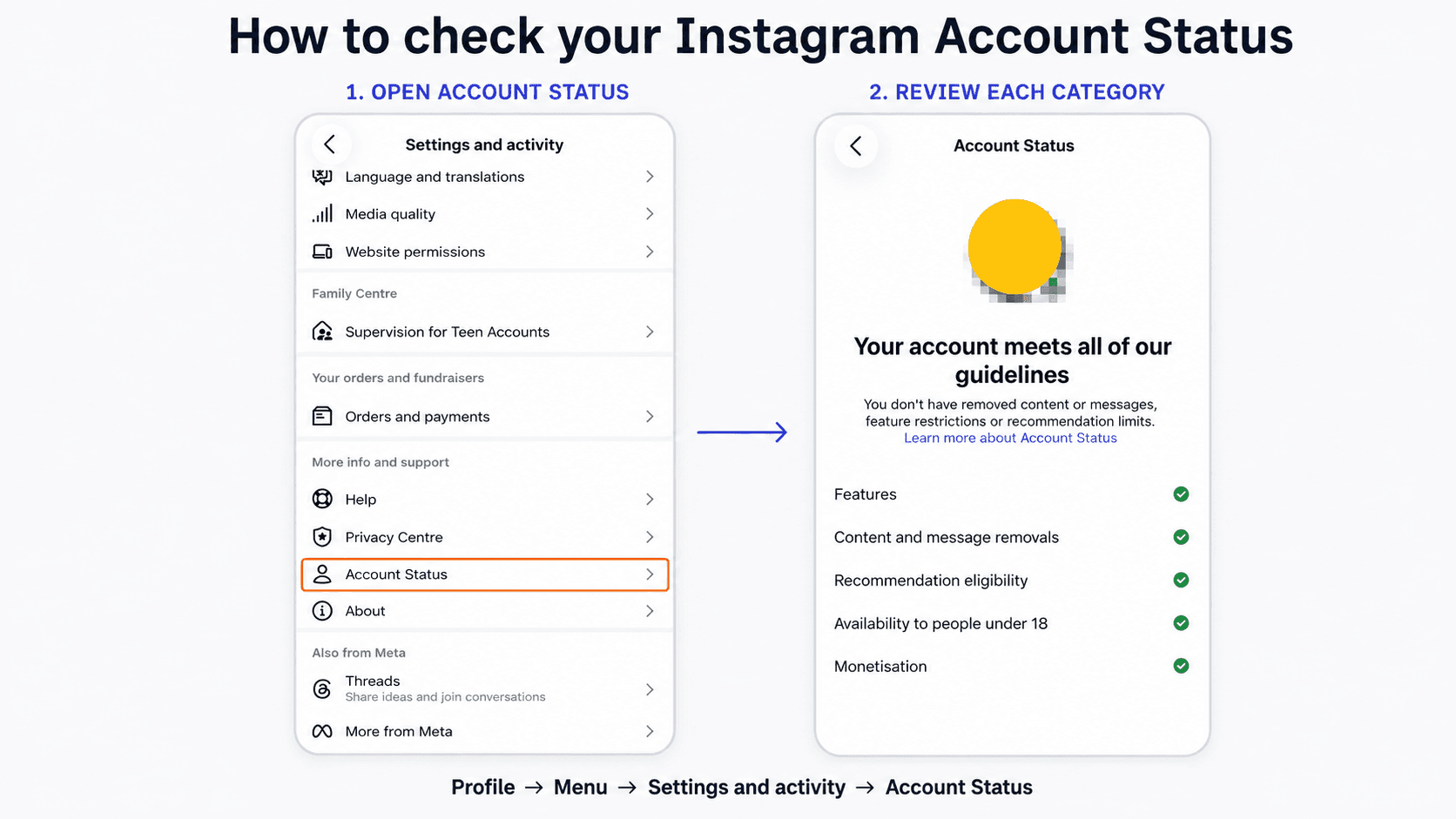
Account Status can show information about feature restrictions, removed content or messages, recommendation eligibility, age availability, and monetization. A clean screen indicates that no issue is displayed in those categories at that moment; it is not a promise that every action or delivery problem will appear there.
Instagram’s 2024 Online Safety Report says review mechanisms may be available for content restrictions, feature limits, account suspensions, and terminations. It also says users can check review updates through Account Status or Support Requests. Availability still depends on the decision and the options shown to the affected account.
A 60-second way to identify the problem
Can you log in? If yes, you probably do not have a fully disabled account.
Does only one action fail? That points toward an action or feature block.
Does the login screen explicitly say suspended or disabled? Use that notice as your primary evidence.
Is a review button available? Follow that flow instead of searching for unofficial recovery forms.
Does Account Status show a restriction? Open the affected category and read the cited rule.
Is there no enforcement notice at all? Check whether the account was hacked or whether you simply lost access. Use Instagram’s official account recovery flow for suspicious access.
Can automation cause these restrictions?
Automation is not a separate account status. It is one possible context behind a warning or restriction. The important distinction is between a tool and the behavior produced through it. Repetitive comments, unsolicited commercial contact, unsupported access methods, or sudden high-volume activity may create risk whether actions are automated or manual.
Before connecting a platform, review whether the tool uses supported access and whether the workflow starts from genuine user intent. Our guide to whether ManyChat is safe for Instagram explains that distinction in more detail.
For implementation guidance, see our resources on Instagram DM automation, setting up Instagram auto replies, comment-to-DM workflows, Instagram DM limits, connecting Instagram to Dealism-instagram-dm), and Instagram channel automation.
Frequently asked questions
Is an Instagram action block the same as a suspension?
No. An action block usually affects a specific feature while you can still access the account. A suspension is an account-level state that may prevent login and hide the account.
Does an Instagram warning mean I will be banned?
No. A warning does not guarantee a future suspension. It does mean you should read the notice, stop the relevant behavior, and check for restrictions before continuing.
Is a disabled Instagram account permanently deleted?
Not necessarily. The answer depends on the exact notice and whether Instagram still offers a review. A disabled account is inaccessible, while deletion refers to the removal of the account and its information.
How long does an Instagram action block last?
Instagram does not publish a universal duration. Use any date or instruction shown in your own notice and avoid websites claiming that every action block follows the same timeline.
What if I cannot find Account Status?
Try the Instagram mobile app rather than the desktop website, update the app, and search the settings for “Account Status.” Menu names and availability can vary. If the account is inaccessible, follow the instructions on the login notice instead.


