Managing your WhatsApp contacts is just as important as managing WhatsApp conversations. Over time, you may want to remove old, inactive, or unwanted contacts from WhatsApp. If you’re searching for delete-whatsapp-contact, this guide explains exactly how to do it on Android and iPhone, plus what happens after a contact is deleted.
Can You Delete a WhatsApp Contact?
Yes, you can delete a WhatsApp contact, but it’s important to understand what deletion actually does.
When you delete a contact:
The contact is removed from your phone’s address book
The contact will no longer appear in your WhatsApp contact list
Chat history is not deleted automatically
If you also want to remove past conversations, you’ll need to delete the chat separately.
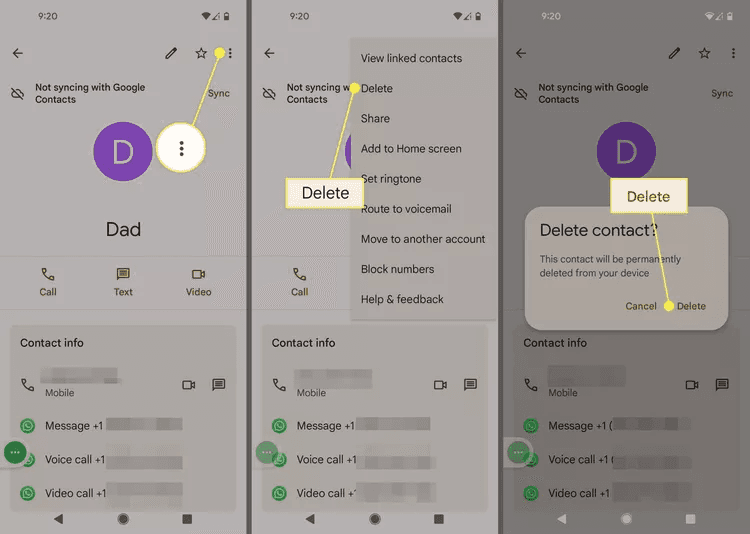
How to Delete a WhatsApp Contact on Android
On Android, WhatsApp contacts are linked directly to your phone’s address book. Deleting a contact from WhatsApp will also remove it from your device.
Step-by-Step Guide (Android)
Open WhatsApp and go to the Chats tab
Tap the search bar and enter the contact’s name
Tap the contact to open the chat
Tap the contact’s name at the top
Tap

Select View in address book
Tap Delete → Delete to confirm
The contact is now deleted from both WhatsApp and your phone’s address book.
Important Note (Android)
If you’ve enabled WhatsApp contact syncing, deleting the contact will remove it from your phone as well
Deleting a contact does not delete your chat history with them
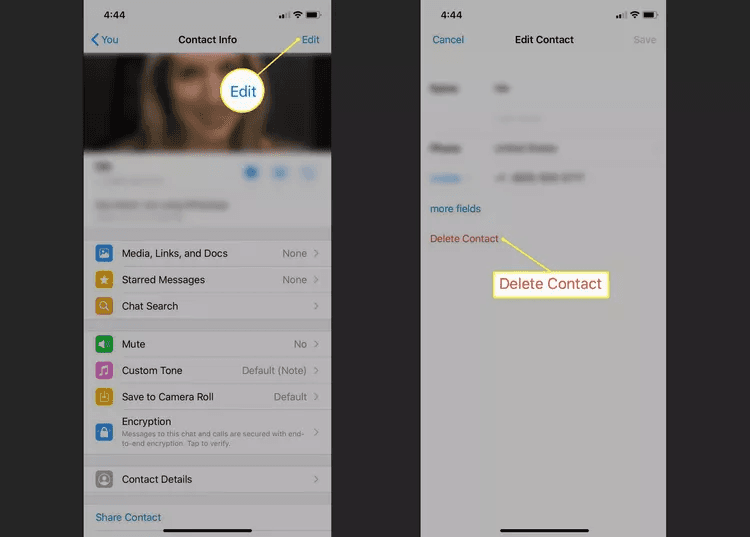
How to Delete a WhatsApp Contact on iPhone
On iPhone, WhatsApp contacts are also synced with your device’s Contacts app. Removing a contact deletes it from both places.
Step-by-Step Guide (iPhone)
Open WhatsApp
Tap the search bar and enter the contact’s name
Tap the contact, then tap their name at the top
Tap Edit
Select Delete Contact
Tap Delete to confirm
The contact is removed from your iPhone and WhatsApp.
Important Note (iPhone)
If WhatsApp contacts are synced, the contact will be deleted from your phone’s address book
Your existing chat history remains unless you delete it manually
What Happens After You Delete a WhatsApp Contact?
Here’s what users often want to know after deleting a contact:
The contact disappears from your WhatsApp contact list
Past chats remain visible in your chat history
You can still receive messages if the contact messages you again
The deleted contact will appear as an unknown number
Deleting a contact does not block them. This guide on how to know if someone blocked you on WhatsApp can help.
Delete Contact vs Delete Chat vs Block Contact
Action | Removes Contact | Deletes Chat | Stops Messages |
Delete Contact | Yes | No | No |
Delete Chat | No | Yes | No |
Block Contact | No | No | Yes |
Understanding the difference helps you choose the right action.
Things to Consider Before Deleting a WhatsApp Contact
Before you delete a contact, keep these points in mind:
Back up important messages if needed, especially WhatsApp voice messages, documents, and photos.
Delete the chat manually if you don’t want message history
Block the contact if you want to stop communication
Remember that deletion is reversible only by re-adding the contact
For businesses using WhatsApp as a sales or support channel, deleting contacts should be handled carefully. Before removing a lead or customer record, make sure important chat history, follow-up details, and customer intent are not lost. An AI sales agent like Dealism can help manage customer conversations across channels and keep useful context available.
Frequently Asked Questions (FAQs)
Does deleting a WhatsApp contact delete chat history?
No. Deleting a contact does not remove chat history. You must delete the chat separately.
Will the other person know if I delete them?
No. WhatsApp does not notify contacts when they are deleted.
Can a deleted contact still message me on WhatsApp?
Yes. If they have your number, they can still message you unless you block them.
Can I restore a deleted WhatsApp contact?
Yes. You can restore it by adding the phone number back to your contacts.
Is deleting a contact the same as blocking them?
No. Deleting removes the contact, while blocking prevents messages and calls.
Conclusion
Knowing how to delete-whatsapp-contact helps you keep your WhatsApp contact list clean and organized. Whether you’re using Android or iPhone, the process is quick and straightforward. Just remember that deleting a contact doesn’t remove chat history or stop messages — for that, you’ll need to delete chats or block the contact.
By managing contacts wisely, you can enjoy a more private and clutter-free WhatsApp experience. Contact cleanup is only one part of managing messages. You can also read this WhatsApp Marketing Automation guide to learn how to organize replies and follow-ups more efficiently.


