

WhatsApp bot features now range from simple greeting messages and keyword replies to AI-powered qualification, recommendations, booking guidance, follow-up, and human handoff. The important detail is that these capabilities do not all come from WhatsApp itself. Some belong to the free WhatsApp Business App, some require the WhatsApp Business Platform, and others depend on the automation or AI provider you connect.
This guide explains the 15 features worth evaluating in 2026, where each feature comes from, and which ones matter for support, marketing, and sales.
Quick Answer: What Should a WhatsApp Bot Be Able to Do?
A useful WhatsApp bot should handle the repetitive parts of a conversation without trapping customers in a rigid flow. At minimum, it should send approved message types, answer common questions, collect information, and transfer a conversation to a person. More advanced systems can interpret natural language, use business knowledge, qualify leads, recommend the next action, and support contextual follow-up.
The right feature set depends on the job. A support bot may prioritize accurate FAQs and human escalation. A sales bot may need qualification, product recommendations, booking or checkout links, and follow-up. A marketing workflow may need templates, audience controls, scheduling, and opt-out handling.
Where WhatsApp Bot Features Actually Come From
Before comparing tools, separate the messaging channel from the software that operates on it. Calling every capability a “WhatsApp feature” creates unrealistic expectations.
Layer | Typical capabilities | What to verify |
|---|---|---|
WhatsApp Business App | Business profile, catalog, labels, quick replies, greeting and away messages | Best suited to manual conversations and lightweight organization |
WhatsApp Business Platform | Programmatic messaging, templates, interactive messages, webhooks and integrations | Meta policy, template approval, pricing, provider setup and messaging limits |
Automation provider | Flows, routing, scheduling, broadcasts, integrations and team inboxes | Which features are native, which require another service, and how usage is priced |
AI agent | Natural-language replies, knowledge grounding, qualification, recommendations and summaries | Accuracy controls, business boundaries, handoff behavior and supported connections |
Meta’s official WhatsApp Business Platform features include rich media, interactive messages, templates, read receipts and product experiences. Scheduling, lead scoring, cross-channel memory, calendar actions, and AI sales behavior are generally supplied by the software built around the channel.
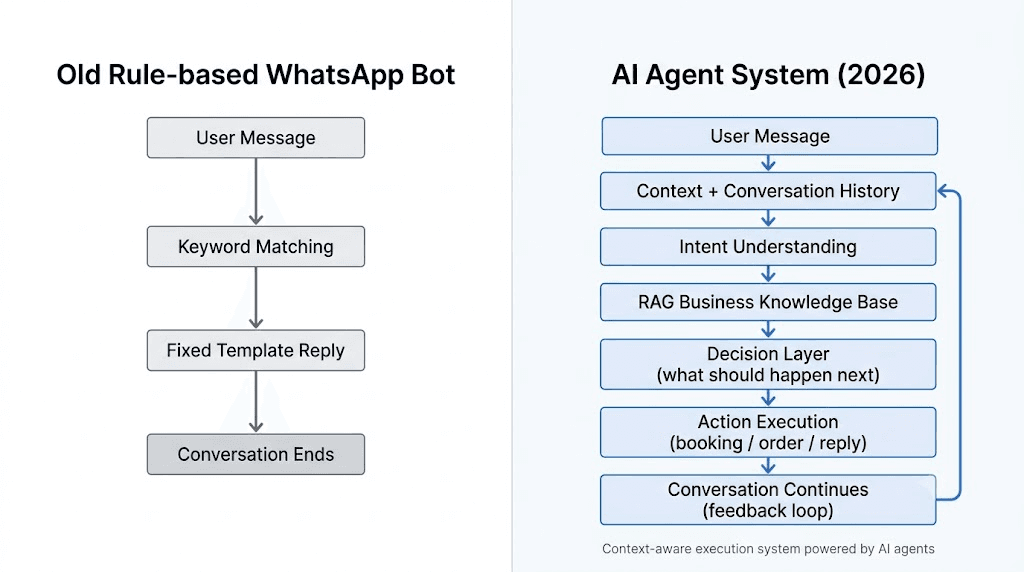
15 WhatsApp Bot Features to Evaluate in 2026
Use the list below as a buying checklist. Do not assume that every vendor supports every feature on every WhatsApp connection.
1. Rich Media and Interactive Messages
A bot should be able to use the message formats that fit the task: text, images, documents, video, location, buttons, lists, and product information where supported. Interactive choices reduce typing and are useful for selecting a service, choosing a department, or confirming an action.
Check: whether the format is supported by your account setup, whether a template is required, and what happens when an interactive element is unavailable.
2. Quick Replies, Greeting Messages, and Away Messages
These are useful baseline features for small businesses. Quick replies help a person insert saved answers. Greeting and away messages acknowledge a customer and set expectations. They do not understand the customer’s intent or conduct a complete conversation on their own.
Best for: businesses that still manage most conversations manually but want faster, more consistent responses.
3. Message Templates for Outbound Contact
WhatsApp message templates are pre-approved formats used for eligible business-initiated messages. They can support reminders, order updates, follow-ups, and marketing messages, subject to Meta’s category, consent, quality, and policy requirements.
Check: who manages template submission, how variables are validated, how opt-outs are handled, and which charges apply in the customer’s market. Meta’s business messaging policy should be treated as the source of truth.
4. Keyword Triggers and Rule-Based Flows
Rules remain useful when the journey is predictable. A keyword can route “hours” to business hours, send a menu after “start,” or direct “agent” to a person. A structured flow can also collect a few consistent fields.
The limitation appears when customers phrase the same request in many ways, combine several questions, or change direction mid-conversation. Good systems use rules for bounded tasks and provide a fallback when the input does not match.
5. Scheduling and Campaign Delivery
Scheduling is usually a feature of the connected tool, not an intrinsic capability of a bot. Depending on the provider, a business may schedule an eligible message, campaign, reminder, or follow-up. Delivery still depends on consent, templates, messaging windows, account quality, and Meta policy.
If timing is the main requirement, compare the practical methods in this guide to scheduling WhatsApp messages. For outbound campaigns, also check audience segmentation, frequency controls, opt-outs, and reporting rather than evaluating the send button alone.
6. Natural-Language Understanding
An AI-powered bot can interpret requests that do not match an exact keyword. For example, “Can I come after work tomorrow, and do you take walk-ins?” contains questions about time, availability, and policy. The system should identify those needs before answering.
Check: how the bot handles unclear requests, spelling mistakes, voice-note transcripts, multiple intents, and low-confidence answers.
7. Context-Aware Replies
Context awareness means the bot can use relevant details from the current conversation instead of treating every message as a new ticket. If a customer already named the service and preferred date, the next reply should not ask for both again.
Check: how long context is retained, what data is stored, when the system asks for confirmation, and whether a human can see the same conversation history.
8. Business-Knowledge Grounding
A useful AI agent should answer from approved business information such as product details, service descriptions, policies, locations, and FAQs. Retrieval-based grounding can reduce unsupported answers by giving the model relevant source material, but it does not guarantee that every answer will be correct.
Check: how knowledge is added and updated, whether sources can be restricted, what the bot does when information is missing, and how sensitive or high-risk questions are escalated.
9. Multilingual Conversations
Multilingual support is valuable when customers naturally switch languages or when a business serves several markets. The important test is not whether the system can translate a sentence; it is whether product names, policies, tone, prices, and handoff rules remain correct in each language.
Check: which languages are supported, whether the bot detects language automatically, and whether knowledge content is localized or merely translated at reply time.
10. Lead Qualification
A sales-focused bot can ask a small number of relevant questions about needs, timing, location, use case, or budget. It can then pass the collected context to a salesperson or guide the customer to the appropriate option.
Lead scoring is not a standard WhatsApp function. If a vendor offers it, ask which signals determine the score, whether your team can change the rules, and whether the score is visible and explainable.
11. Booking and Next-Step Guidance
A good bot does more than drop a generic calendar link. It can first clarify the required service, location, staff member, or urgency, then share the right booking path. Actual availability checks and confirmed bookings depend on the calendar or booking integration.
Check: whether the system can read live availability, create or change appointments, prevent duplicate bookings, and hand unusual cases to a person.
12. Order, Cart, and Follow-Up Continuity
For commerce and lead generation, a bot may answer product questions, share an appropriate checkout link, provide an order update from connected data, or continue a follow-up after a conversation pauses. These actions require the relevant commerce, CRM, or messaging setup; they should not be assumed from the word “chatbot.”
Check: which customer events trigger a message, whether the customer has consented, how duplicate follow-ups are prevented, and when automation stops after a reply or purchase.
13. Human Handoff With Context
Automation should make it easy to involve a person when judgment, empathy, approval, or specialist knowledge is required. The handoff should include the conversation and the relevant details already collected, so the customer does not have to start again.
Check: what triggers escalation, how the team is notified, whether the bot pauses while a person responds, and how ownership returns to automation afterward.
14. Integrations, Webhooks, and Data Sync
Integrations connect the conversation to systems such as a CRM, calendar, store, help desk, or internal database. Webhooks can notify another system when a message arrives or a conversation changes state.
Check: whether integrations are native or custom, which direction data moves, how failures are retried, what permissions are required, and whether current customer data is available before the bot answers.
15. Analytics and Conversation Summaries
Useful reporting should show more than message volume. Depending on the system, teams may review response time, automation rate, handoffs, unanswered questions, qualified leads, bookings, and outcomes connected to external tools. AI summaries can help a person understand a long conversation, but the summary should remain linked to the original messages.
Check: which outcomes are directly measured, which are inferred, and whether the data can be exported or connected to your reporting stack.
Want to test the difference between a scripted reply and a sales conversation? Create a free Dealism account and build your AI sales agent →
WhatsApp Business App vs. Platform vs. AI Agent
These options are complementary, not interchangeable. The Business App is a manual inbox with useful small-business tools. The Business Platform provides infrastructure for programmatic messaging and integrations. An automation tool or AI agent adds the workflow and conversation behavior.
Capability | Business App | Business Platform | Automation or AI provider |
|---|---|---|---|
Manual one-to-one chat | Yes | Through connected software | Often provided through a team inbox |
Greeting, away message and saved replies | Yes | Different implementation | May add rules or generated replies |
Approved outbound templates | Not the same Platform workflow | Yes, subject to Meta rules | Provider may manage creation and delivery |
Natural-language qualification | Manual | Not supplied by the channel alone | Available in some AI systems |
CRM, calendar, or store actions | Limited | Enables integrations | Depends on connectors and configuration |
Human handoff | The person already runs the chat | Requires connected software | Workflow depends on the provider |
For a broader comparison of platforms, see the guide to the best WhatsApp marketing tools for small businesses. If the goal is automatic outbound delivery, compare these WhatsApp auto message senders and their policy requirements.
How Dealism Handles the Reply and Follow-Up Stage
Dealism is an AI messaging product with automated flows and a 24/7 AI Customer Agent for Instagram, WhatsApp, and Live Chat. It is not a native WhatsApp feature and does not replace Meta’s templates or messaging rules. Through supported WhatsApp connections, a business can train one AI Customer Agent on its products, services, policies, and reply style.
A typical workflow looks like this:
A customer asks about a product, price, service, availability, or appointment.
Dealism answers with configured business information and asks only the questions needed to understand the request.
The agent can qualify the inquiry and recommend an appropriate product, booking page, checkout, or next step.
If the conversation pauses, a configured follow-up can help continue it within the supported workflow and applicable messaging rules.
When judgment or approval is needed, the conversation can be handed to a person with context.
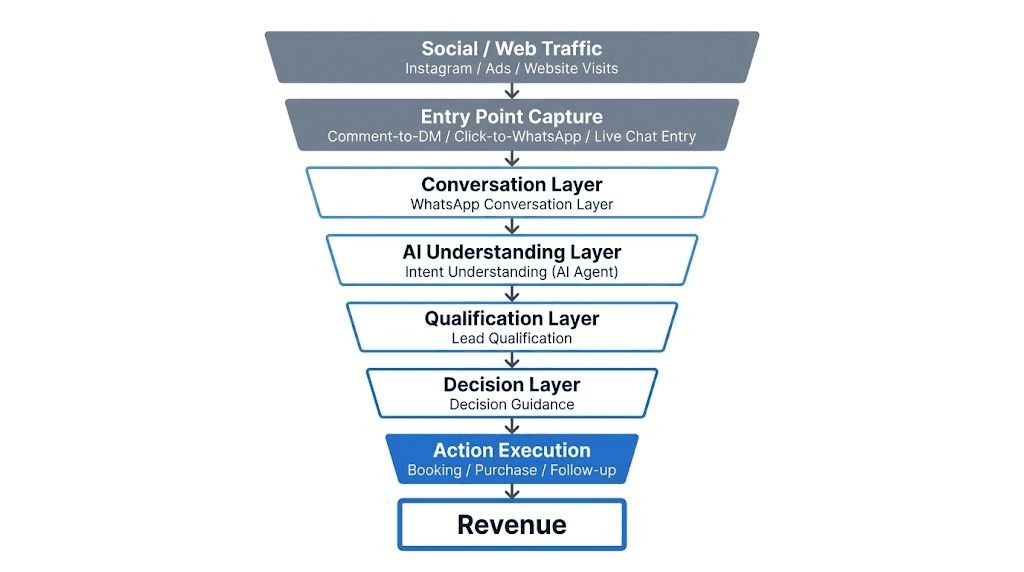
This is most useful for businesses that receive recurring questions and sales inquiries but do not want every conversation forced through a button tree. Learn how this fits into a broader WhatsApp automation strategy.
Start with Dealism’s Free plan for your WhatsApp customer questions → Dealism’s free plan includes unlimited active contacts, unlimited workflows, one AI Customer Agent, core CRM and 50 AI credits you can claim every day.
Must-Have Features by Business Type
Business type | Prioritize | Do not overlook |
|---|---|---|
Local service business | FAQs, qualification, booking guidance and handoff | Business hours, location, live availability and exceptions |
Clinic or wellness provider | Approved non-clinical information, scheduling path and human escalation | Consent, sensitive data, access controls and clinical boundaries |
E-commerce business | Product questions, recommendations, checkout and order data | Inventory accuracy, campaign consent and follow-up suppression |
Consultant or agency | Lead qualification, service matching, booking and summaries | Clear escalation for custom scope and pricing approval |
Support team | Knowledge grounding, routing, ticket context and handoff | Fallback behavior, service levels and unresolved-question reporting |
Run a test set before choosing a tool. Include clean FAQs, vague requests, several questions in one message, an unsupported request, a customer who changes their mind, and a case that must reach a person. The best feature list is the one that works on your real conversations.
Frequently Asked Questions
Are rule-based WhatsApp bots still useful in 2026?
Yes. They work well for predictable menus, routing, data collection, confirmations, and simple FAQs. They become frustrating when the customer’s language or journey does not fit the predefined path.
Do I need the WhatsApp Business Platform to use a bot?
It depends on the provider and connection method. Many programmatic messaging and integration use cases rely on the WhatsApp Business Platform, while some tools support other connection options. Verify the exact setup, limitations, pricing, and policy implications before choosing a product.
Can a WhatsApp bot send scheduled messages?
A connected automation tool may schedule eligible messages, reminders, campaigns, or follow-ups. The bot itself does not remove template, consent, messaging-window, quality, or policy requirements.
Can AI stop a WhatsApp bot from hallucinating?
No system can promise that every generated answer will be correct. Approved knowledge, restricted instructions, confidence handling, testing, monitoring, and human escalation can reduce risk. High-stakes questions should have stricter boundaries.
What is the difference between a WhatsApp chatbot and an AI agent?
A traditional chatbot usually follows rules, keywords, or a fixed decision tree. An AI agent can interpret less structured language and choose among configured actions based on context. In practice, many systems combine both: deterministic rules for predictable tasks and AI for flexible conversation.
Which WhatsApp bot features matter most for sales?
Start with accurate answers, lead qualification, next-step recommendations, booking or checkout guidance, contextual follow-up, and a reliable human handoff. Integrations matter when the bot needs live availability, order status, CRM ownership, or other business data.
Final Takeaway
The strongest WhatsApp bot is not the one with the longest feature list. It is the one that clearly separates channel capabilities from provider capabilities, stays within business and policy boundaries, and completes the specific jobs your customers need.
Use the WhatsApp Business App for lightweight manual communication. Use the Business Platform when you need programmatic messaging and integrations. Add automation or an AI agent when the workflow requires consistent qualification, guidance, follow-up, and handoff.
Create your free Dealism account and see how an AI sales agent handles your WhatsApp conversations →


