
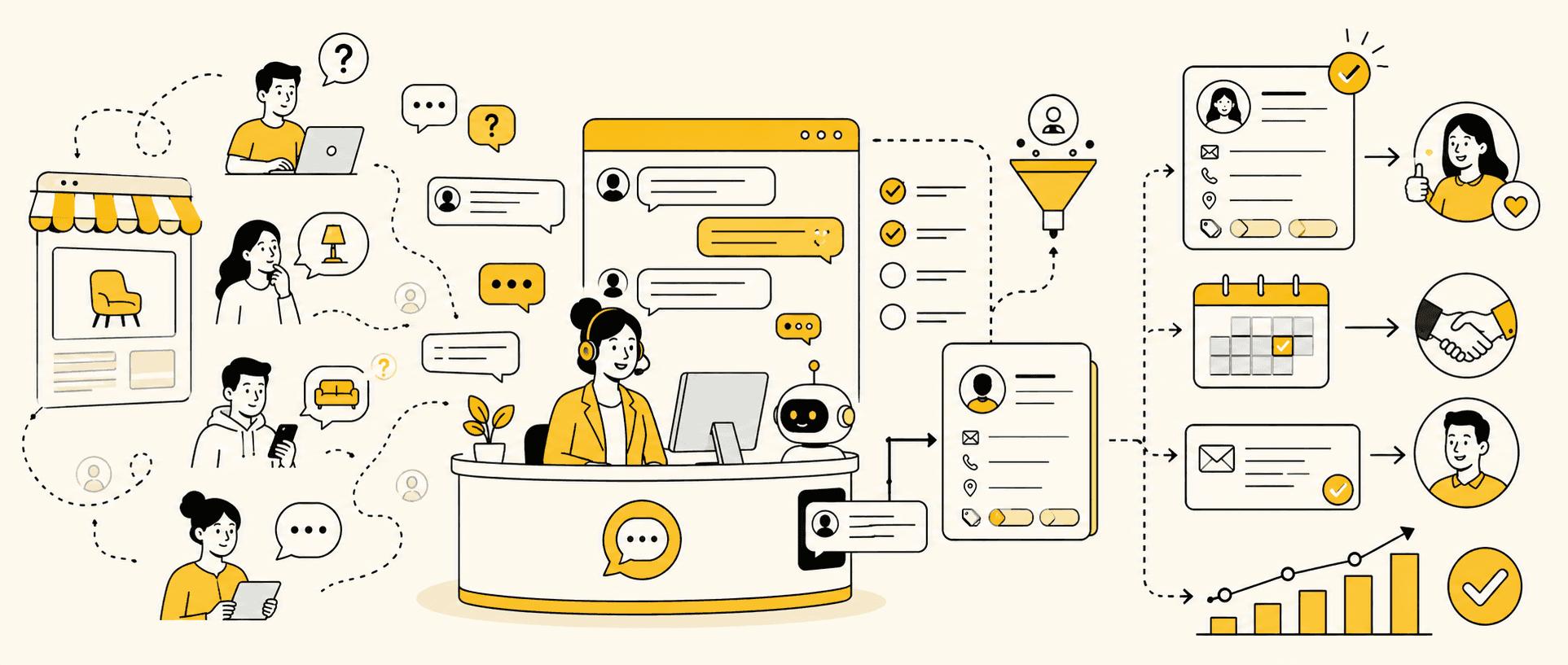
A visitor reaches your pricing page at 9:47 p.m. They do not fill out the contact form or call. Instead, they type: “Do you have availability this week?”
That message is not automatically a qualified lead. It is a moment of active intent. What happens next determines whether the visitor disappears, becomes a useful sales opportunity, or takes a concrete action such as booking an appointment, requesting a quote, or starting checkout.
Live chat lead generation is the process of using real-time website conversations to recognize buying intent, answer questions, qualify potential customers, collect the information needed for follow-up, and guide each suitable visitor toward a sales action.
Here is how to use live chat for lead generation:
Define what a qualified lead means to your business.
Place chat on pages where buying questions happen.
Trigger conversations from meaningful visitor behavior.
Match the opening message to the page and context.
Answer the visitor’s question before qualifying them.
Ask a small number of questions that improve the recommendation.
Request contact details at the right moment.
Score, route, and hand off leads without losing context.
Turn the conversation into a concrete next action.
Follow up and measure the complete path to revenue.
This guide combines the strategic and practical sides of website chat lead generation, from widget placement and scripts to qualification, privacy, analytics, and sales follow-up.
What Is Live Chat Lead Generation?
Live chat lead generation uses a website chat conversation to turn an anonymous or partially known visitor into a potential customer the business can meaningfully help and follow up with.
The chat may be handled by a person, a chatbot, an AI sales agent, or a combination of them. The technology matters less than the outcome: the conversation should identify why the visitor is there, determine whether there is a reasonable fit, and establish a useful next step.
This article focuses specifically on generating sales leads. For a broader explanation of the channel itself, including common support use cases, see what live chat is and how it works.
When does a chat become a qualified lead?
Teams often use “visitor,” “contact,” “lead,” and “opportunity” as if they mean the same thing. They do not.
Stage | What it means | Example |
|---|---|---|
Website visitor | Someone is viewing the site | Reads a service page |
Chat contact | The visitor starts or replies to a chat | Asks, “How much does this cost?” |
Captured contact | The business has a usable way to reconnect | Shares an email or phone number |
Qualified lead | Need, fit, timing, or intent meets defined criteria | Needs the service in the covered area this month |
Sales opportunity | A suitable lead agrees to a commercial next step | Books a consultation or requests a proposal |
A name and email address can be useful, but they do not prove that someone is qualified. Conversely, a visitor who asks about tomorrow’s availability may show strong intent before sharing any contact details.
Define qualification around the decision your business needs to make: should this conversation be routed, booked, quoted, nurtured, or closed?
Live Chat vs. Contact Forms: Where Each Works Best
Live chat does not need to replace every form. It solves a different problem: helping a visitor while interest and uncertainty are both active.
Method | Main strength | Main weakness | Best use |
|---|---|---|---|
Contact form | Collects structured information | Requires effort before help | Detailed requests and applications |
Lead magnet | Builds an audience | Often captures low buying intent | Education and long-term nurturing |
Basic live chat | Provides immediate interaction | Quality depends on availability and skill | Questions during evaluation |
AI-assisted sales chat | Scales answers and qualification | Requires accurate knowledge and handoff rules | High-volume inbound conversations |
A form works well when the visitor already knows what to request. Chat works well when a question, objection, or choice is blocking the next action.
The strongest conversion path may use both. Chat can clarify the need and then send a partially prepared visitor to the right form, calendar, product, or checkout. This turns the widget into one part of a broader system for converting website traffic into leads, rather than an isolated box in the corner.
How to Use Live Chat for Lead Generation: 10 Steps
Adding a widget is the installation step, not the strategy. The following workflow connects visitor behavior to a measurable sales result.
Step 1: Define the conversion goal and a qualified lead
Start by naming the action the chat should support. Depending on the business, that may be:
Booking a product demo;
requesting a service quote;
scheduling an appointment;
finding the right product;
starting checkout;
applying for a program;
speaking with a specialist.
Then define the minimum qualification criteria. A home-service company might need service type, ZIP code, timing, and property status. A SaaS company may need use case, team size, current process, and desired implementation date. A clinic may need the requested service, location, general scheduling preference, and whether the question requires a qualified professional.
Do not collect every possible field. Ask only what changes routing, recommendation, or next action.
A simple lead definition can be written like this:
A qualified lead is a visitor with a need we serve, in a location or customer segment we support, who is considering action within a relevant timeframe and agrees to an appropriate next step.
This definition keeps the team from celebrating chat volume while the pipeline stays empty.
Step 2: Put live chat on high-intent pages
Not every page deserves the same chat experience. Start where visitors are most likely to have buying questions:
Pricing pages;
product and service pages;
comparison pages;
demo or booking pages;
cart and checkout pages;
high-value campaign landing pages;
pages with frequent form abandonment.
A visitor reading a general educational article may need navigation. A visitor comparing plans may need help choosing. The second situation deserves a more sales-oriented message and faster routing.
Review analytics, recordings, search queries, form abandonment, and existing customer questions to identify friction. The goal is not to make the widget appear everywhere. It is to make help available where uncertainty prevents action.
TechTarget’s guidance on using live chat for lead generation similarly emphasizes inviting the right visitors and choosing an appropriate moment rather than treating all website traffic equally.
Step 3: Trigger conversations from visitor behavior
An automatic message five seconds after every page load usually reacts to time, not intent. It can interrupt visitors before they understand the page.
Stronger triggers use behavior such as:
Visiting pricing;
returning to the site within a short period;
viewing several products or services;
scrolling deeply through a comparison page;
spending meaningful time on a high-consideration offer;
abandoning a form;
moving toward exit after reviewing key information.
Each signal should produce an appropriate response. A returning pricing-page visitor might see:
Welcome back. Would it help to compare the plans based on your team size?
A visitor leaving an application page might see:
Before you go, is there a question about eligibility or the application process I can answer?
Use restraint. Repeated pop-ups, messages that cover important content, and triggers disconnected from the page reduce trust.
Automation can handle the first interaction, but it needs a clear purpose. A dedicated guide to chatbot lead generation explains the broader bot-specific approach; here, the bot or AI is simply one possible component of the live chat workflow.
Step 4: Match the opening message to the page
“Hi! How can I help?” is polite but makes the visitor do all the work. A contextual message reduces the effort required to begin.
Pricing page
Comparing the plans? Tell me how many people need access, and I can point you to the closest fit.
Service page
Are you looking for help this week, or are you still comparing providers?
Product page
Need help choosing a size or model? Tell me how you plan to use it.
Booking page
Is there a timing or service question stopping you from booking?
Returning visitor
Welcome back. Would a quick comparison help you decide between the two options?
After-hours visitor
We can help with pricing, availability, and fit now. If your question needs a specialist, we’ll collect the context and arrange the next response.
Keep the promise accurate. Do not claim immediate human service if only an automated assistant is available. The opening should also fit the company’s tone and the visitor’s likely level of intent. A coherent customer messaging strategy for lead conversion matters more than a collection of clever greetings.
Step 5: Answer the first question before qualifying
Many businesses make visitors “earn” an answer by providing an email, selecting a department, or completing several questions. That creates the same friction the chat was meant to remove.
Use this sequence:
Answer what can be answered.
Explain any important condition.
Ask one question that changes the recommendation.
Weak response
Visitor: How much is the service?
Business: It starts at $99.
Better response
Visitor: How much is the service?
Business: The standard visit starts at $99. The final price depends on the service type and location. What ZIP code is the property in?
The second response is still direct, but it creates a reason to continue.
If a price cannot be given immediately, explain why:
We price the project after confirming the room size and scope. If you share those two details, I can tell you whether it falls into our standard package or needs a custom estimate.
Do not use qualification as a way to avoid transparency. The visitor should receive value at each step.
Step 6: Ask qualification questions naturally
Good qualification is a short conversation, not an interrogation. The best question depends on what the business must learn next.
Useful categories include:
Need: What are you trying to accomplish?
Fit: Which product, service, or customer type is relevant?
Location: Can the business serve this area?
Timing: When is the result needed?
Urgency: Is the visitor exploring or ready to act?
Constraints: Are there technical, scheduling, or budget limits?
Decision: What would help the visitor choose?
Ask one question at a time and use the answer. If the visitor says they need a five-person plan, do not later ask how many users they have.
Avoid vague questions such as “Tell me more” when a specific prompt would be easier:
Which part is most important right now: reducing response time, qualifying inquiries, or booking more appointments?
For regulated or sensitive businesses, qualification must stay within safe boundaries. A website chat can route a healthcare inquiry without trying to diagnose it, or collect a request for financial help without making unreviewed promises.
Step 7: Capture contact details at the right moment
There are four common approaches:
Pre-chat form: collect basic data before the conversation.
Progressive capture: ask for information after the visitor engages.
Action-based capture: collect details as part of booking, quoting, or checkout.
Offline form: let the visitor leave a message when immediate service is unavailable.
Pre-chat forms give agents context but can reduce the number of conversations. Progressive capture lowers initial friction but risks losing contact if the visitor exits early. Test both based on the value and complexity of the offer.
Whenever possible, connect the request to a benefit:
I can send the comparison and save the plan we discussed. Which email should I use?
To check service availability and have the right specialist follow up, what is the best phone number?
Do not ask for data simply because the software supports the field. Explain why it is needed and what will happen next.
Step 8: Score, route, and hand off the lead
Not every chat belongs in the sales queue.
Conversation type | Example | Appropriate route |
|---|---|---|
General information | “What do you offer?” | Automated answer or general queue |
Existing-customer support | “Where is my order?” | Support |
Early research | “I may need this next year” | Nurture or resource |
Qualified inquiry | “Can you quote this project for August?” | Sales |
Urgent, high-intent request | “Can someone confirm availability today?” | Priority sales or scheduling |
Sensitive or complex issue | Complaint, unusual requirement, regulated advice | Qualified human |
Lead scoring should support judgment, not replace it. Useful signals include page context, stated need, timeframe, location, company size, repeat visits, and the next action requested.
When transferring the conversation, preserve:
The original question;
relevant answers;
pages or products viewed when appropriate;
qualification details;
promised next step;
contact preference.
If the conversation continues on another channel, the customer should not need to start over. This is especially important for businesses managing sales chats across multiple platforms.
Step 9: Move the conversation to a concrete action
A qualified conversation needs a clear destination. Depending on the visitor and offer, that may be a booking, quote, recommendation, checkout, application, or human sales conversation.
Use language that makes the decision easy:
Based on your timeline and location, the standard assessment is the right next step. I have Tuesday at 2 p.m. or Thursday at 10 a.m. Which works better?
The Team plan covers the five users and reporting you mentioned. Would you like the checkout link, or do you need a written quote first?
I can send the specification list and have a specialist review the unusual requirement. What email should we use?
Consider this example:
Visitor: Do you install the equipment, or is it self-service?
Business: Installation is included within 30 miles. Are you inside that area?
Visitor: Yes, ZIP code 78704.
Business: Great, that is covered. Is this replacing existing equipment or a new setup?
Visitor: A replacement, and we need it this month.
Business: The standard package should fit. I can arrange a 20-minute assessment to confirm the connection requirements. We have Wednesday afternoon or Friday morning. Which is better?
The chat answers, qualifies, recommends, and advances. It does not rush directly from “hello” to “book a call.”
For the broader process after qualification, see this guide to converting leads into sales.
Step 10: Follow up before intent disappears
Some visitors are qualified but not ready to act in the same session. Follow-up should continue the conversation, not restart it with a generic pitch.
Record:
Why the visitor contacted you;
what they need;
what was answered;
any objection or constraint;
the agreed next step;
the owner and timing of follow-up.
A useful message might be:
Hi Jordan, this is Maya from Northline. You asked yesterday about installation for the 78704 location. I confirmed that the standard package covers your area. Would you like the Wednesday assessment time we discussed?
Set a reasonable cadence based on the offer and permission given. A visitor who asked for next-day availability needs a fast response. A visitor planning for next quarter may need a useful resource and a later check-in.
Stop when the person declines or when further contact is no longer appropriate. For more examples, use a structured sales lead follow-up process rather than sending repeated “just checking in” messages.
Live Chat Lead Generation Examples by Business Type
The workflow stays consistent, but qualification and the desired action change by business model.
SaaS pricing inquiry
Trigger: A repeat visitor spends time on pricing.
Opening: “Would it help to compare plans based on your team size?”
Qualification: Team size, use case, current system, implementation timing.
Action: Product recommendation, demo, or trial.
Local service quote
Trigger: A visitor views the same service and quote page.
Opening: “Do you need help for a specific date or location?”
Qualification: Service, ZIP code, timing, scope.
Action: Estimate, assessment, or booking.
Clinic appointment inquiry
Trigger: A visitor opens the treatment and scheduling pages.
Opening: “Do you have a question about the service or available appointments?”
Qualification: Requested service, general timing, location, safe routing needs.
Action: Appointment or qualified human handoff.
The chat should not make diagnoses or guarantees. Its job is to facilitate an appropriate next step.
Ecommerce product recommendation
Trigger: Multiple related product views or cart hesitation.
Opening: “Need help comparing these two models?”
Qualification: Intended use, size or compatibility, delivery location.
Action: Recommendation and product/checkout link.
Course or education lead
Trigger: A visitor reviews curriculum, tuition, and admissions.
Opening: “Are you comparing programs or checking whether this course fits your goal?”
Qualification: Goal, current level, start date, eligibility.
Action: Enrollment page, advisor call, or application.
For service businesses, connect these chat actions to the wider local-service sales funnel, including what happens after booking or quoting.
Who Should Handle Lead Generation Chats?
The right operating model depends on volume, complexity, coverage, and risk.
Model | Best for | Main limitation |
|---|---|---|
Internal sales team | Complex, high-value conversations | Limited hours and capacity |
Managed live chat service | Businesses needing outsourced coverage | Quality depends on training and scripts |
Rule-based chatbot | Predictable routing and FAQs | Struggles with unplanned language |
AI sales agent | Contextual answers and scalable qualification | Needs current knowledge and safeguards |
Hybrid model | Most growing businesses | Requires clear ownership and handoff |
This article is about building the lead-generation process, not choosing between technologies. The dedicated live chat vs. chatbot lead generation comparison examines the operating models and tradeoffs in more depth.
Whichever model you choose, define:
What it may answer;
what it must never claim;
which signals require a human;
where conversation data is stored;
who owns the next action;
how performance is reviewed.
How to Measure Live Chat Lead Generation
Do not optimize only for chat starts. More conversations can mean stronger engagement, an intrusive trigger, or more support requests.
Funnel stage | Metric | What it reveals |
|---|---|---|
Visibility | Widget impressions | How often visitors see chat |
Engagement | Chat start rate | Whether prompts attract interaction |
Response | First response time | How quickly help begins |
Capture | Contact capture rate | Whether conversations remain followable |
Qualification | Qualified lead rate | Whether chat attracts suitable buyers |
Action | Booking, quote, demo, or checkout rate | Whether suitable chats progress |
Conversion | Lead-to-customer rate | Whether chat influences revenue |
Quality | Pipeline or revenue influenced | Commercial value, not just volume |
Segment results by page, trigger, visitor type, business hours, handler, and desired action. A pricing-page prompt may produce fewer conversations but more qualified leads than a sitewide greeting.
Google Analytics allows businesses to mark important actions as key events. Depending on the setup, useful events may include chat started, contact captured, booking completed, quote requested, or checkout opened. Avoid sending sensitive conversation text into analytics platforms.
Review transcripts alongside metrics. Numbers show where the funnel breaks; conversations explain why.
Privacy and Data Collection
Chat can collect names, emails, phone numbers, IP-related information, page activity, and the content of a person’s request. Treat that information as customer data, not free marketing material.
Practical safeguards include:
Tell visitors who is collecting the information.
Explain why the information is needed.
Collect only what the next step requires.
Avoid requesting passwords, verification codes, or unnecessary sensitive data.
Limit access to transcripts and contact records.
Set retention and deletion rules.
Review vendors and integrations.
Provide a visible privacy notice and contact route.
Privacy obligations depend on where the business and visitors are located. US businesses can use the FTC’s privacy and data security guidance as a starting point and obtain appropriate legal advice for their situation.
Trust also affects conversion. A visitor is more likely to share information when the request has a clear purpose and the business explains what happens next.
Common Live Chat Lead Generation Mistakes
Triggering before the visitor has context
Immediate pop-ups often interrupt rather than help. Use page and behavior signals.
Using one greeting everywhere
A pricing visitor and a support visitor have different needs. Match the message to the page.
Asking for contact details before providing value
Explain or answer something first unless advance identification is genuinely necessary.
Treating every chat as a qualified lead
Support requests, job inquiries, spam, and casual research should not inflate the sales pipeline.
Answering without advancing
A correct but closed response can end a high-intent conversation. Answer and propose the next useful question or action.
Asking too many qualification questions
Collect only information that changes fit, routing, recommendation, or timing.
Losing context during handoff
Transfer the transcript, summary, qualification details, and promised action.
Leaving follow-up without an owner
Every qualified lead needs a responsible person or automated process and a clear deadline.
Measuring chat volume instead of pipeline
Track qualification, action, customer conversion, and influenced revenue.
Letting scripts and knowledge become outdated
Review high-performing conversations, errors, changed offers, pricing, policies, and objections regularly.
From Chat Transcripts to a Better Sales System
The biggest source of improvement is often already inside the business: its real conversations.
Chat transcripts reveal how customers describe their needs, which questions predict buying intent, where explanations fail, which objections recur, and what top-performing salespeople do differently.
Dealism uses this information as part of a broader sales strategy learned from chat history. Dealism's built-in "ChatGPT for sales", helps extract useful patterns from successful conversations and organize how goal-oriented agents respond, qualify, schedule, follow up, or hand a conversation to a person.
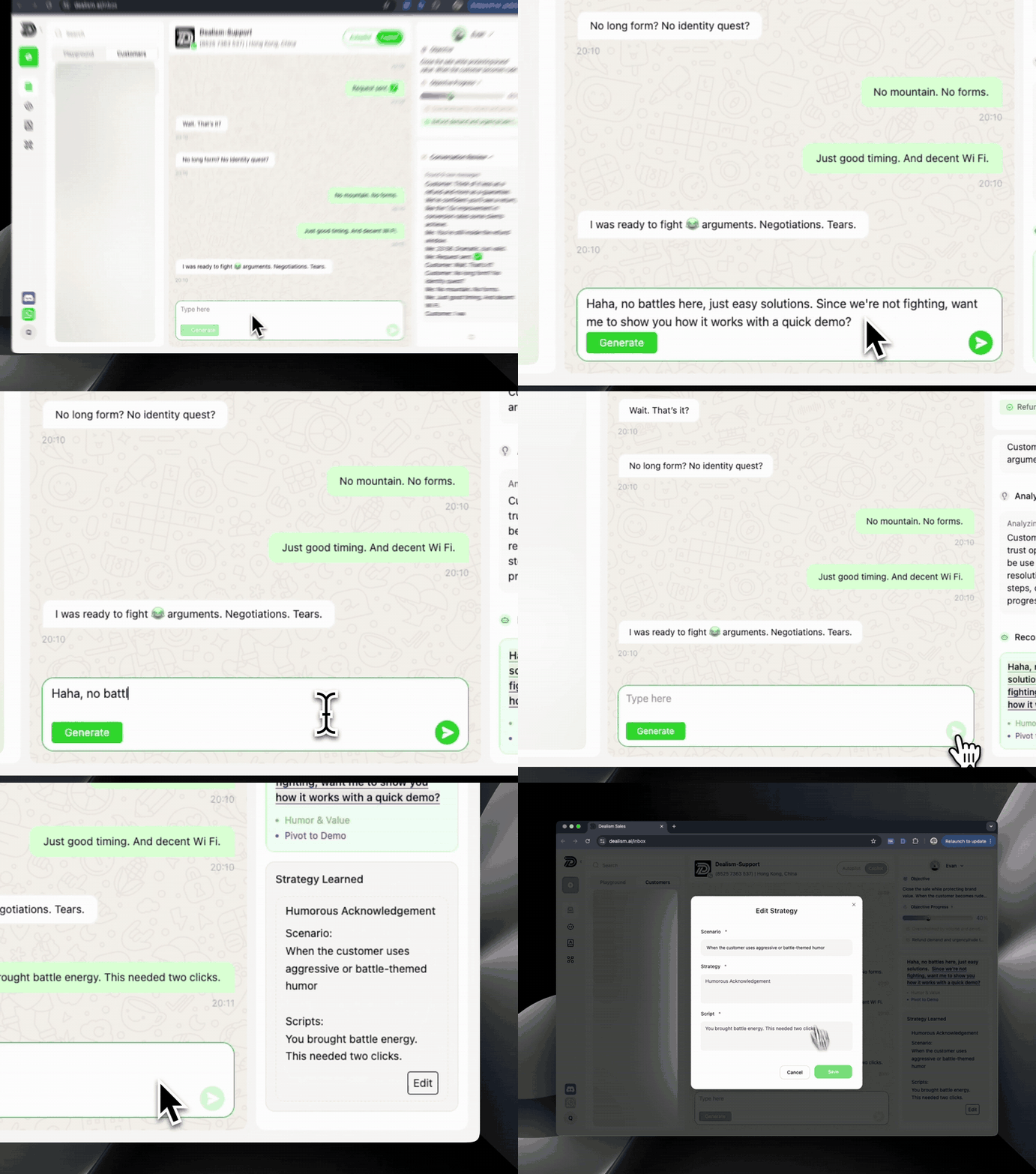
This matters because a generic automation rule can collect fields without understanding the decision. A more useful agent answers the actual question, clarifies what is missing, and works toward the action that fits the visitor and business.
The operating principle remains the same:
Let automation handle predictable volume.
Use context to personalize the next question.
Preserve the methods that work for the business.
Keep human judgment available for complex or sensitive decisions.
Measure results beyond the first reply.
Start with one high-intent page and one goal. Review the conversations before expanding to every page or channel.
Frequently Asked Questions
Does live chat generate qualified leads?
It can, but starting a chat is not the same as becoming qualified. Live chat generates qualified leads when the business defines fit, asks relevant questions, captures usable information, and moves suitable visitors toward a sales action.
Where should a live chat widget appear?
Start with pricing, product, service, comparison, booking, cart, and high-value landing pages. Use page-specific messages and measure qualified outcomes before expanding sitewide.
Should I require an email before starting a chat?
Not always. A pre-chat form provides contact information but may reduce participation. Test it against progressive capture, where the visitor receives help before being asked for details.
What questions should live chat agents ask?
Ask only questions that change fit, recommendation, routing, or timing. Common topics include need, location, intended use, urgency, customer type, and desired next action.
Is live chat better than a chatbot?
Neither is universally better. Human live chat handles nuance and trust well; chatbots scale predictable tasks; AI agents can support more contextual automation. Many businesses use a hybrid model.
How should I handle chats after business hours?
Set accurate expectations. Use automation to answer safe questions, collect context, and identify urgent leads. Tell the visitor when a human will respond and preserve the conversation for follow-up.
How do I measure live chat conversion?
Track the path from widget view to chat start, contact capture, qualification, commercial action, customer conversion, and influenced revenue. Segment performance by page and trigger.
Can small businesses use live chat for lead generation?
Yes. Start with one or two high-intent pages, a small set of qualification questions, and one next action. Expand only after the workflow produces useful leads consistently.
Turn Website Conversations Into Sales Actions
Live chat lead generation works when a business connects immediate help to a disciplined sales process.
Place the chat where buying questions occur. Trigger it from real behavior. Answer before qualifying. Collect only the information required for the next step. Preserve context during routing and follow-up. Then measure whether conversations become bookings, quotes, demos, purchases, and customers.
The widget is only the entrance. The system behind it determines whether active interest becomes pipeline.
If your team is ready to move beyond disconnected replies, you can start a free Dealism account and test the workflow on one high-intent page.


