
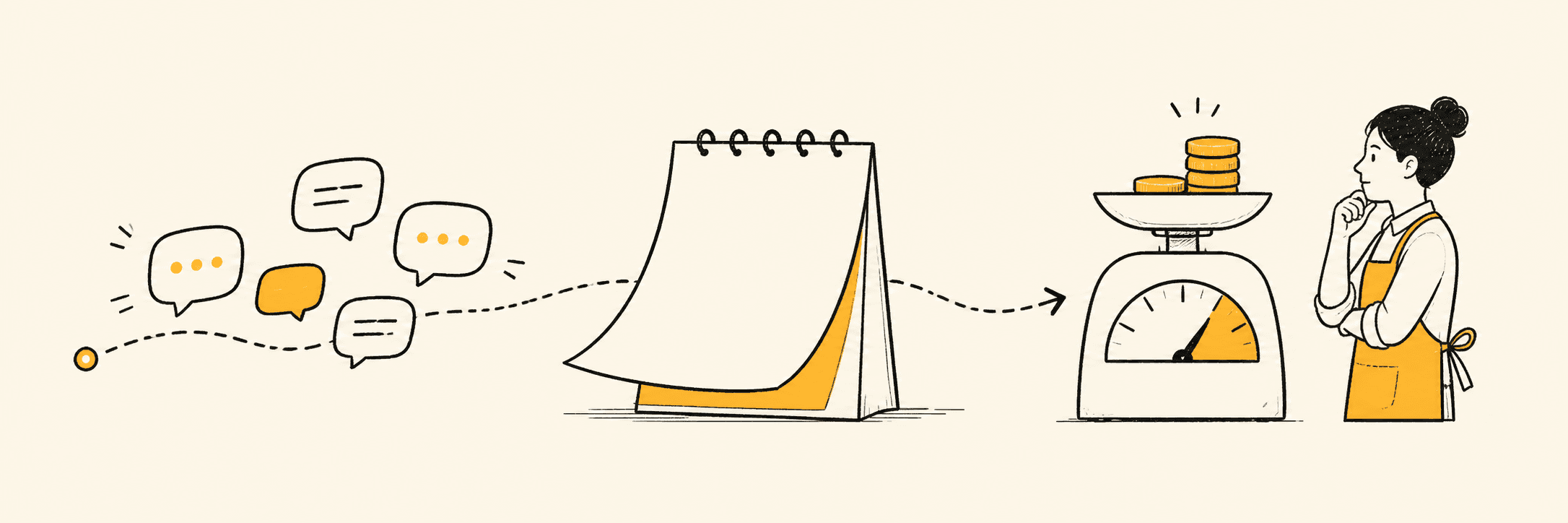
Starting October 1, 2026, Meta will charge businesses per delivered message for service replies and utility templates sent through the WhatsApp Business API inside the 24-hour customer service window. Both message types are free under the current policy.
The change affects replies sent through the API, including messages written by human agents and responses generated by third-party AI systems. It does not turn every WhatsApp conversation into a paid conversation: ordinary WhatsApp Business App usage is different, incoming customer messages do not create a Meta message charge, and the 72-hour free entry window from Click-to-WhatsApp ads and Facebook Page CTA buttons is expected to remain.
Pricing update: As of August 6, 2026, Meta has not published the final October service-message rate cards. This guide explains the confirmed policy change and shows you how to calculate your exposure without inventing a price. We will update the examples when Meta publishes the new rates.
What Changes on October 1, 2026?
The short version is that replies which have been free inside the customer service window will become billable when delivered through the WhatsApp Business Platform.
Message type | Before October 1, 2026 | From October 1, 2026 |
Service reply inside the 24-hour window | Free | Charged per delivered message |
Utility template inside the 24-hour window | Free | Charged per delivered message |
Marketing template | Charged per delivered message | Still charged |
Authentication template | Charged per delivered message | Still charged |
Free entry-point messages | Free for 72 hours when eligible | Expected to remain free |
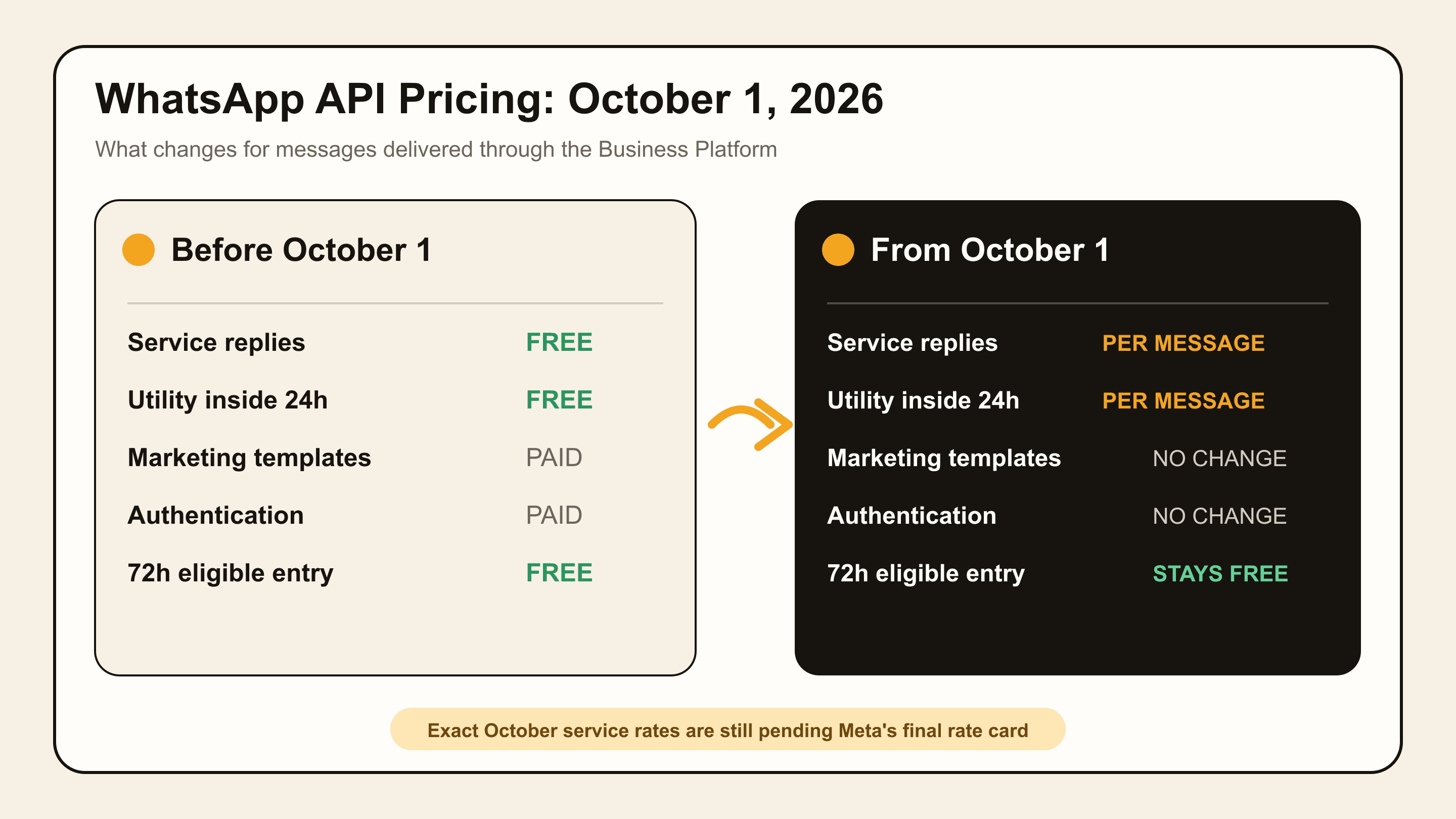
Service messages are free-form replies sent after a customer contacts the business. They include ordinary support or sales replies written by an employee as well as replies produced by a third-party AI agent.
Utility templates cover non-promotional updates connected to a customer action, such as order confirmations, shipping updates, payment notifications, and appointment reminders. These are currently free when sent inside an open 24-hour customer service window. That exemption is scheduled to end on September 30.
Meta’s current WhatsApp Business Platform pricing page confirms that businesses are charged when messages are delivered and that pricing depends on the recipient market and message category. Partner notices from Twilio and Alibaba Cloud describe the October change.
How WhatsApp Business API Pricing Works Today
WhatsApp API pricing can be confusing because several rules overlap. The simplest way to understand it is to answer four questions about each message.
Was the Message Delivered?
Meta charges for eligible messages when they are delivered, not merely when your software attempts to send them. Your reports should therefore use delivered message counts rather than button clicks, queued messages, or attempted sends.
What Category Does the Message Belong To?
WhatsApp uses four main categories:
Marketing: promotions, offers, product recommendations, abandoned-cart reminders, and other messages intended to drive a commercial action.
Utility: transactional information requested by or connected to a customer, such as an order update or appointment reminder.
Authentication: one-time passwords and identity-verification messages.
Service: free-form replies sent while the 24-hour customer service window is open.
Before October 1, marketing and authentication templates are billable. Utility templates are billable outside the 24-hour window but free inside it. Service messages are free inside the window.
Is the 24-Hour Customer Service Window Open?
When a customer messages your business, a 24-hour window opens. Each new customer message resets the window.
While the window is open, the business can send free-form replies. Once it closes, the business generally needs an approved template to restart the conversation.
The window still matters after October 1 because it controls which message formats you can send. What changes is the assumption that API replies inside it are automatically free.
If you are building workflows for reminders and follow-ups, this distinction is important. Our guide to scheduling WhatsApp messages explains the operational side, while this article focuses on the underlying Meta charges.
Where Is the Recipient Located?
Rates vary by the recipient’s market and message category. A business operating from the United States may pay different rates when messaging customers in North America, Brazil, India, or Europe.
That means you should not estimate a global WhatsApp bill using one blended rate unless you already know the geographic mix of your delivered messages.
Which Messages Become Billable?
Human Replies Sent Through the API
If a customer asks a question and an employee replies through a team inbox or another interface connected to the API, that reply is still an API message. From October 1, the delivery is expected to be billed as a service message.
The fact that a person typed it does not make it a free WhatsApp Business App reply.
Replies From Third-Party AI Agents
Replies generated by a third-party AI customer service or sales system also qualify as service messages when delivered through the API inside the open window.
This matters for businesses using AI to answer product questions, qualify leads, recommend services, or handle routine support. Automation can improve response coverage, but after October 1 each delivered response may contribute to Meta usage costs.
Free-Form Service Messages
A message does not need to use a template to be billable. The core October change is that free-form API replies inside the 24-hour service window become a priced category.
Partner announcements currently describe service pricing as a fixed per-message rate tied to the relevant market, without a volume tier. The final Meta rate card should be treated as the source of truth once released.
Utility Templates Inside the Service Window
Utility templates sent outside the 24-hour window are already charged. From October 1, utility templates sent inside the window will also be charged.
Examples include:
“Your appointment is confirmed for Tuesday at 2 p.m.”
“Your order has shipped.”
“We received your payment.”
“Your booking has been changed.”
Businesses with large order, booking, or payment-notification volumes should include these messages in their forecast instead of measuring only free-form support replies.
What Will Still Be Free?
Incoming Customer Messages
The customer does not create a business message charge simply by sending you a question. The charge applies to eligible business messages delivered through the platform.
The 72-Hour Free Entry Point
When a customer starts a conversation through an eligible Click-to-WhatsApp ad or Facebook Page CTA button, a 72-hour free entry window can apply. The current official pricing page says eligible messages delivered during this period are free, and provider notices say this benefit is not changing on October 1.
Do not confuse this with the ordinary 24-hour customer service window. The 72-hour benefit depends on the qualifying entry point.
Regular WhatsApp Business App Messages
The October policy concerns the WhatsApp Business Platform/API. It does not introduce API delivery charges for ordinary messages typed and sent only through the free WhatsApp Business App.
However, a shared team inbox, bot, integration, or automation may be sending through the API even if the interface looks like a normal chat inbox. Confirm the actual connection with your provider.
Messages That Are Not Delivered
Because Meta bases message charges on delivery, failed delivery attempts should not be counted as delivered billable messages. Your provider may still have separate platform rules or fees, so check its contract rather than assuming every cost disappears.
Who Will Be Affected?
Start by identifying your setup. The phrase “WhatsApp Business” is often used for both the free app and the API, but they are not the same product.
Setup | Subject to WhatsApp API message pricing? | Dealism support |
Regular WhatsApp connection | Not under WABA per-message pricing | Supported |
Standalone WABA/Cloud API | Yes, for messages delivered through the API | Supported |
Official Coexistence | API-delivered messages follow API pricing | Supported for eligible Business App numbers through Meta Embedded Signup |
WhatsApp Business App only | Not under API message pricing | Depends on the selected connection path |
Coexistence allows an eligible business to use the WhatsApp Business App and API with the same number. It does not make API-sent messages free. Because final billing behavior can depend on how the message is sent and recorded, businesses using Coexistence should confirm October handling with their compatible provider and Meta’s final documentation.
Dealism supports three connection paths: official WABA Coexistence for an eligible existing WhatsApp Business App number, a dedicated WABA number, and Desktop QR for Personal WhatsApp or WhatsApp Business App. Meta decides Coexistence eligibility, and API-delivered messages remain subject to Meta's applicable pricing rules.
If you are comparing automation paths, start with this practical guide to WhatsApp automation before committing to a connection type.
What Does WhatsApp Business API Really Cost?
Your final WhatsApp cost may have three separate layers.
1. Meta Message Charges
These are the underlying charges for delivered WhatsApp Business Platform messages. They depend on the category, recipient market, current rate card, and sometimes volume tier.
2. BSP or Hosting Fees
A Business Solution Provider may charge a platform subscription, per-message markup, onboarding fee, support fee, number fee, or another usage charge. Some providers pass Meta fees through at cost; others use different commercial structures.
3. Automation or AI Software Cost
Your inbox, chatbot, CRM, campaign tool, or AI agent may have its own subscription or credit model. This is separate from Meta’s charge unless the vendor explicitly states otherwise.
When comparing WhatsApp marketing tools for small businesses, ask every vendor for the same breakdown:
What do I pay directly or indirectly to Meta?
Does the provider add a markup?
What monthly platform fee applies?
Are AI replies or seats billed separately?
Which costs increase with message volume?
A low software subscription does not guarantee a low total cost. Likewise, a higher subscription may be reasonable if it produces better business outcomes. Compare the complete stack.
WhatsApp API Pricing Calculator
You can forecast the October impact before the final rates are available. Use variables for the unknown prices, then replace them when Meta publishes the rate card.
Basic Meta Cost Formula
Monthly Meta cost = delivered messages × applicable market/category rate
For a more complete model:
Total monthly WhatsApp cost = Meta message fees + BSP fees + software cost
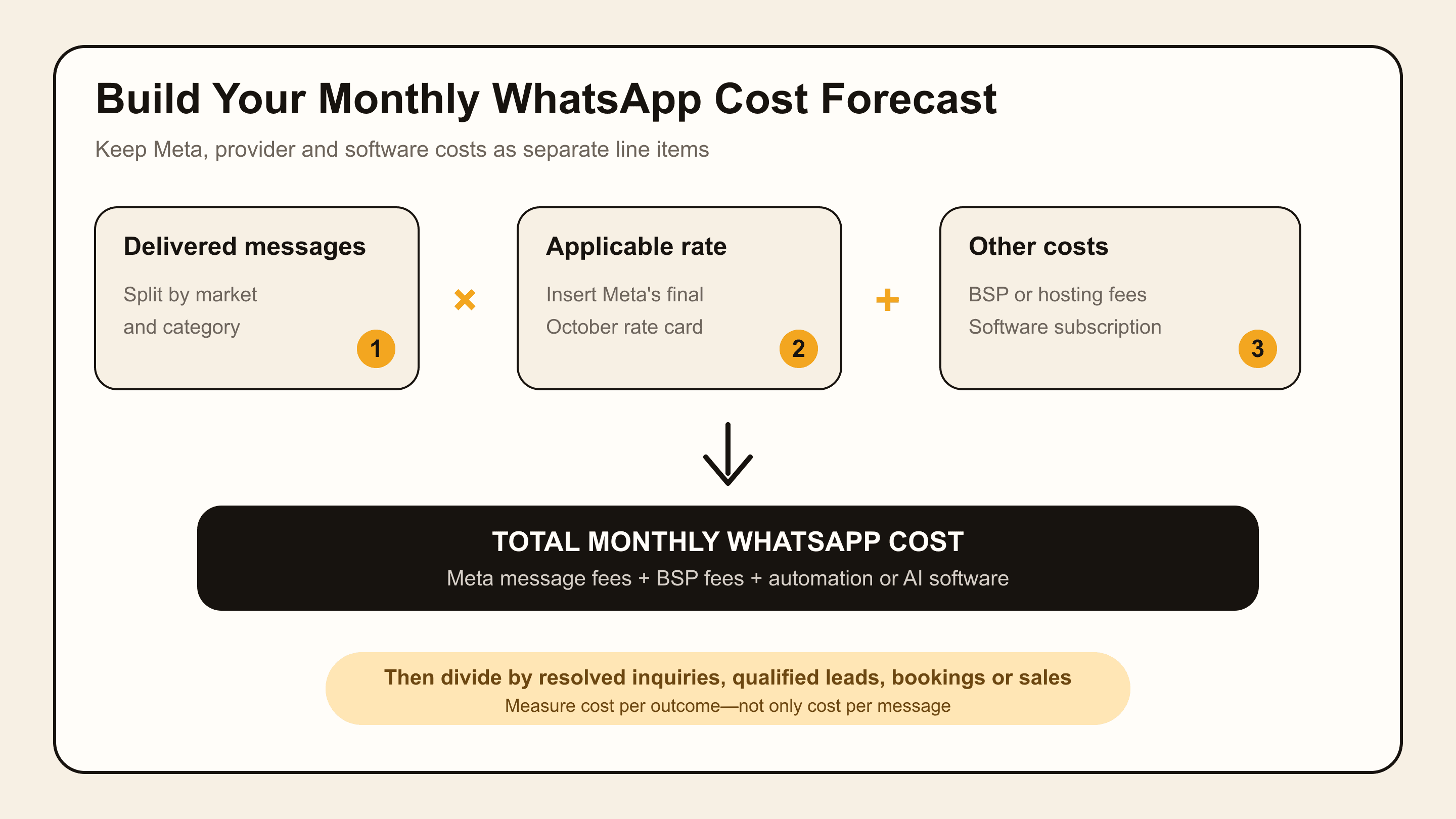
Use a separate row for each market and category rather than multiplying all messages by one rate.
Input | Example baseline | Your number |
Delivered service messages | 8,000 | |
Service-message rate | Pending | |
In-window utility templates | 2,000 | |
Utility rate | Pending | |
Other billable templates | 1,500 | |
Existing template cost | From current bill | |
BSP fees | Current provider fee | |
Automation/software cost | Current subscription |
The forecast becomes:
(8,000 × service rate) + (2,000 × utility rate) + existing template cost + BSP fees + software cost
Do not stop at the channel bill. Connect the cost to a completed result:
Cost per resolved inquiry = total WhatsApp cost ÷ resolved inquiriesCost per qualified lead = total WhatsApp cost ÷ qualified leadsCost per booking = total WhatsApp cost ÷ completed bookingsCost per sale = total WhatsApp cost ÷ completed sales
This prevents the cheapest messaging workflow from looking “efficient” when it creates poor answers, repeated contacts, or abandoned sales conversations.
How to Estimate Your Cost Before October 1
Count Delivered Service Messages
Measure how many business replies are delivered through the API during a representative month. Do not count incoming customer messages or send attempts that never reach the recipient.
Separate Messages by Customer Market
Export or report the destination market for each message. If 70% of your customers are in Brazil and 30% are in North America, model those groups separately.
Count Utility Templates Inside the Window
Businesses often exclude these because they are currently free. Add order confirmations, appointment reminders, delivery updates, and payment notifications sent inside the customer service window.
Record Replies per Inquiry
Calculate the average number of business messages used to handle one customer inquiry. Then inspect the distribution. Ten thoughtful replies in a complex sale may be reasonable; ten fragmented replies to answer a basic price question probably are not.
Use the Pricing Data Your Integration Already Receives
Technical teams can use Meta pricing analytics and retain the pricing object from message-status webhooks. UnifyPort’s walkthrough on tracking service-message charges shows the fields to record, including message category, market, volume, and billable status.
Recalculate When the Rate Card Is Published
Your August forecast should be a volume baseline, not a final budget. Update it when Meta publishes the October rates, then compare the forecast with the first actual October invoice.
Do Not Reduce Messages—Reduce Wasted Messages
The wrong reaction is to make customer service deliberately less helpful. A business can save one message and still lose a customer worth far more than the fee.
The better goal is to remove messages that add no information or movement.
Common sources of waste include:
Splitting one useful answer into several short bubbles
Asking for information the customer already provided
Sending a generic greeting before addressing a clear question
Making the customer repeat details after a human handoff
Triggering unnecessary confirmations
Running a long qualification flow for a low-value, simple request
Sending broad follow-ups without evidence of buying intent
For example, imagine a customer asks:
“Do you have a beginner course under $100, and can I start this weekend?”
A fragmented bot might send a greeting, ask what the customer wants, request a budget, ask about experience, and finally provide a link.
A better response can acknowledge the beginner requirement, price limit, and timing in one clear message, recommend the relevant course, and ask only the one missing question needed to confirm fit.
This does not mean every answer should become a huge paragraph. It means each reply should have a purpose.
If your current workflow relies heavily on scheduled campaigns or broadcasts, review your automated WhatsApp campaign tools and WhatsApp bulk-messaging practices separately. The cost and consent risks of outbound messaging are different from inbound service replies.
How Dealism Helps Each Paid Reply Do More
Dealism cannot remove or bypass Meta’s message charges. If a Dealism agent sends a message through an independent WABA connection and Meta classifies that delivery as billable, the underlying Meta fee still applies.
Dealism is an AI messaging product with automated flows and a 24/7 AI Customer Agent for Instagram, WhatsApp, and Live Chat. It is designed to help small businesses make each conversation more useful.
An agent can:
Answer routine questions from real business information
Recognize needs such as service, goal, timing, location, or budget
Ask only the clarifying questions required for the next decision
Recommend the appropriate product, booking page, checkout, or next step
Keep context so customers do not need to repeat themselves
Transfer a complex or high-intent request to a person
Summarize the customer, conversation, stage, and next action
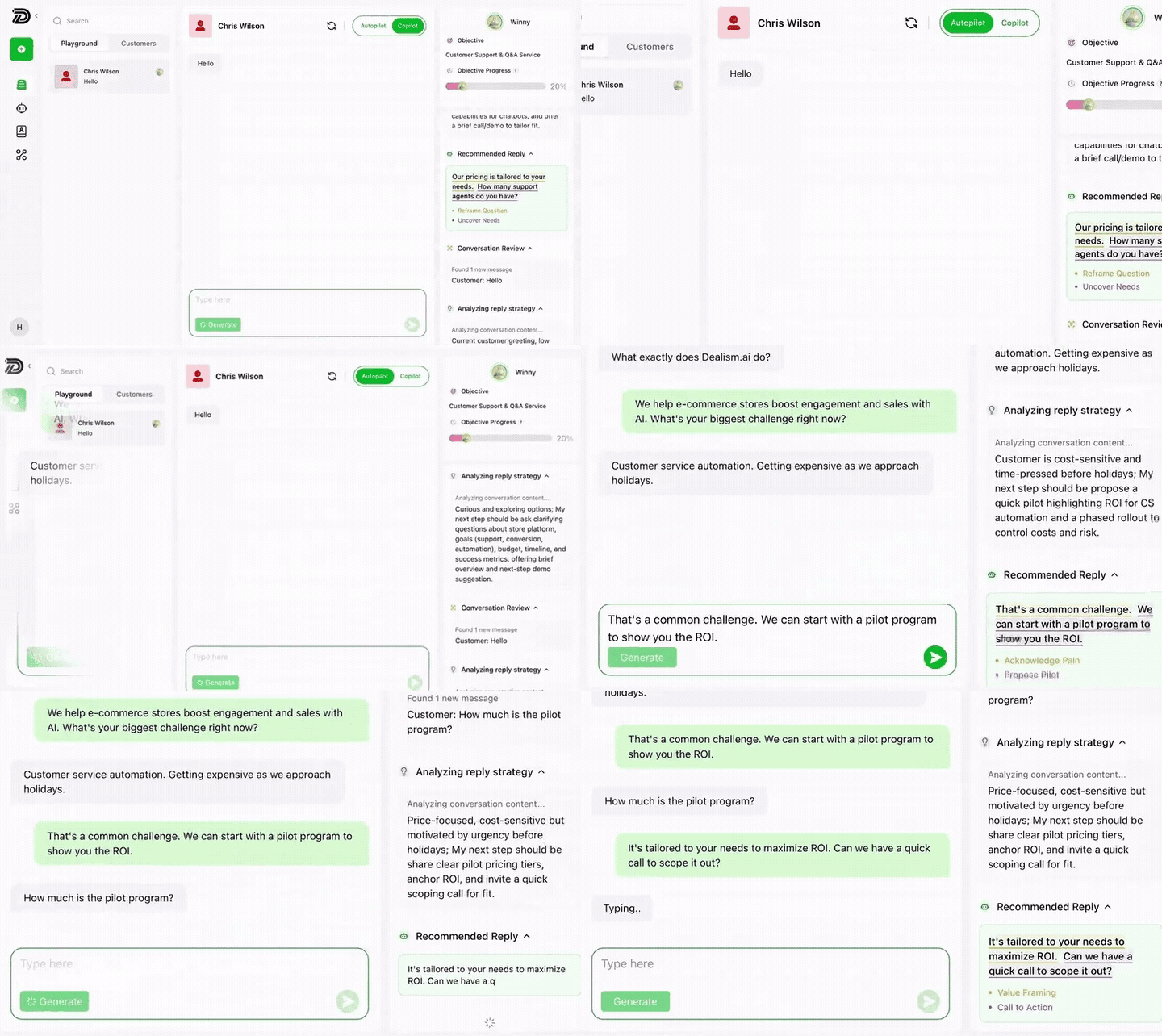
The difference becomes easier to see when you measure outcomes instead of message volume.
Suppose two workflows each deliver 10,000 business messages. One produces thousands of generic replies but cannot show what happened next. The other can identify which conversations became qualified leads, bookings, purchases, or human handoffs.
The second workflow is not automatically cheaper at the message level. It is more measurable at the business level.
You can compare this approach with a traditional WhatsApp AI chatbot or review how a WhatsApp auto-reply agent should move beyond a fixed greeting.
Prepare before the pricing change: Create your free Dealism account and use the Free plan to test how an AI Customer Agent handles real customer questions. Dealism’s free plan includes unlimited active contacts, unlimited workflows, one AI Customer Agent, core CRM and 50 AI credits you can claim every day. Confirm your connection type and any Meta or provider charges before going live.
October 1 Preparation Checklist
Use the weeks before the change to establish a clean baseline.
Confirm whether each number uses the regular app, standalone WABA, or Coexistence.
Ask your provider which messages are delivered through the API.
Export at least one representative month of delivered-message data.
Separate service, utility, authentication, and marketing messages.
Segment messages by recipient market.
Count utility templates sent inside the 24-hour window.
Measure average business replies per inquiry.
Find fragmented replies and repeated questions.
Update product, pricing, policy, booking, and support knowledge.
Define when AI should answer and when a human should take over.
Track resolved inquiries, qualified leads, bookings, and sales.
Replace placeholder rates when Meta publishes the final rate card.
Compare the October forecast with the actual provider invoice.
Do not rebuild every WhatsApp workflow at once. Start with the highest-volume questions and the conversations closest to a business outcome.
You can also review Dealism pricing separately from your Meta and BSP costs. Treat each layer as its own line item in the forecast.
Frequently Asked Questions
Will Regular WhatsApp Business App Messages Be Charged?
The October change applies to messages delivered through the WhatsApp Business Platform/API. It does not introduce API per-message charges for ordinary messages sent only through the WhatsApp Business App. If you use an integration or shared inbox, confirm whether that system sends through the API.
Will AI-Generated WhatsApp Replies Be Charged?
Third-party AI replies delivered through the API inside the 24-hour customer service window are expected to be classified as service messages and charged from October 1. Meta Business Agent has separate pricing rules and should not be mixed into the same calculation.
Are Human-Agent Replies Charged?
If a human reply is delivered through the API, it is expected to become a billable service message. A human typing the message does not change the delivery channel.
Are Utility Messages Still Free Inside 24 Hours?
They are free under the current policy when sent inside the open window. From October 1, 2026, utility templates delivered inside that window are scheduled to become billable.
Does the 72-Hour Free Entry Point Remain?
Current Meta information and provider announcements say the eligible 72-hour window from Click-to-WhatsApp ads and Facebook Page CTA buttons remains free. Confirm the final policy when Meta updates its October documentation.
Does WhatsApp Coexistence Avoid API Fees?
No. Coexistence does not make API-delivered messages free. It allows eligible businesses to use the Business App and API with one number. The billing result depends on how each message is sent, so confirm the final treatment with a compatible Coexistence provider.
Are Meta Charges Included in BSP Pricing?
It depends on the provider. Some pass through Meta charges separately, while others combine costs or add markups and platform fees. Request an itemized explanation before comparing plans.
How Can I Calculate My Monthly WhatsApp API Cost?
Multiply delivered billable messages by the applicable rate for each category and recipient market. Then add BSP fees and automation/software costs. Replace placeholder rates after Meta publishes the October rate card.
Can Dealism Eliminate Meta Message Fees?
No. Dealism does not bypass Meta pricing. It can help answer from verified business information, qualify needs, preserve context, recommend next steps, and hand conversations to people so each paid interaction has a clearer purpose.
Prepare for the Cost Change Without Making Customer Service Worse
The October update changes the economics of WhatsApp API support and sales conversations, but the answer is not to stop helping customers.
First, identify which messages actually pass through the API. Then establish a delivered-message baseline, separate markets and categories, and wait for Meta’s final October rates before locking the budget.
Finally, remove waste rather than value. Combine fragmented answers, avoid repeated questions, improve your business knowledge, and connect every conversation to a useful next step.
Businesses should judge the new model by more than cost per message. The stronger measure is what each conversation completes: a resolved question, a qualified lead, an appointment, a checkout, or a confident human handoff.


