Conhecimento
Atualizado
Leitura de 4 min
Exclua apenas quando as informações não precisarem mais ser utilizadas
Para um fato alterado, editar geralmente é mais seguro do que criar uma duplicata. Exclua uma entrada quando ela estiver obsoleta, incorreta ou não for mais adequada para as respostas dos clientes.
Encontre a entrada de conhecimento
Abra Knowledge (Conhecimento). Use a Busca para encontrar o nome de um produto, pergunta ou frase. Você também pode filtrar por categoria — por exemplo, faq, pricing, product_info ou usecase — para refinar a lista.

Edite o conhecimento
Localize a entrada na lista de Conhecimento.
Selecione Edit (Editar) na coluna de Ação.
Corrija o conteúdo e salve a alteração.
Busque por entradas duplicadas ou conflitantes que também possam precisar de atualização.
Mantenha a resposta direta e os fatos essenciais fáceis de encontrar. Se um preço, política ou serviço mudou, inclua as novas condições e remova termos desatualizados.
Exclua o conhecimento
Localize a entrada que você não deseja mais que o Agente utilize.
Selecione Delete (Excluir) na coluna de Ação.
Revise a entrada e confirme a exclusão se solicitado.
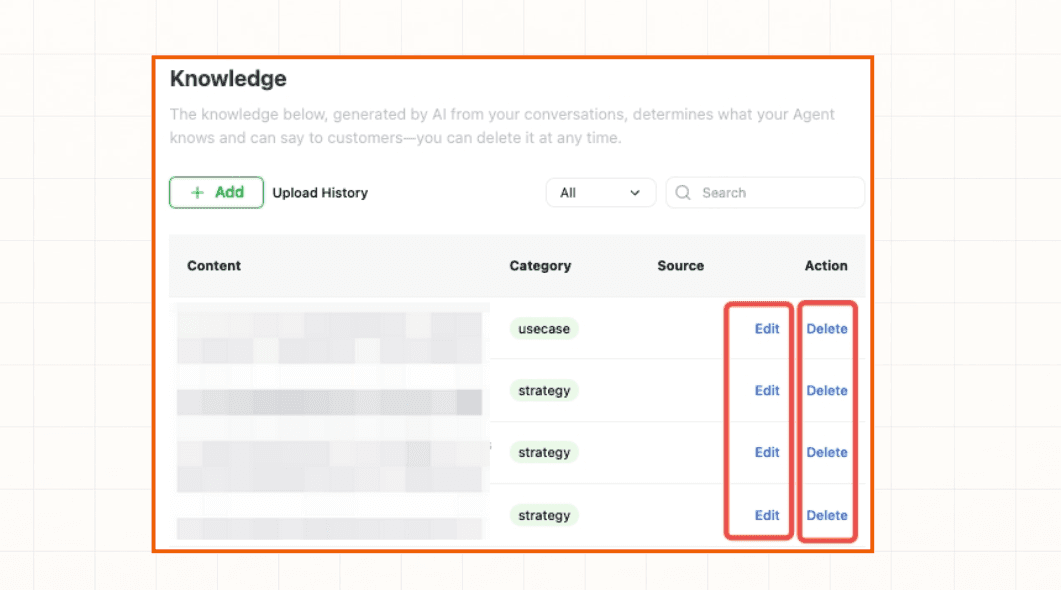
Antes de excluir, verifique se outra FAQ, produto, política ou caso de uso possui links para a mesma informação. Adicione uma substituição primeiro caso os clientes ainda precisem de uma resposta.
Verifique a alteração
Busque na lista de Conhecimento novamente e teste o Agente com perguntas relacionadas à entrada editada ou excluída. Confirme se a resposta antiga não está mais sendo usada e se a resposta atualizada está completa.
Se o Agente continuar usando informações desatualizadas, consulte O Agente não está usando o novo conhecimento ou entre em contato com o Suporte da Dealism.