
Customer conversation automation

Automation for Every First Step.

Start from the customer action, automate the predictable next move, and bring in AI or your team when the conversation needs more.

Meta Business PartnersInstagramWhatsAppWebsite Live ChatAI continuation ready
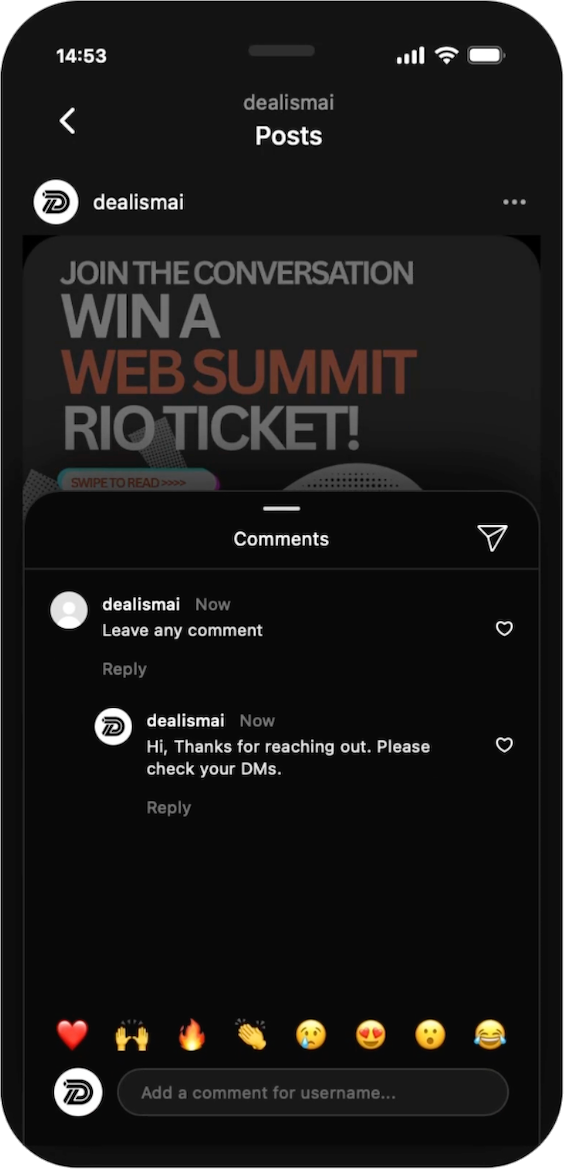
Dealism Instagram post with automated comment reply

A useful first step, not a script for every customer

What Is Customer Conversation Automation?

A predictable customer moment can receive a clear fixed action. The rest of the conversation can remain open to AI or to your team.

  1. 1Customer action
    A clear trigger starts the flow.

    A comment, first message, reply, or chat entry gives the automation a useful reason to begin.

    Customer action

  2. 2Fixed next step
    Send, ask, collect, or route.

    Automation handles the one predictable action you have already approved for that customer moment.

    AnswerRoute

    Fixed next step

  3. 3AI continuation

    When the customer asks something open-ended, AI can continue from your approved business information and the conversation context.

    Intent
    Known
    Missing

    AI continuation

  4. 4Your team

    People take over decisions, exceptions, negotiations, and moments where personal judgment matters.

    AnswerRoute

    Your team

Triggers by channel

Which Customer Actions Can You Automate?

Good messaging automation begins with an action that tells you what the customer expects next.

Triggers by channel

WhatsApp

Use the entry point a customer chose to give the first message a clear purpose.

Available channel triggers

01

Link or QR entry

Continue from the link or code a customer scanned.

02

Click-to-WhatsApp ad

Match the first reply to the ad they opened.

03

Incoming message

Respond to the customer’s first question with context.

04

Opening question

Start with one useful detail or next action.

Triggers by channel

Website Live Chat

Let the page and the first customer action shape a helpful opening in live chat.

Available channel triggers

01

Widget opens

Welcome a visitor when they choose to start a chat.

02

Page welcome

Offer an opening that fits the page they are viewing.

03

Contact capture

Collect the detail your team needs for the next step.

04

First question

Move from a visitor’s question to the right conversation.

Start with one job

Four First Steps Worth Automating

Solve one repeated customer moment well before you add more messages or more branches.

01 · First step

Deliver what you promised

How this step works

Send the guide, menu, catalog, booking page, or product detail that matches the content a customer just engaged with.

Explore Comment-to-DM

02 · First step

Ask for one useful detail

How this step works

Collect the location, service type, preferred date, or other single detail that makes the next step clearer.

Build an automation

03 · First step

Point toward the next action

How this step works

Guide high-intent customers toward an approved resource or booking path without turning a first reply into a maze.

Start a focused flow

04 · First step

Open after-hours conversations well

How this step works

Acknowledge the customer, capture what your team needs, and make the next route clear without pretending a person is available.

See the Unified Inbox

Simple setup

Build the Next Step, Not a Complicated Flow.

Choose a template, configure one clear customer action, and test the journey before you publish.

Step 01 of 05

Choose a template

Start from a proven automation template, then make it fit the customer action you want to handle.

‹   Automation templates×

Start by choosing a template

Build on Instagram’s official API for secure automation.

AllInstagramWhatsApp

Turn comments into DMs

Start with a proven customer action.

Turn Story replies into DMs

Start with a proven customer action.

Book more meetings

Start with a proven customer action.

Drive traffic to website

Start with a proven customer action.

Instagram DMs auto reply

Start with a proven customer action.

Get leads from Stories

Start with a proven customer action.

Step 02 of 05

Set up trigger

Choose the action that starts the flow: a comment, a Story reply, a message, or another supported entry point.

1Trigger setup

When someone comments on

All posts
Next post only
Posts with keyword(s) in caption
Select posts manually

And this comment has

All comments
Comments with keyword(s)
Next

Step 03 of 05

Set up automated message

Write the fixed first response, add an approved button, and make the next customer action clear.

2They will get

An opening DM

Text message
Thanks for your comment!24/900
+   Add button

You can add up to 3 buttons.

PreviousNext

Step 04 of 05

Agent handoff

Set the moment when an open-ended question should continue with your AI Customer Agent or move to your team.

3Agent handoff

ON

Let an AI Customer Agent continue when a customer needs more than a fixed reply.

AI continuation

Answer from approved business knowledge

Handoff when:

The question needs judgment, approval, or a personal response.

Next

Step 05 of 05

Preview & go live

Review the customer journey, test it with a real example, and publish when every next step is clear.

Dealism Instagram post with automated comment reply

Automation workspace

See Every Flow Where It Belongs.

Create, publish, and review channel automations from one workspace.

What stays visible

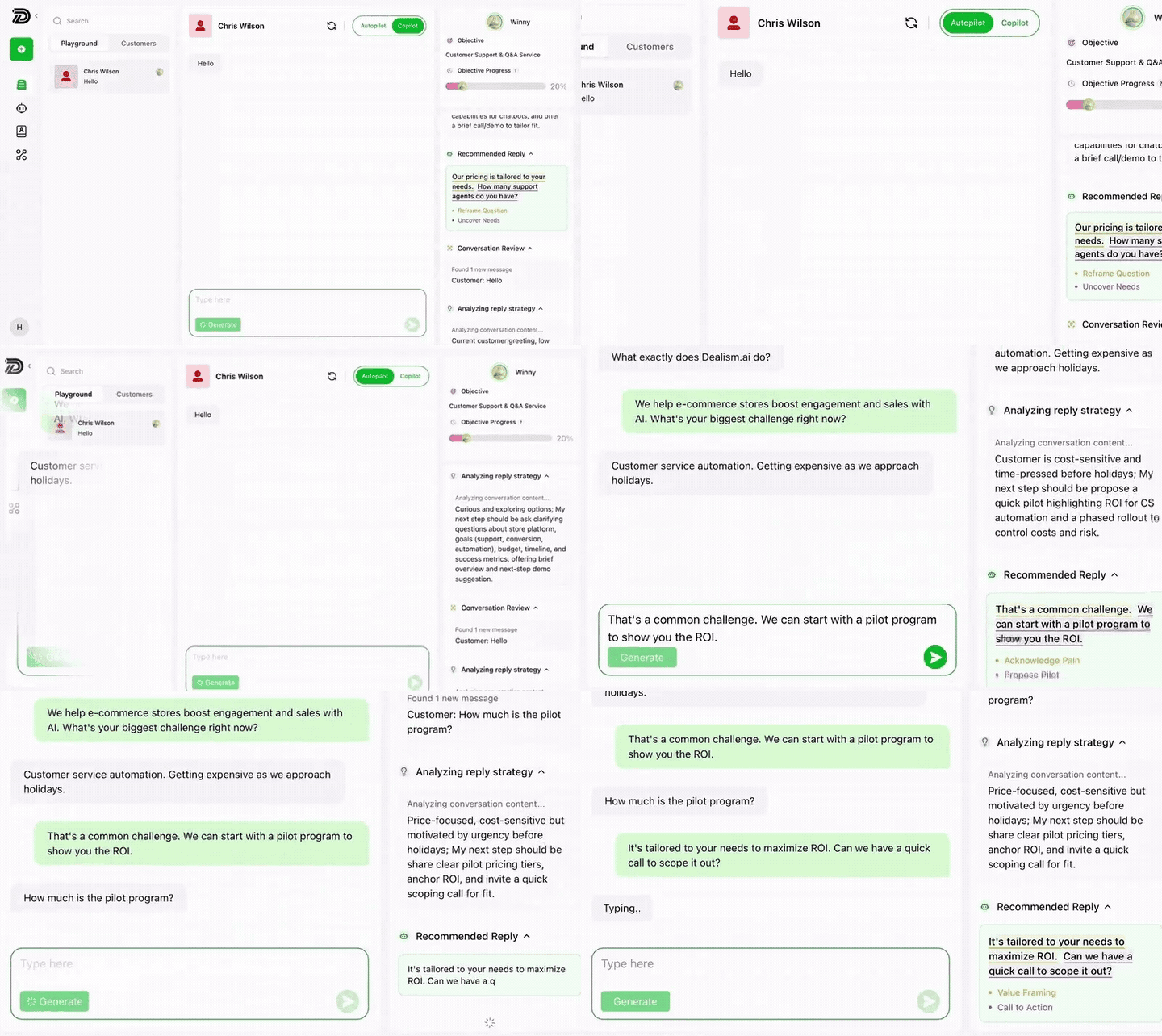
Keep the trigger, fixed action, execution history, and AI continuation visible without mixing them into the customer’s conversation.

  • Published and draft workflows
  • Channel and trigger labels
  • Execution history
  • AI continuation status
Build your first automation
Dealism workspace showing an active customer conversation and an AI continuation

Current Dealism product interface

Automation → AI → people

Repeat the Repeatable. Keep the Conversation Human.

Use a fixed action where consistency is useful. Use AI where the customer’s question needs context. Keep people in charge of judgment and relationships.

01 · Predictable triggers

Automation

How it helps

Send the link, ask the first question, collect a field, or route the conversation in the same approved way.

The first useful step

02 · Open-ended questions

AI Customer Agent

How it helps

Understand what a customer means, answer from approved business knowledge, and recommend a useful next step.

Explore AI Customer Agent

03 · Judgment and relationships

Your team

How it helps

Take over exceptions, approvals, negotiations, and sensitive conversations with the earlier context ready.

Explore Your team

Security

Automate Customer Conversations with Confidence

Dealism uses supported business messaging connections. Your team controls the Agent’s knowledge, permissions, boundaries, and handoff rules.

Meta Business Partner

Dealism is a Meta Business Partner and Dealism PTE. LTD. has completed Meta Access Verification.

Meta Business Partners

Approved knowledge

The AI Customer Agent works from the business information and guidance you provide.

Human control

Your team can review and continue conversations that require judgment.

FAQ

Questions About Customer Conversation Automation

It is a fixed action that begins from a predictable customer moment. It can deliver a link, ask a first question, collect a detail, or route a customer toward the next step.
No. Automation is for repeatable triggers and structured actions. An AI Customer Agent is for open-ended questions where the customer’s wording and context affect the answer.
Dealism supports automation entry points for Instagram, WhatsApp, and Website Live Chat. Each channel has its own connection rules and available triggers.
Yes. Your team can continue a conversation when it needs approval, judgment, negotiation, or personal attention. The earlier conversation remains available as context.
Dealism’s Comment-to-DM trigger sends a configured private message when a person comments on a selected Instagram post or Reel. Advanced AI replies, qualification, follow-up, and multichannel capabilities are separate.
No. Start with one customer action and one useful response. Add more only when the first step is reliably moving customers toward the next action your business needs.

Ready for the next customer action

Start the First Useful Conversation Loop

Give a predictable customer moment a clear next step. Then let AI or your team continue when the conversation needs more than a fixed message.

Build your first automation
Dealism.Every customer action deserves a useful next step.