Knowledge
Updated
4 min read
File size limit
Files can be up to 30MB each. Prepare a clean, current source before uploading it.
Prepare the source
Before adding knowledge, remove outdated versions, duplicated sections, internal comments, and sensitive information. Use clear headings and readable text. For a webpage, use a direct public URL to the page containing the information.
Add knowledge by file
Open Knowledge from the left navigation.
Select Add.
Select Add Knowledge by File.
Choose a file up to 30MB and complete the upload.
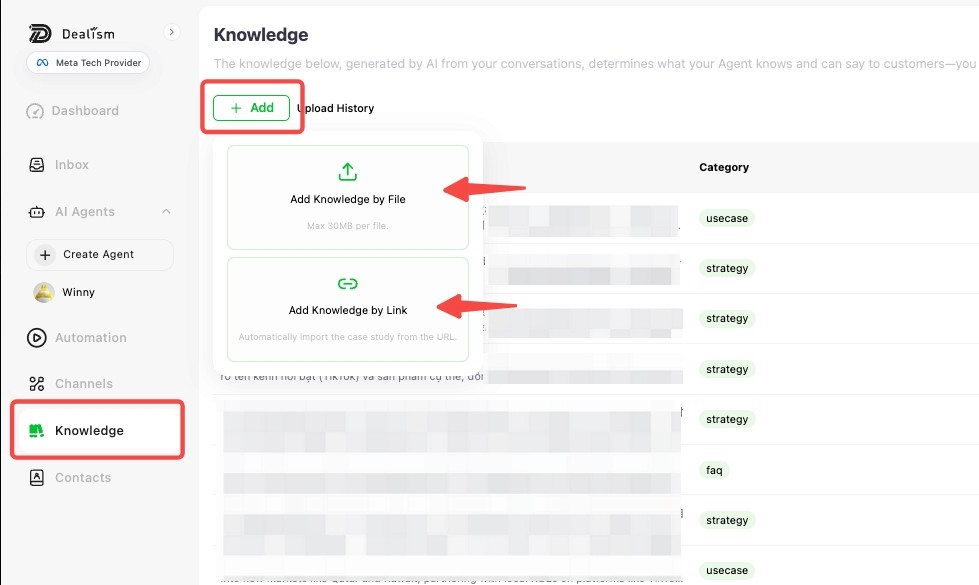
Add knowledge by link
Select Add.
Select Add Knowledge by Link.
Enter the direct URL for the source page and complete the import.
Use a stable page that contains the actual business information. Avoid search-result pages, temporary preview links, login-only pages, or a homepage that does not contain the details you want the Agent to learn.
Review the result
Check Upload History, then search the Knowledge list for the imported information. Read the entry, verify its category, and test the Agent with a question the source should answer.
If the file does not complete successfully, see A document failed to upload. If the entry exists but is not used in answers, see Agent is not using new knowledge.