Inbox & Contacts
Updated
4 min read
Good to know
Before turning Autopilot back ON, resolve the reason you took over and update any missing Knowledge or Strategies. Test important changes with Try Me, then return the conversation to Autopilot when you’re ready.
Overview
After taking over a customer conversation, you can return it to your AI Customer Agent by turning Autopilot back ON.
You can resume Autopilot for one conversation or turn it on globally for all contacts.
Return one conversation to AI
Go to Inbox and open the conversation you want your Agent to handle again.
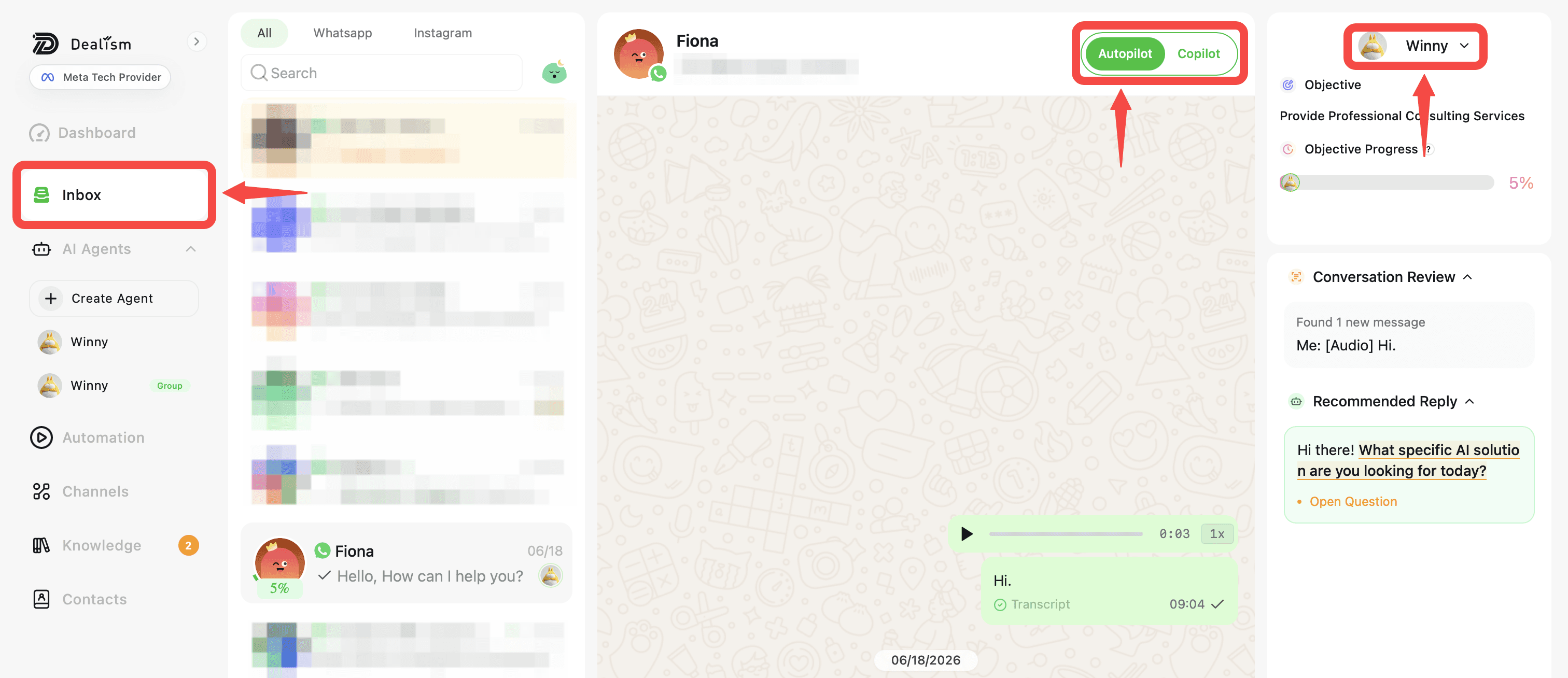
Select the Autopilot control in the top-right and turn it ON.
The conversation returns to Autopilot, allowing the assigned AI Customer Agent to automatically handle supported incoming messages again.
Other conversations are not affected by this change.
Return all conversations to AI
To resume Autopilot globally, go to Inbox.
Select the global Autopilot control next to the search bar on Web or from the Inbox toolbar on mobile.
Turn Autopilot ON to resume automatic handling across applicable conversations.
Review why you took over
Before returning a conversation to Autopilot, consider why human assistance was needed.
If the Agent was missing product information, pricing, policies, or another business detail, update its Knowledge first.
If the situation requires a specific way of handling a customer, consider adding or updating a Strategy.
Test your changes
If you changed the Agent’s Knowledge, Strategies, playbook, or other important settings, test the situation again with Try Me.
Use a question similar to the one that required your intervention and confirm that the Agent now responds appropriately.
Return a Support Needed conversation
If the conversation was marked Support Needed, resolve the customer’s issue and address the reason the Agent requested human input.
Once the conversation is ready for automatic handling again, turn Autopilot back ON.
Continue monitoring the conversation in Inbox to make sure the Agent handles the next customer response as expected.
Keep a conversation in Copilot when needed
You don’t have to return every conversation to Autopilot immediately.
Leave Autopilot OFF when you want to continue handling the conversation yourself or reviewing the Agent’s suggested responses before sending them.
Turn Autopilot ON when you’re ready for the Agent to resume automatic replies.